How to Add a Widget to the WordPress Sidebar: A Complete Technical Guide
Adding a widget to your WordPress sidebar seems like a straightforward task on the surface. However, the underlying architecture powering these site elements has undergone significant changes in recent years, shifting from a purely PHP-driven system to a modern block-based approach. Understanding how this system works is essential for maintaining a fast, secure, and easily manageable website.
Whether you are a small business owner managing a single site or an IT administrator overseeing a fleet of high-traffic WordPress deployments, the way you implement and manage widgets directly impacts your server performance and security posture. Let us walk through the technical realities of adding, customizing, and optimizing your WordPress sidebar widgets.
At OwnWebServers, we know that every database query and PHP execution counts. By leveraging the right tools and hosting infrastructure from NVMe-powered shared hosting to fully managed VPS environments you can ensure your sidebars render quickly without bottlenecking your server resources.
Understanding the WordPress Sidebar Widget System
The widget system in WordPress has historically been a simple way for non-technical users to drag and drop dynamic content into predefined areas of a theme, such as sidebars, footers, and headers. Administrators could populate these areas with standard elements like recent posts, categories, or arbitrary text. Behind the scenes, this relied on a registry of available widgets and widget areas defined by the active theme.
The Transition to Block-Based Widgets Since WordPress 5.8
The release of WordPress 5.8 marked a major paradigm shift by introducing block-based widgets. Instead of relying on legacy PHP widget classes, the system now utilizes the Gutenberg editor natively within the widget management interface. This transition allows users to insert any standard Gutenberg block such as columns, buttons, or group blocks directly into a sidebar. This provides vastly superior layout capabilities right out of the box without the need for third-party page builder plugins.
Leveraging the Legacy Classic Widgets Plugin
Change does not always sit well with established workflows. If your existing infrastructure relies on custom admin interfaces or if you simply prefer the classic drag-and-drop UI, WordPress core maintains the Classic Widgets plugin. Installing this plugin restores the traditional interface, bypassing the block editor entirely while keeping the underlying widget registration system intact. This is particularly useful for enterprise environments standardizing on legacy themes that have not yet been updated to support full site editing.
Methods for Adding Widgets to Your WordPress Sidebar
Depending on your theme architecture and administrative preferences, there are three primary methods for adding and managing custom sidebar widgets.
Using the Block-Based Widget Editor (Appearance > Widgets)
The most common method is navigating to Appearance > Widgets in the WordPress admin dashboard. Here, you are presented with a list of available blocks on the left and your active widget areas on the right. Clicking any widget area opens a block editor instance. You can click the plus icon to add a block, configure its settings in the right-hand sidebar, and arrange it via drag-and-drop or the block list view. Once saved, the changes are immediately reflected on the frontend.
Customizing Sidebars via the WordPress Customizer
For administrators who prefer live previews, the WordPress Customizer (accessible via Appearance > Customize) offers an identical block-based interface. This route is ideal when you need to see exactly how a custom sidebar widget interacts with your active theme’s responsive design before committing changes to a live environment.
Editing Sidebar Regions Directly in Block Theme Templates
If you are utilizing a modern block theme (Full Site Editing), you can bypass the traditional widget registration system entirely. Administrators can edit theme block templates directly via Appearance > Editor. This approach allows precise server-side rendering control over header and footer regions by inserting standard blocks where legacy widget areas used to reside, effectively merging the concept of widgets and page templates into one cohesive editing experience.
Programmatic Sidebar Management for Multiple Sites
Webmasters managing several WordPress installations cannot afford to manually configure sidebars across disparate sites. Programmatically injecting or registering widgets ensures consistency and reduces administrative overhead.
Injecting Widgets via the widgets_init Hook in functions.php
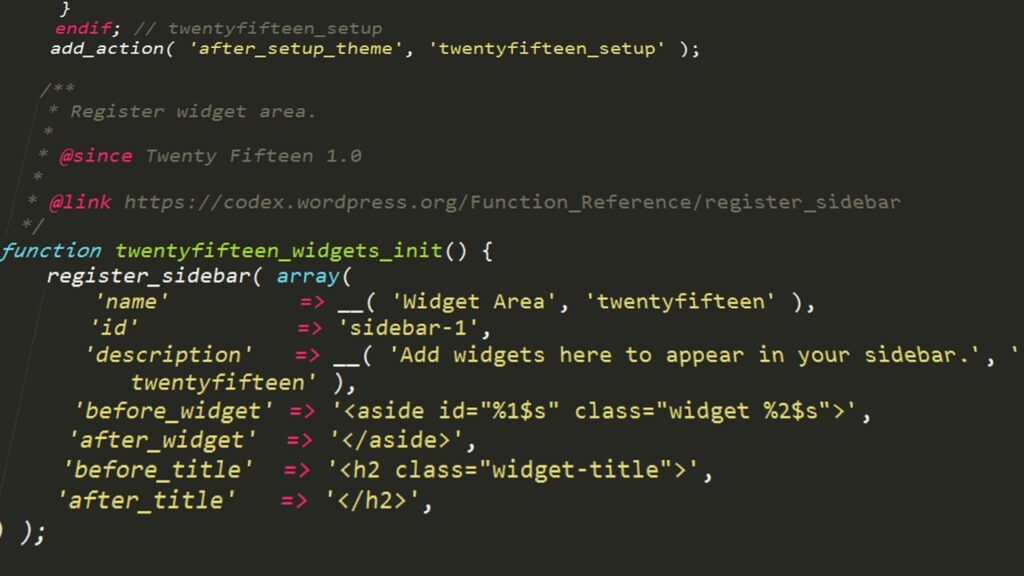
To register a new sidebar or widget area programmatically, you use the widgets_init hook within your theme’s functions.php file. Here is a practical example of registering a custom sidebar:
// Register Custom Sidebar
function ownwebservers_register_custom_sidebar() {
register_sidebar( array(
'name' => __( 'Primary Custom Sidebar', 'ownwebservers_textdomain' ),
'id' => 'primary-custom-sidebar',
'description' => __( 'A custom sidebar for optimized content delivery.', 'ownwebservers_textdomain' ),
'before_widget' => '',
'before_title' => '',
'after_title' => '
',
) );
}
add_action( 'widgets_init', 'ownwebservers_register_custom_sidebar' );
Deploying Custom Site-Specific Plugins for Global Widget Configuration
Hardcoding functionality into a theme’s functions.php file means that changing or updating your theme will wipe out your custom sidebars. The safer, more maintainable approach is to deploy a custom site-specific plugin. By creating a simple plugin file that hooks into widgets_init, you ensure your widget configurations persist across theme updates, making it an essential strategy for multi-site management.
Performance Implications of Sidebar Widgets
A visually appealing sidebar is useless if it drags down your Time to First Byte (TTFB). WordPress widget performance is heavily influenced by what those widgets compute and retrieve upon page load.
The Impact of Dynamic Widgets on TTFB and Shared Hosting Resources
Heavy sidebar widget usage particularly unoptimized dynamic widgets or third-party plugins fetching external data increases client-side render time and backend database queries. On shared hosting environments with strict entry-process limits, complex sidebar PHP executions can rapidly consume available worker processes, causing delays for incoming traffic and significantly slowing TTFB.
Offloading Complex Functionality with Asynchronous AJAX and JavaScript
Complex sidebar functions like RSS feed aggregators, social media streams, or weather widgets often perform remote requests sequentially during PHP execution. To prevent concurrent PHP execution from blocking server threads on Managed VPS or Dedicated Server environments, offload this functionality. Replacing heavy PHP widgets with lightweight JavaScript widgets or asynchronous AJAX requests ensures the server builds the base HTML quickly, while secondary data loads in the client’s browser without blocking the initial page render.
Serving Static Sidebars via Redis and Varnish Page Caching on VPS Environments
Enterprise and high-traffic WordPress deployments must rely on advanced caching mechanisms to handle load. By implementing page caching via Redis or Varnish, the server bypasses PHP entirely on subsequent requests. This allows fully assembled sidebars complete with their dynamic logic applied to be served as static HTML directly from memory. On OwnWebServers’ managed cloud and GPU/VPS server configurations, this architecture guarantees lightning-fast delivery even under intense traffic spikes.
Security Considerations for Third-Party Widgets
Custom sidebar widgets and third-party plugins are frequent vectors for compromise if not properly vetted.
Auditing Custom Widgets for XSS, CSRF, and File Inclusion Vulnerabilities
Poorly coded widgets frequently introduce severe PHP vulnerabilities into your stack. When writing or evaluating custom code, you must audit for common attack vectors:
- Cross-Site Scripting (XSS): Ensure all data passed through untrusted sources like user input or external APIs is strictly sanitized using WordPress core functions like
esc_html(),esc_attr(), andwp_kses(). - Cross-Site Request Forgery (CSRF): Any form processing or settings updates within widget admin panels require valid nonce verification using
wp_nonce_field()andcheck_admin_referer(). - Arbitrary File Inclusion: Never pass user-supplied input directly into PHP file inclusion functions like
include()orrequire(). Restrict allowed paths strictly within the plugin directory.
Evaluating External Data Fetching and Plugin Code Quality Prior to Deployment
Security teams should assess how third-party widgets handle external API requests before deploying them to production. Check for proper SSL/TLS verification when fetching remote data and ensure the plugin caches remote responses rather than making live HTTP requests on every single page load.
Best Practices for Sidebar Widget Management
- Maintain a strict limit on the number of active widgets per sidebar to minimize layout shift and reduce compound database queries.
- Always prefer standard Gutenberg blocks over legacy PHP widgets when possible to take advantage of native WordPress performance optimizations.
- Migrate heavy theme-level code into a lightweight, site-specific plugin to ensure portability and survivability across theme transitions.
- Sanitize all output data to harden your site against XSS vulnerabilities without exception.
- Utilize asynchronous JavaScript and AJAX loading techniques when embedding third-party media streams or external RSS feeds.
- Audit third-party widget plugins at least quarterly to verify compatibility with the latest WordPress core security updates.
- Implement page-level or object caching (Redis/Memcached) on your hosting stack to serve fully rendered sidebars as static HTML.
Troubleshooting Widget Issues
| Symptom | Likely Cause | Fix |
|---|---|---|
| Widgets menu missing from admin dashboard. | Theme has disabled the widget system (common in Full Site Editing block themes). | Use Appearance > Editor to modify block templates directly, or switch to a classic/ hybrid theme if traditional widgets are absolutely required. |
| Sidebar widgets disappear after updating to new WP version. | Plugin conflict or incompatibility with the block-based widget editor introduced in WP 5.8. | Enable error logging to identify the failing plugin. Update all third-party plugins to their latest versions or install the Classic Widgets plugin as a temporary fallback. |
| Severe slowdown in Time to First Byte (TTFB). | An active dynamic widget is making blocking HTTP requests or running unoptimized database queries on every page load. | Deactivate widgets individually to isolate the culprit. Replace with static text blocks or implement an object caching mechanism like Redis via your hosting control panel. |
| Custom code widget outputs raw PHP to screen. | Using an unsupported method to execute PHP directly inside a standard text block without proper escaping. | Remove inline PHP logic from content blocks. Build functionality properly within a site-specific plugin using shortcodes or custom Gutenberg blocks instead. |
Conclusion
The evolution from legacy text boxes to sophisticated block-based widgets has fundamentally changed how we design WordPress sidebars. While modern tools make it easier than ever to build engaging layouts, they also demand careful consideration regarding how those elements are executed server-side.
By understanding both the visual interface and the underlying code like widgets_init, caching strategies, and security protocols you can maintain dynamic sites that perform brilliantly under load. Pair these technical strategies with robust hosting infrastructure such as OwnWebServers’ NVMe storage-backed Managed Cloud VPS solutions and you ensure your custom sidebar widgets remain an asset to user experience rather than a liability to site performance. Keep your caching layers active, audit your third-party code diligently, and let asynchronous loading handle your complex data streams.