Knowledge Base
- All
- Accounts and Billing
- Cloud Hosting
- CMS Hosting
- Dedicated Hosting
- Dedicated Server
- Entertainment
- Linux Servers
- Make Money Online
- MySQL
- New Technologies
- Other
- Our Portfolio
- Patchman
- Reseller Hosting
- Sales FAQ
- Security
- Social Media
- Tech Support
- Tutorials
- Web Designs
- Web Hosting
- Web Hosting Addons
- Web Tutorials
- Website Development
- WHM
- Windows Hosting

Windows Server Installation: Step by Step Guide for 2026 Full Setup Tutorial
To install Windows Server in 2026, download the correct Windows Server 2025 ISO or use installation media supplied through your organization’s licensing channel. Back up the target server, confirm that the hardware and storage controller are supported, create a bootable USB drive, and boot the server in the appropriate firmware mode. In Windows Setup, choose […]
How Do I Deploy a Django App on Your VPS or Shared Server?
Deploying a Django application does not have to be complicated. Depending on your hosting environment, you can deploy your Django app on shared hosting using cPanel and Passenger or on a VPS using Gunicorn and Nginx. Shared hosting is suitable when you want a simpler setup with fewer server-level configurations. A VPS gives you more […]
How to Manually Install n8n on Ubuntu?
In today’s digital environment, automation helps businesses reduce repetitive work and improve productivity. If you are searching for a flexible workflow automation platform, n8n is an excellent open-source solution. It allows you to connect different applications, automate routine tasks, and manage workflows without requiring advanced coding knowledge. In this guide, we will explain how to […]
How to Transfer a Minecraft World to a New Server
Have you spent months building your Minecraft world and now want to move it to a new server? Whether you are upgrading your hosting plan, switching providers, or moving from a local computer to a VPS, you can transfer your existing world without starting over. The process is straightforward when you have access to your […]
How to Migrate Large Files & Backups to a Storage VPS
Moving large files or server backups can become difficult when the data reaches hundreds of gigabytes or more. A normal file upload may take hours, and an interrupted connection can force you to start again. For regular backups, manually copying everything each time is also inefficient. A Storage VPS gives you a separate location where […]
How to Activate Windows License on a VPS: Full Guide
When you purchase or set up a Windows VPS, one of the first things you may need to check is whether Windows is properly activated. An activated Windows Server ensures that the operating system is correctly licensed and ready for use. In many cases, Windows activation is already included with a Windows VPS Hosting plan. […]
How to Save and Exit in Nano Editor Linux
Nano is one of the easiest text editors to use from the Linux command line. It is commonly used to edit configuration files, scripts, text files, and other files directly from the terminal. However, many beginners face one common question after editing a file: How do I save and exit Nano in Linux? Unlike graphical […]
How to Install NPM and Node.js on Mac
Node.js is a JavaScript runtime that lets you run JavaScript outside a web browser. It is commonly used for building websites, web applications, APIs, and other server-side applications. NPM, short for Node Package Manager, comes with Node.js and makes it easier to install and manage the packages your projects need. If you are using a […]

How to Use SSH on Shared Hosting Plans to Change PHP Version
Learn how to change the PHP version via SSH on shared hosting. Discover how to use cpcli, absolute paths, and .bashrc aliases for secure PHP CLI execution.

What are HTTP, HTTPS, and HTTP/2/3? A Deep Dive into Modern Web Protocols
Explore the technical evolution of HTTP, HTTPS, HTTP/2, and HTTP/3. Learn how QUIC, TLS, and ALPN impact server configuration, security, and hosting performance.

Everything You Need to Know About CloudLinux and Server Resource Limits
Understand CloudLinux LVE resource limits (CPU, EP, PMEM, IOPS), CageFS security, and how to prevent 504 timeouts on your hosting environment.

Optimizing WordPress Discussion Settings for Performance and Security
Learn how to optimize WordPress discussion settings to reduce MySQL load, prevent SEO spam, and improve server performance on VPS and dedicated hosting.

How to Add a TXT DNS Record in cPanel for Verification and Email Authentication
Learn how to add and configure TXT DNS records in cPanel. Set up SPF and DMARC, manage character limits, and verify domain ownership with this guide.

Using www and non-www domains with an SSL certificate
Learn how to configure www and non-www domains with SSL. Implement 301 redirects, secure SANs, manage HSTS, and prevent redirect loops on Apache, Nginx, and CDNs.

How to Disable Trackbacks and Pingbacks in WordPress: Security, Performance, and Server-Level Configurations
Learn how to disable WordPress trackbacks and secure XML-RPC to prevent DDoS amplification, reduce spam, and lower MySQL CPU overhead.

How to Adjust the Reading Settings in WordPress?
Optimize WordPress reading settings for performance. Learn how pagination, static homepages, and RSS feeds impact server resources, caching, and database queries.

How to Create a Custom Transport Script for Backups
Learn how to create secure, reliable custom backup transport scripts for dedicated and cloud servers. Cover SFTP, S3 APIs, error handling, encryption, and resource throttling.

How To Restore Files and Folders Using the cPanel Backup Restore Tool
Learn how to safely restore files and folders in cPanel. Discover granular restoration tips, NVMe performance impacts, and how to troubleshoot failed jobs.
How to Add a Widget to the WordPress Sidebar: A Complete Technical Guide
Learn how to add widgets to your WordPress sidebar using the block editor, Customizer, or programmatically. Plus performance and security tips for high-traffic sites.

Updating n8n in Docker: A Step-by-Step Guide
Learn how to update n8n in Docker to ensure you have the latest features and security patches. Follow our step-by-step guide for a seamless update process.

Unpinning Remote Desktop Connections on Linux: A Step-by-Step Guide
Learn how to unpin Remote Desktop connections on Linux using Xrdp, Xfce, GNOME, and KDE. Customize your remote desktop display and manage desktop entries with xdg-desktop-menu.

Mastering CSF Firewall: A Comprehensive Guide to Configuration and Security
Learn how to install, configure, and optimize CSF Firewall for enhanced security and DDoS protection on your Linux servers. Discover best practices and troubleshooting tips.

Why Emails Land in Spam: Understanding the Root Causes and Solutions
Discover why your emails are landing in spam and learn how to fix it. From email authentication protocols to mail server configuration, we’ve got you covered.

How to Open Task Manager in Remote Desktop?
Learn how to open Task Manager in Remote Desktop sessions on both Linux and Windows systems, including keyboard shortcuts and alternative methods.

Mastering MariaDB Performance: A Comprehensive Optimization Guide
Boost MariaDB performance with expert tips and tricks. Learn how to optimize configuration, upgrade to the latest version, and implement best practices for high-traffic workloads.

How To Change The Root Password Of Webuzo Control Panel
Learn how to securely change the root password of your Webuzo control panel using the Linux ‘passwd’ command. Understand the precautions and best practices to avoid potential issues.

Unlock Secure Server Access: Why SSH Key Authentication Reigns Supreme
Learn how SSH key authentication offers superior security over traditional password-based authentication, and discover best practices for implementing SSH keys in web hosting environments.

Troubleshooting IMAP Synchronization Issues in Plesk: A Step-by-Step Guide
Learn how to troubleshoot and resolve IMAP synchronization issues in Plesk, caused by incorrect mail server settings, outdated mail clients, and more.

Boost Windows Security: A Step-by-Step Guide to Changing the RDP Port
Reduce the attack surface of your Windows servers by changing the default RDP port. Learn how to edit the registry, use PowerShell, and configure firewalls.

Combating Spamming Scripts in cPanel: A Comprehensive Guide
Discover how to identify and prevent spamming scripts in cPanel with our in-depth guide, covering system logs, built-in tools, and best practices.

Selecting the Ideal Windows VPS for Remote Desktop Protocol (RDP)
Discover the key considerations for selecting a reliable Windows VPS for Remote Desktop Protocol (RDP). Learn about system requirements, security features, and more.

Protecting Windows Servers with IPBan: A Step-by-Step Guide
Learn how to install and configure IPBan on Windows using virtual machines or Linux emulators to protect your servers from brute-force attacks.

Configuring a Secure Firewall with CSF: A Step-by-Step Guide
Learn how to install and configure CSF firewall on your Linux server to secure your hosting environment and protect against unauthorized access.

Lock Down Your Server: Expert cPanel Ubuntu Hardening Guide
Protect your cPanel Ubuntu server from cyber threats with our expert hardening guide. Learn how to implement CSF, mod_security, 2FA, and more to secure your server.

Migrating from cPanel to Plesk: A Step-by-Step Guide
Learn how to migrate from cPanel to Plesk with our comprehensive guide, covering pre-migration requirements, migration methods, and post-migration tasks.

Secure Your Email Domain with SPF, DKIM, and DMARC Records in cPanel
Learn how to configure SPF, DKIM, and DMARC records in cPanel to secure your email domain and prevent spam and phishing attacks.

Plesk vs cPanel: Choosing the Right Control Panel for Your Hosting Infrastructure
Compare Plesk and cPanel control panels for Linux and Windows hosting, covering licensing, architecture, performance, and multi-tenant management.

Why SMTP Port 25 is Blocked: Security, Compliance, and Modern Mail Delivery
Learn why OwnWebServers blocks outbound SMTP port 25 to prevent spam, protect IP reputation, and ensure deliverability via secure ports 587 and 465.

Windows Server 2025 vs 2022: What’s New for Web Hosting and Linux Administrators
Learn about the key features and enhancements in Windows Server 2025, including QUIC support, hotpatching, and Azure Arc integration, and how they impact web hosting and Linux administrators.
Hardening Postfix and Dovecot to Improve Email Deliverability and Pass SPF, DKIM, and DMARC

How to Install Node.js Applications in Plesk: A Complete Setup Guide
Learn how to deploy Node.js apps in Plesk using the Node.js extension, Passenger integration, version manager, and production-ready configuration.

Green Hosting for Sysadmins: A Practical Guide to Carbon-Neutral Infrastructure
A technical guide to PUE, SCI, and carbon-free energy claims, plus kernel tuning, ARM migration, and autoscaling tactics that cut hosting emissions.

HTTP/3 & QUIC Protocol Adoption: A Linux Sysadmin’s Guide
A practical guide to deploying HTTP/3 and QUIC on Linux servers: nginx, Apache, Caddy, LiteSpeed, firewall rules, TLS 1.3, and kernel tuning.

LiteSpeed vs. Nginx: A Deep-Dive Performance Benchmark Analysis
In-depth benchmarks comparing LiteSpeed and Nginx on RPS, latency, TTFB, and CPU usage across static, PHP, and mixed workloads for production hosting.

Zero-Downtime Website Migration: A Complete rsync and DNS TTL Playbook
Learn how to migrate a live website to a new server with zero downtime using rsync, DNS TTL prep, and database sync best practices.

AI-Powered Hosting: How Machine Learning Is Automating Linux Server Management
How AI and ML are transforming Linux hosting: anomaly detection, predictive autoscaling, log analysis, patch management, and automated security.

Edge Computing & CDN-Integrated Hosting: A Sysadmin’s Guide
Deep-dive guide to HTTP/3 at the edge, resilient caching, edge compute functions, and origin hardening for modern CDN-integrated hosting architectures.

IPv6-Only Hosting: A Practical Guide to NAT64, DNS64, and Modern Address Planning
Learn to deploy IPv6-only hosting with NAT64/DNS64, 464XLAT, correct /64 planning, ip6tables firewalls, and rDNS to keep services reliable and compatible.

PHP 8.x End-of-Life Schedules & Compatibility: A Sysadmin’s Upgrade Guide
Track PHP 8.0-8.4 end-of-life dates, understand the support lifecycle, and learn how to install, run multiple versions, and test compatibility safely.

Serverless Architecture vs. Traditional Hosting: Which Fits Your Workload?
Compare serverless architecture and traditional Linux hosting on cost, cold starts, scaling, control, and security to choose the right model for your workload.

GDPR, CCPA, and Data Residency: A Practical Compliance Guide for Web Hosting
Learn how to meet GDPR, CCPA, and data residency requirements in hosting: region locking, encryption, DPAs, SCCs, right to erasure, and log retention.

Ransomware & Malware Trends Targeting Hosting Environments: A Sysadmin’s Defense Guide
How modern Linux ransomware, web shells, and cryptominers target hosting nodes, hypervisors, and control panels, plus practical defenses for sysadmins.

Traditional Hosting vs AI Hosting: A Complete Technical Comparison
Compare traditional web hosting and AI hosting across hardware, GPUs, VRAM, storage, and cost to choose the right infrastructure for your workload.
How to Access Linux Server Using PuTTY SSH Terminal
PuTTY is a free and open-source terminal emulator, serial console, and network file transfer application that supports various network protocols, including SSH. This guide will walk you through the steps to access a Linux server using PuTTY. 1. Prerequisites Before you start, ensure you have the following: – A computer running Windows. – Internet access. […]
How to Change the Permission of a Web Disk Account in cPanel
In cPanel, the Web Disk feature allows you to access your website’s files directly from your computer’s desktop using an FTP client or web browser’s file manager tool like Windows Explorer or Finder on Mac OS X systems (if you’re using Linux or another operating system that doesn’t natively support WebDAV, you can still use […]
How to upload a new logo in PrestaShop
Step 1: Login into the PrestaShop dashboard. Step 2: Hover over Preferences and then click Themes in the top menu. Step 3: Click the browse button next to Header Logo under Appearance. For your new PrestaShop logo browse your computer and after selecting it click the green Save button. (present to the right of the […]
How to increase Mail box limit
An error “Mailbox Quota Exceeded” occurs when you try to log into your webmail . Follow the steps as given below to increase the “Mailbox” quota. Step 1: Login to the cPanel Step 2: Then navigate to Email accounts Step 3: There is an option called “Change Quota” under every email account . Step 4: […]
How to connect FTP using Transmit FTP client
Follwing steps will show you how to connect FTP using Transmit FTP client. Step 1: Open Transmit client. Step 2: On the right side of the screen enter your FTP details . Server = Either your domain or the server’s IP address or Server hostname User Name = Your FTP username Password = Your FTP […]
Steps to delete multiple tables in the database using phpMyAdmin
This article will explain you the steps to delete multiple tables in the database using phpMyAdmin. For these follow the steps as below: Step 1: Login to cPanel account. Step 2: Under Databases select Mysql Databases. Step 3: The phpMyAdmin page will get appear infornt of you. Step 4: Select the databases from the list […]
How to Disable Roundcube webmail via WHM?
In this article you will understand how to disable Roundcube webmail via WHM. Follow the steps as given below: Login to WHM. Navigate to Home, select Server Configuration and after that choose Tweak Settings. Locate the option Enable Roundcube webmail. Click on OFF to disable. Click on Save.
How to enable the custom HTML page error in Plesk panel?
Step 1: Log in to Plesk Panel Step 2: Navigate to Websites & Domains and click on ‘Hosting Settings’ Step 3: Inside, ‘Web scripting and statistics’ tick on ‘Custom Error Document’ Step 4: After that go to ‘Websites & Domains’. Click on ‘Error Documents’ Under ‘Virtual Directories’. Step 5: Click on the error we want […]
What steps can I take to make the most of Ownwebservers cloud web hosting?
Online Cloud Storage is an upscale commodity for any business that has established it’s own on-line shop, but with the cloud businesses can realize that resources are provided at an inexpensive rate in order that they’re able to get good price for cash without having to compromise on the service that they receive. With dedicated […]
How to export/import MySQL database with correct character set on Dedicated server?
To Export/Import MySQL database with correct list on dedicated server export your database with the right set is very important so as to avoid any quite issues with data that has non english characters within the table. For example, if the list of your data is Unicode (UTF8) you’ll be able to use the subsequent […]
How can I change the comment settings on my WordPress website
This article will explain you how can I change the comment settings on my WordPress website. Let’s see the steps as below: Step 1: Login to your WordPress admin dashboard. Step 2: On the dashboard under More Actions heading, click on Turn comments on or off. Step 3: Discussion Settings window opens up in the […]
How to change the default Drupal theme
This article will show you the steps to change the default Drupal theme. Firstly you have to login to the Drupal admin panel. After that click on Administer and select Appearance and choose the theme you wish to use for your web site. In your Drupal Administration Area -> Appearance you should now be able […]
How to Access Email Account Without Logging in Webmail?
In this tutorial will explain you how to access email account without logging in Webmail. Step 1: Login to your cPanel as admin. Step 2: Under “EMAIL” section, click “EMAIL ACCOUNTS”. Step 3: As you select email account you can see all the accounts under your account. Step 4: Select the email account from the […]
How to set Default maximum email quota for new packages via WHM?
Step1: Login to WHM. Step2: Then navigate to Home and select Server Configuration after that choose Tweak Settings. Step3: For new packages find the option Default maximum email quota. Step4: Identify a value. Step5: Click on Save.
How to setup the email auto responder in Plesk panel?
Step 1: Log in to Plesk Panel Step 2: At Website and Domains, click on ‘Mail Accounts’ Step 3: On which we want to set auto-response select that email account Step 4: After that click on ‘Auto-Reply’ button. Step 5: To set up our email auto-reply enter all the details. Step 6: Click ‘OK’ button
Steps to delete email forwarder in cPanel
In this article you will understand about the steps to delete email forwarder in cPanel. Following are the steps for the same: Step 1: Login to your cPanel account. Step 2: Under Email you have to select Forwarders option. Step 3: Search for the forwarder that you wish to delete. Step 4: After finding the […]
How to change the FTP quota via cPanel
Step 1: Login to the cPanel account. Step 2: Under Files section, select FTP accounts. Step 3: From the list present, click the available FTP account. Step 4: For the FTP account click Change Quota for which you wish to change the quota. Step 5: After that you have to enter the disk space quota, […]
How to enable Out of memory warnings via WHM?
In this tutorial will explain you how to enable Out of Menory warnings via WHM. Step1: Login to WHM. Step2: After login navigate to Home that select Server Configuration in that select Tweak Settings. Step3: Search for the option Out of memory warnings. Step4: Click on ON to enable. Step5: Click on Save.
Add image to Roundcube interface
Step 1: For editing HTML source code, Click on the HTML icon . Step 2: In the pop-up HTML Source Editor window, enter in the following code replacing this image path with your own: <img src=”http://yourdomainname.com/logo.png”> Step 3: Click on Update to be dropped back to the signature editing page. Step 4: Then click on […]
How to enable cPanel password reset in WHM?
The WHM control panel permits individual users to reset their cPanel password without logged into their cPanel. Once your customer (cPanel account user) forgets the cPanel password, this feature is additional helpful and there will be no need to contact you for a password reset. For the safety reasons, we keep this Tweak Setting disabled […]
How to add DNS record in Plesk ?
You can add many various types of records to the DNS zone for a domain (for example, CNAME, MX, PTR, and more). The subsequent procedure demonstrates a way to add A record to the DNS zone. A record permits you to point a subdomain to an IP address: Log in to Plesk. In the left […]
Direct link/URL to access phpMyAdmin without installing software
The cPanel account that is hosted under shared server, try using the below URL to directly access phpMyadmin. http://www.yourdomainname.com:2083/3rdparty/phpMyAdmin/index.php Make sure you substitute yourdomainname.com together with your actual name. To enter your login credentials, you will be get prompted . you’ll login to phpMyAdmin with constant credentials you employ for cPanel. Once entered it ought […]
How To Check a MySQL Database for Errors in cPanel
In this tutorial you will understand how to check MySQL Database for errors. Let’s see the steps as follow: Step 1: Log in to cPanel. Step 2: Click the “MySQL Databases” icon. Step 3: Under “Modify Databases”, and in the “Check Database” drop down box, select the database you want to check. b After that, […]
How to Run SQL Queries in phpMyAdmin
In this tutorial will demonastrate on how you can run SQL Queries in phpMyAdmin. Step 1: Go to cPanel > Software >phpMyAdmin. Step 2: Navigate to the area your SQL query will apply to. Select the database or the tables you want run the queries against. Step 3: Click on the SQL tab. Step 4: Type in […]
How to enable two-factor authentication (2FA) in cPanel
Two-factor authentication adds an extra layer of protection by requiring you to enter a unique code beside your regular password when you login. This code is generated by an app on your smartphones and changes each after 60 seconds. No one will login without both your password and access to your smartphone to come up […]
How To Restrict Access To WP-Admin For Preventing Malicious Attacks?
While the internet is a nice platform for establishing a powerful on-line identity it also brings plenty of perils. Some time ago, people have witnessed one among the most important DDos attacks within the history of web. we tend to also heard about the WordPress web site being targeted by the hackers. These items bring […]
How to Use phpMyAdmin to Export MySQL Database Files
The tutorial can illustrate a way to export a replica of your MySQL database backup file into your database server. So, let’s move additional with the steps: 1. Log in to Plesk. 2. Select “Databases” section from the left-hand side of the screen. 3. Click on “phpMyAdmin”. You will enter into the “phpMyAdmin” page. 4. Now, select the database from the […]
Clean the YUM Cache in CentOS
This article can justify a way to clean the YUM cache in CentOS. YUM is an abbreviation for Yellowdog Updater, Modifier that could be a free and open-source command-line package-management tool. it’s developed for computers with Linux operating system software uisng the RPM Package Manager.You to automatically update packages and dependency management on RPM-based distribution […]
How to Turn Off PHP Error Reporting
In this article, we are going to understand how to disable the PHP error reporting. PHP errors are generated by your websites and logged in error_log files within the directory wherever your PHP files are situated. If you are do not would like the error_log file you’ll disable PHP error logging. To turn off PHP […]
How Should You Enable BoxTrapper in cPanel
In this tutorial will indicate to you ways to enable BoxTrapper in cPanel. BoxTrapper may be a utility that helps you decrease the number of spam you get. In combination with BoxTrapper Spam Filters should be used to reduce server load and backscatter to unauthorized email addresses. Below are the steps: 1. Log in to cPanel. […]
How to Update the Plesk’s Password
In this post you will see how to update Plesk’s password. Following is the procedure for updating the password: 1. Plesk is be logged in. 2. Choose “My Profile“ present on the left-hand side of the screen. 3. Type the New Password, In the Password section of the Plesk Preferences . 4. Your password should […]
How to Get Raw FTP Logs from the WHM Panel
This guide can assist you in understanding what’s Raw FTP Log and the way to get the Raw FTP logs from the WHM panel. What a Raw FTP Log is? Raw FTP Logs: The raw access logs are files that contain that record each visitor’s connection to a domain’s FTP server, and therefore the documents […]
How to Uninstall or Delete Fantastico from VPS or Dedicated server?
In this tutorial we will understand that from your VPS or Dedicated server how to remove Fantastico : Via SSH, Login to your VPS or Dedicated server as root, and implement the commands as given below: rm -rf /var/netenberg/ rm -rf /usr/local/cpanel/whostmgr/docroot/cgi/fantastico/ rm -rf /usr/local/cpanel/3rdparty/fantastico* rm -rf /usr/local/cpanel/base/frontend/*/fantastico rm -f /usr/local/cpanel/base/frontend/x/cells/fantastico.html rm -f /usr/local/cpanel/whostmgr/docroot/cgi/addon_fantastico.cgi Thus […]
How to use MySQLTuner ?
Using the MySQLTuner helps you review a MySQL installation quickly and being considered is a script it has more effective way to improve its performance and achieve stability. Note : Before you run the MySQLTuner script you’d need to be logged in as root user. Let’s see the steps to use MySQLTuner ? Step 1 […]
Why & How to Optimise & Repair MySQL Database using phpMyAdmin in cPanel
In this article will understand the way to optimize and repair MySQL Database using phpMyAdmin in cPanel. Why Optimise and Repair MySQL Database? Before moving further on the method of optimizing and repairing the MySQL database allow us to perceive why it’s necessary to do so: 1. Databases develop to a substantial extent once a […]
How to Configure Settings in WordPress?
In this tutorial we will guide you with steps to configure settings in WordPress: Log in to WordPress. On the left sidebar, go to settings and click on General. On the General settings page, you can edit the fields like the blog title, tagline, and website URL. You can also change the timezone, date, and time formats. Click on Save […]
How to Access the In-Browser Terminal Interface from WHM?
In the cPanel and WHM, users will directly access the command-line once in session. It’s a privilege that’s exclusive to those that log in as the root user. Let’s see how to Access Terminal Interface from WHM 1. With your root access Log in to your WHM account. 2. From the side menu Select the […]
Smartest Method to Redirect non-WWW URLs to WWW?
In this post we will see the best method for redirecting non-WWW URLs to the WWW 1. Access your root account by using your email (or login) and password. If you log in as a super admin, cPanel sends you to the admin dashboard first, but if you join in as a user, cPanel takes […]
How to remove the passphrase from an Apache SSL Key?
Most webmasters would typically use a pass phrase for an Apache SSL key considering the safety perspective. However usually fail to understand that you simply have to be compelled to manually enter it when you start Apache, else it might not start. So, if you would like to get rid of this and wish to […]
How to Implement Mail Forwarding in Plesk
In this tutorial, you will understand how to implement Mail Forwarding in Plesk. Follow the steps as below to set up email forwarding for an email address: 1. Log in to Plesk. 2. Select the “Mail” option, from the left-hand side. 3. Then from the list given select the email address. 4. Select the “Forwarding” […]
cPanel disk usage info
In the tutorial we are going to explain that how you can check the cPanel disk usage. For these Please do follow the steps as mention below: Login to your cPanel. Go to “STATISTICS” portion at the right corner of your cPanel. Click on the “Disk Usage” option. Here you will find the disk usage […]
VMware vCenter operations Manager custom UIs fails Error
Login to the VMware vCenter operations Manager because changing the admin password the custom UIs get fails Indications Via script “resetadminpwd.sh” the password identification of the admin user for VMware vCenter Operations Manager has been reset recently. With the help of the admin account, the access to Analytics virtual machines and UI is functioning. Custom […]
How to Use WHM to Customise the cPanel User Interface
This article explains a way to customise your hosting customers’ user interface. You’ll simply brand cPanel victimization Web Host Manager (WHM) to show your logos, totally different designs, and more. For your customers WHM is used for rebranding and customizing cPanel. Changes like the logos of the company, or the style of interface, its appearance. […]
How to Create A cPanel Package in WHM
In this tutorial you will understand how to make a cPanel package in WHM Following are the simple steps: 1. Log in to WHM. 2. Select the “Packages” category from the left-hand side menu and click on the “Add a Package” option. 3. Write down the “Package Name”. 4. Select the value of the “Resource”. […]
What is Rootkit Hunter ?
Rootkit Hunter also known as rkhunter may be a scanning tool. It helps you to scan out several exploits like backdoors, common exploits like – E-mail injection, Buffer overflows, format string bugs, and rootkits wherever the name originates from. Rkhunter is a UNIX operating system based tool. The approach of working, for rkhunter goes like […]
How to Create a New .htaccess file to Fix WordPress 500 Internal Server Errors
A 500 internal server error is a slip-up that stops your web site from functioning properly. This can be caused by a problem that prevents your server from carrying out a request. Though there are variety of potential causes of 500 internal server errors, one among the foremost common could be a corrupted .htaccess file. […]
Separate server for each domain in a VPS?
Q. I even have a VPS account and that i would be running a number of web sites using different languages. If one web site is using ruby on rails platform, different one is using java and another one php. So is it possible to use a separate server for every domain? Am i able […]
How to Setup An Addon Domain in Plesk Control Panel
In this tutorial, you will understand how to set up an addon domain in Plesk. An Addon Domain is a second domain name that you simply will link to your Windows Hosting. link to your Windows Hosting. For your Addon Domain name you can build an effective functional website , exactly like you would for […]
No. of MySQL Databases allowed your web hosting packages?
Q. How many MySQL databases do you allow on your web hosting packages? Ans. We tend to enable unlimited range of MySQL databases on all our web hosting plans. You’ll be able to create as several MySQL databases as you would like to among the disk space allocated to your account. The only restriction is […]
Password Protect Directories
Q. However do I password protect directories? Ans. Follow these steps in cPanel, To password protect a folder/directory : Step 1: Login to your control panel using your account username/password at http://yourdomain.com/cpanel Step 2: Click on “Password Protection” under Services Step 3: Browse to the folder in which you want to restrict access Step 4: Click on the name of the folder Step 5: It will […]
How to change MySQL root password from WHM?
In this tutorial, you will understand the steps to change the root password of MySQL server from WHM. This tutorial is only applicable to Linux VPS and Dedicated server customers. 1. With root user Login to WHM. 2. Under SQL Services category. Locate and select MySQL Root Password option. 3. At next screen, you’ll have […]
How to Fix Error Forcing close of thread 310 user: ‘root’ in MySQL?
Problem Statement MySQL server keeps on shutting down. Error Message C:\Program Files\MySQL\MySQL Server 5.5\bin\mysqld: Forcing close of thread 310 user: ‘root’ Solution You can resolve this issue by increasing maximum connection to MySQL server. Firstly you have Login to MySQL server and navigate to /etc/my.cnf file. Find & increase max_connections value and save the my.conf file. Restart MySQL […]
Default Files and Folders in cPanel Account
Following are the list of files and folders in cPanel Account: public_html: To make your website publicly available over the Internet, please upload your web pages and images into this folder. public_html/cgi-bin: CGI Bin directory. public_html/images: It is used to store the images for any webpages you upload. public_ftp: It contains files to be accessible via anonymous FTP. public_ftp/incoming […]
How To Brand Your Reseller Hosting Plesk Control Panel With Your Own Logo ?
Most of the beginners starting as a hosting reseller don’t even recognize that they will complete their reseller hosting business by setting up their own logo in to the plesk control panel. Currently lets learn out how to brand your reseller hosting business together with your own custom made logo in to Plesk control panel. […]
How to set up email signature in cPanel webmail
Following are the steps to set up email signature in cpanle webmail: 1. Click on Settings in the upper right corner of the screen, after logging into Roundcube webmail interface : 2. Click on Identities option as you are in Settings menu : 3. After that select the needed Identity (email address you would like […]
Back up and restore a database on Dedicated server using SSH
Using SSH, on Dedicated server how can i back up a database. Follow the steps as explain below to back-up the MySQL database on a Linux dedicated server using SSH. Step 1 : First step is to log-in to your linux dedicated server using SSH Step 2: Then, to take backup of the MySQL Database […]
How do I delete backup files from my server using Plesk
This article, will help you to remove any backup files from the server storage and remote storage using Plesk. Below are the steps to remove a backup file from Plesk’s backup storage: 1. Open Plesk and log in using your account details. 2. From the drop-down menu Select Tools & Settings . 3. On the […]
How to fix WordPress Blank Page Error
The Following tutorial shows numerous ways in which to fix white blank page error. Note: Please take the backup of your web site before you make any changes. Why does one get this Blank Page Error? The white screen of death, indicates that you just exhausted the memory limit. This might be caused by a […]
How To Protect Your WordPress Website From Spam?
For preventing your WordPress web site there are several measures which will be undertaken for preventing malicious and spam activities, they are as follow: Update WordPress Version Make sure that you simply have updated WordPress to the latest version. Each new WordPress update contains of the many new patches, security fixes and new options. At […]
How to Do Email Routing in Plesk?
If you’re running email hosting, you need to take precautions to keep the e-mail service active. If the primary server goes down, you’ll keep receiving mail on a backup server with email routing in Plesk. Below are the steps to Set Email Routing : 1. As root Log in to your Plesk account. 2. From […]
How to add a Package in Centos Web Panel?
From this article we are going to see the steps to add a package in CWP. Step 1. Login to CWP. Step 2. Search and Click on Packages. Step 3. Click on Add new package. Step 4. Enter Required Details. Package Name : Provide Package Name Disk Quota : Provide size of Package Bandwidth : […]
Ubuntu/Debian Bash: Mail: command not found (CentOS, Redhat)
You are unable to see most of the commands in your system with the nominal installation of any Linux distro. Then only the mandatory packages are install for running an OS and skipped unnecessary packages. The mail command is used in most of the Linux operating system distribution for sending emails from the command line. […]
How to Change the Time-zone in Webmail?
In this article, you may learn the way you’ll change the time zone settings within the Horde and Roundcube webmail clients. # How to Change the Time Zone? By default Webmail applications use the host server’s time zone. If you’re present in a totally different zone or would like to change your time zone, you’ll […]
How To Search Through A Database In phpMyAdmin?
There are some attributes hooked up to the search feature of phpMyAdmin. Let’s see how you can search through a database in phpMyAdmin. Following ate the steps: Login to cPanel and go to phpMyAdmin. Click on the database that you simply wish to look here. Click on the ‘Search’ tab. You can enter the words […]
How to Fix the Issue of Web Server Redirecting to the Hostname from WHM?
Is your web server redirecting to hostname after you access web applications like WHM, cPanel or Webmail? one among the reasons causing the problem is that the expired SSL security on it domain. Due to a default setting for the SSL, it keeps redirecting to the hostname and Non-SSL redirection. Below are some simple steps […]
How to configure SMTP settings in OpenCart?
To send emails from the dashboard, by default OpenCart uses PHP mail() function . This is often an excellent in built feature that helps you to send emails to your clients/porspects regarding your new products, offers, promotions etc. To enhance the e-mail delivery, you should take into account fixing SMTP for all the outgoing emails. […]
How to login into Windows PLESK Control Panel?
In this article we are going to explain how to login into the plesk control panel. You can use the following URLs: yourdomain.com:8880 After using the above URL you will get the login window as shown below: After that enter your username and password that is provided by web hosting provider. Then, click on “Login”
How to Change Your Front Page Content in Joomla
In this tutorial you will understand the way to change your front page content in Joomla. For the aim of this tutorial, assume that you are logged into your administrative panel of your Joomla website. The front page manager permits you to settle on what content can show up on the home page of your […]
How to Reboot a VPS/Dedicated Server via WHM?
VPS and dedicated servers are the most widely user and top-notch in performance. That said, it’s a machine and needs periodic maintenance. once maintenance comes reboot, wherever you’ve need to restart the server. You’ll reboot your VPS hosting or dedicated server at your convenience with the WHM panel. There are alternative reasons when you may […]
How to Install cPAddons Site Software from WHM?
An on-site web application, cPAddons, permits you to mix different scripts so you’ll install them on your web site. With it, you’ll add and manage applications and vendors on-line from cPanel/WHM. cPAddons is more flexible with websites for blogs, bulletin boards, e-commerce, guest books, many more. Follow the steps as given below, to Install the […]
Learn to add Third-Party Software Application in Plesk
In this tutorial we are going to understand how you can find and install third-party software applications using Plesk. To your website third-party applications allow you to add additional features and functionalities. #Below are the Steps to find and install the application : 1. Using login details Log in to Plesk. 2. Click on Applications […]
How to update your servers cPanel license (SSH)
You can also manually update your cPanel License when you get need of. For updating login to the server via SSH and run the command as given below: /usr/local/cpanel/cpkeyclt Thus using the command above your servers cPanel license will get updated.
How do I change permissions on files and folders using Cpanel?
In this tutorial you will learn how to change permissions on files and folders using Cpanel. Step 1: Using your cPanel username and password ,login to your Control Panel at www.yourdomain.com/cpanel. Step 2: Under the ‘Site Management’ menu, click ‘File Manager’ , this will bring up the ‘File Manager Directory Selection’ box where you select […]
What is Email spoofing?
When someone sends an email that looks like it came from a domain that it did not refers to Email spoofing. Currently there is no way to prevent email spoofing.
How do I fix my WordPress installation?
At http://mysql.com/products/tools/administrator/, MySQL.com has a great back/restore solution . Within few minutes this allow you to create and restore backups of your database, only once you need to set up the settings and then you can do a restore/backup at any moment you need to.
Error 500 .htaccess: php_value not allowed here
Q: To the side from Java application I use php and after my php application get install, I get these error in log and my website shows error 500: .htaccess: php_value not allowed here .htaccess: php_flag not allowed here A: By default php – as installed by cPanel – is set to suPHP so php_value […]
How can I add procedures and triggers to my MySQL database?
From their Java applications, as more and more clients want to use advanced SQL features, we are running MySQL version 5.1.x or higher where user can run CREATE PROCEDURE and CREATE TRIGGER statements. Just ensure when assigning database user to a database, you should check ROUTINE and TRIGGER related privileges or ALL privileges . for […]
How can I manage the spam I am receiving?
SpamAssassin is an automated email filtering system that attempts to identify spam messages based on the content of the email’s headers and body.You can enable SpamAssasin through your cPanel account under the ‘Email Mangement’ menu.
-bash: make: command not found
Make utility is to see automatically that items of an large program need to be recompiled. To organize to use make, you want to write a file referred to as the makefile that describes the link among files in your program. In a program, generally from object files the executable file gets updated , that […]
How To Backup And Restore Your Files In OpenCart?
To avoid the lost of files it’s highly important to take regular backups of your web site; So lets see the steps for backing up and restoring your database in OpenCart: Backing Up A File: Go to System. Click on ‘Backup/Restore’. Check the boxes besides every item that you would like to Save and click […]
How do I create an A Record in my cPanel account?
DNS (Domain Name System) has a record as a great feature. You can create A record in your cPanel account, to point your domain to any specific address. Let’s see the following steps for creating an A record in cPanel. To create an A Record in cPanel, follow these steps: Step 1: Sign in to your cPanel […]
How to Enable/Disable SpamAssassin
It uses scores to rate the likelihood that a message is a spam, as you enable SpamAssassin. The messages marked as spam can be configure by SpamAssassin to delete automatically, however this feature we do not recommend. How to Enable/Disable SpamAssassin /Email Management / Spam Protection / How to Enable/Disable SpamAssassin When you enable SpamAssassin, it uses scores to […]
How to Restart Apache Server Using SSH or WHM
Through the WHM or through SSH access you can restart your Apache Web Server. Follow the below tutorials on how to restart your Apache through WHM and through command line. To restart you should have root access to your server. Using SSH, to restart Apache server you should login to your SSH and run this […]
How to Increase Disk Space for a cPanel User in WHM
If you are using dedicated, VPS or reseller hosting, without changing the assigned package you may need to increase disk space for a single cPanel account. In this article, you will learn how to increase disk space for a specific cPanel user in WHM. Step 1: Login to WHM. Step 2: Select Quota Modification under Account Functions. Step 3: Select the domain/username that […]
Split Plesk account from Admin Plesk
Please follow the procedure once login your Plesk admin panel to create a separate control panel In this scenario, You need to create a secondary administrator (Webmaster) account that only has the ability to manage a single domain. Step 1: Go to Users Step 2 : Create User Account. Step 3: Specify the following: Contact […]
How To Create a Phpinfo Page ?
The phpinfo.php may be a reasonably file that enables you to observe the information regarding your dedicated server. The phpinfo file doesn’t consists of the MySQL data, however it holds all the version data regarding the PHP, Apache/IIS, GD and lots of alternative things on your server. Most of the times you’ll see several important […]
How to access Roundcube and set it as the default mail client?
In this tutorial we will understand how to access Roundcube and set it as the default mail client? You need to access Webmail initial To configure Roundcube as your default email client within the Webmail service. If you’re unsure a way to do this, please check our how to access the Webmail service article. Once […]
I would like to dump the Table Structure for my MySQL Database, but none of the data.
The command line option from SSH is given as below: mysql -d -p database_name > file.sql. Where ‘database_name’ is the name of your database, and ‘file.sql’ is the name of the file you would like to write the table structure to. You will be prompted you for a password (-p). Normally mysqldump gives you the entire […]
How to rebuild user data files from a valid httpd.conf file
In some situation your server’s userdata files (/var/cpanel/userdata/ directory comprises for each account) may get corrupted or can be entirely missing. Below are the Steps that explain to rebuild userdata files with a valid httpd.conf file 1. The userdata directory that has been corrupted must be moved to a new location. You can do this […]
My WordPress blog doesn’t work with the temporary URL.
Follow the below steps, to resolve the issue: – Make sure that your WordPress installation is complete, and you recognize what the name of the database is. If Fantastico installed WordPress for you, the name of the database is probably going to be: username_wrdp1 or username_wrdp2. – Login your cPanel at www.yourdomain.com/cpanel. – Choose ‘phpMyAdmin’ […]
How many emails can I send an hour?
Ownwebserver’s allow an account to send a total of 100 emails per hour. For more information please contact our support team for suggestions or solutions on [email protected].
How do I restore a MySQL database?
This article will help you in understanding of how to restore a MYSQL database. Follow the below steps to restore a MySQL database: Step 1: Login to your control panel www.yourdomain.com/cpanel Step 2: Click on ‘Backups’ in ‘Site Management’ Step 3: Click on ‘Browse’ to locate the Database you want to restore then click ‘Upload’ […]
Which Configuration Files and Directories are backed up by the WHM Backup Feature ?
When the Backup Configuration Files is Enabled within the WHM, the WHM Backup Feature backs up the subsequent system configuration files and directories: Configuration Files: /etc/exim.conf /etc/exim.conf.local /etc/exim.conf.localopts /etc/namedb/named.conf /etc/rc.conf /etc/named.conf /etc/proftpd.conf /etc/localdomains /etc/httpd/conf/httpd.conf /etc/group /etc/shadow /etc/master.passwd /etc/passwd /etc/fstab /etc/ips /etc/ips.remotemail /etc/ips.remotedns /etc/reservedips /etc/reservedipreasons /etc/quota.conf /etc/wwwacct.conf /etc/remotedomains /etc/rndc.conf /etc/secondarymx /etc/my.cnf /root/.my.cnf /usr/local/cpanel/3rdparty/interchange/interchange.cfg /usr/local/apache/conf/httpd.conf Directories: /etc/namedb […]
Perl installation on Linux VPS and Dedicated Servers.
Perl is one of the popular programing language typically wont to develop common gateway interface (CGI) programs because of its attractive text manipulation facility. If you aiming to use Perl on your server you would need to install it first. As you have got root access to your Linux system VPS or dedicated server you’ll […]
How do I prevent WordPress from overloading my shared server?
If you happen to experience a surge in traffic WordPress blogs may be extraordinarily resourced intensive. Poorly enforced WordPress setups will place a high load on web servers and cause interruptions of service or account suspensions for using too many resources. Here are some tips that may assist you build your WordPress install more stable: […]
How to Change MX Records of a Domain – cPanel Help
Not quite often are you needed to change MX Records, however once you are switching servers. Following the steps as below to change a domain’s MX (Mail Exchange) records for the emails to be run from a server. It forms an important part of DNS records because of the fact that it something that may […]
How to Use WHM Feature Manager
In this tutorial, you will understand about How to Use the WHM Feature Manager. You can choose the features you want to make available in your accounts’ cPanel with the help of WHM’s Feature Manager. You’ll have a lot of management over the features you provide in your web hosting packages this way. This enables […]
How to Edit Your Profile in WordPress
This tutorial you show you how to edit your profile in WordPress. The steps to edit your WordPress profile are given as below: 1. Log into your “WordPress” account. 2. From the left sidebar Select “Users”. 3. After that click on the “Profile and select it” 4. Update your “Personal information”, in this section 5. […]
How Do You Update PHP Version In Plesk Server
In this tutorial you will see the process of determining which PHP version your Plesk server is running and how to switch to a different PHP version. Applications like PHP should be managed through the Plesk interface on a server like Plesk. Follow the steps during this tutorial to update PHP and switch to a […]
Setting email alert when backup limit exceeds
If you have hosted your web site on a VPS or a dedicated server, you would possibly like to get an update if this current backup disk-space limit exceeds. So here is a step by step method to create a disk-space monitoring script that may send you an email if the backup limit exceeds. To […]
PHP Mail Function Disabled on Shared Web Hosting
We had previously decided to disable the mail function because the the mail() function was typically employed by malicious users on our network to send spam and alternative uninvited e-mails. we tend to suggest our customers to use an e-mail library so as to send e-mails, there are many in which to choose from. CodeIgniter […]
Using MS Access database on windows hosting
Q. Would I be able to use an MS Access database rather than mysql or php on windows hosting packages? Ans :- Microsoft Access (MS Access) database yet as Microsoft SQL (MS SQL) databases are supported on all our windows web hosting uk plans. You’ll be able to add multiple databases under any of our […]
How to Remove DNS Zones from WHM
In this tutorial, we’ll show you using WHM how to delete DNS zones. A domain on your server could expire at any time. Either that or the domain has been claimed by a distinct DNS server. it’ll nearly always result in an error. After you try to register an account for that domain, it shows […]
How Do You Make Domain Alias in Plesk?
In this article you will come to know, how to make Domain Aliases in Plesk. Follow the steps to create a domain alias in Plesk. To the same website to point multiple domain names you can use a domain alias. It is beneficial for branding. For example, the domain name example.com, if your website is […]
How to Rename A Database in phpMyAdmin
In this article, you’ll see just by using simple steps how to rename a database in phpMyAdmin. The newest version of phpMyAdmin allows you to modify the database’s name. Keep in mind that you’ll need to update user permissions and any scripts that reference it,as you alter the name of a database. Before You Get […]
How Do I Register A Domain Name through OwnWebServers Client Area?
In this article you can understand how to register a domain name from the OwnWebServers Client Area. Just in few simple steps you can do it. Follow these below steps: 1.You have to First login to your Client Area using your registered email id and password. 2. Once you are logged in, from the sub menu […]
How to change MySQL database user’s password from cPanel
This tutorial contain the process of changing MySQL database user password from cPanel. Following are steps to change the MySQL database user password from cPanel : 1. Enter in your cPanel account. 2. You will enter into the cPanel homepage. You have to Select the “Database” section and click on the “MySQL Databases” icon from it. 3. Find the […]
How Do You Perform Ping Test in Windows
In this article, you’ll understand how do you perform the ping test in windows? On a network the ping command sends data packets to a specific IP address and then returns the time it took to transmit that data and receive a response. For quickly testing various points on your network It’s a useful tool […]
How to Get Your WordPress Database Details in cPanel
In this article you will learn about how to access your WordPress database details. Using the procedure given below, the WordPress database, DB User, and DB Password may all be discovered in the “wp-config” file. 1. Login to cPanel. 2. Click on the option “File Manager”. 3. You will be directed to a new page, where you will find […]
What is Reverse DNS and How Does it Work?
In this article we are going to learn what reverse DNS is and how it works. Reverse DNS (rDNS) is the method of resolving an IP address to a domain name, which is the inverse of a forward DNS query. What is Reverse DNS? A DNS operation of a website name from an IP address […]
How to Remove the cPanel Account in WHM
In this tutorial, we are going to learn how toTerminate Accounts Feature or Remove the cPanel Account in WHM which will allow you to remove unneeded cPanel accounts. In WHM, you’ll simply remove a cPanel account with only a few clicks. 1. As root user, Log into your “WHM account”. 2. Then in the search […]
How Do You Delete an FTP Account in Plesk
In this tutorial we are going to understand how to delete an FTP account. Let us follow the steps: 1. Log in to Plesk. 2. Select Websites & Domains from the left-hand menu. 3. Select the domain for which you wish to delete an account, then click on the FTP Access options. 4. Locate the account you wish to delete on the FTP Accounts tab and […]
How to Create New MX Records in cPanel
This tutorial shows you ways to feature new MX Records in cPanel. Following are the Step-by-Step guide to Create an MX record for your domain: 1. Log in to your cPanel account. After entering the correct credentials click Login . 2. Go to Domains Navigate to Domains, on the cPanel dashboard and click Zone Editor […]
How to Create an Email Account in Plesk
This section can lead you through the steps of using Plesk to execute the foremost basic web hosting operations. You’ll have constructed a functional mail account at, finish of the tutorial. When reading this text, you’ll simply create an email account in Plesk. Below are the steps to create an email account: 1. Log into your “Plesk […]
WordPress Toolkit
Key Features Quick and Simple Deployment Replication & Sync Debug Administration Superior Auto Update Control Easy migration for single Remote WP instance Site Indexing Plesk Resellers WP-CLI API RPC + CLI Support Installing WordPress In order to install WordPress, follow the steps below Follow the steps below for installation of WordPress Select Websites & Domains > WordPress 2. […]
What Are The Functions Of Joomla Remository?
Joomla Remository could be a Joomla extension. It’s used for managing the file repository in your Joomla CMS. Joomla Remository consists of Remository component beside several different extra modules and plugins. You’ll be able to download the Joomla Remository extension through the official Joomla web site. The list of functions executed by Joomla Remository include […]
How to install red5 on Linux dedicated server
In these Tutorial we will see the, Steps to install the red5 on Dedicated hosting server. root@server [] cd /etc/init.d/ root@server [] wget http://www.indianwebportal.com/downloads/red5 root@server [] chmod 755 red5 root@server [] yum -y install java-1.6.0-openjdk java-1.6.0-openjdk-devel root@server [] cd /usr/src root@server [] rm -rf apache-ant-1.8.0-bin.tar.gz apache-ant-1.8.0 red5-0.8.0.tar.gz root@server [] wget http://pradeeps.in/apache-ant-1.8.0-bin.tar.gz root@server [] tar -zxvf apache-ant-1.8.0-bin.tar.gz root@server [] ls -d /usr/local/ant | mv apache-ant-1.8.0 /usr/local/ant root@server [] export […]
How to Enable IonCube Loader in Plesk?
One of the essential PHP extension is IonCube Loader, that you can enable for your hosting via Plesk. To Enable IonCube Loader 1. Log in to your Plesk account as an administrator. 2. From the navigation menu select the Tools & Settings option. 3. Go to the General Settings section and click on PHP settings. A list of […]
How To Assign Feature List From WHM To cPanel?
Feature lists will be assigned to the packages. If you wish to assign a feature list to a cPanel account, the primary step is to assign the feature list to the package then this package will be assigned to the cPanel account. Steps for assigning a feature list to a package: Login to WHM. Go […]
What is a public_html Folder?
The web root for your primary domain name is known as the public_html folder. Once someone types your main domain (the one provided while signing up for hosting), the public_html folder contains of all web site files that you wish to be displayed. Or in alternative words, once visitors type your domain name into their […]
Check if FTP port 21 is blocked
FTP (File Transfer Protocol) is employed to transfer the files from your local machine to hosting server. FTP by default works on port 21. Your web hosting provider occasionally changes FTP port OR your ISP (Internet Service Provider) blocks it. To see if it’s being blocked, you can telnet the default FTP port 21 . […]
Learn how to Backup or Export the Database from SSH
In this tutorial, we will see how you can export the database from SSH. In situations like moving your site this can be useful, as it can help you to export the entire database, or need to upgrade a website. Generate a Database Backup: Step 1: Connect to your server via SSH. Step 2: In the command […]
How to Permanently Delete All Email from Inbox in Webmail?
With an in-built tool you can completely delete all emails from the Inbox of your Webmail account. To Permanently Delete All Email in the INBOX from Webmail follow the steps mention below: 1. Log in to your Webmail account. 2. Click on your username menu within the top-right corner of the screen. Then, click on […]
How to Restart Apache Server from WHM?
Apache Tomcat is an open-source software. It acts as a Java servlet and Java Server Page container. During this article, you’ll learn to restart Apache server from WHM. To Restart Apache Server 1. With your root account Log in to the WHM panel. 2. From the navigation menu, select the Restart Services option. 3. Click […]
Installing PHP5 Apache Mysql and phpMyAdmin on Linux
In this article you will learn how to install PHP5, Apache and the database manager in MySQL PHPMyAdmin, just in simple 5 steps: 1 – The first command to execute is: sudo apt-get install apache2 apache2-utils libapache2-mod-php5 php5 php5-mysql php5-cli php5-gd 2 – Proceed with the installation and wait for it to end, remembering that […]
How to Remove Files in Linux Terminal?
In this tutorial you will understand, how to use the rm, unlink and rmdir commands to delete files in Linux. How to Remove Files You can use rm (remove) or unlink command to remove or delete a file from the Linux command line. The rm command allows you to remove multiple files at once. With unlink command, you can delete only a single file. While removing files […]
How to Hide My Domain WHOIS Information?
The time you register a website domain name you’ve to provide your personal/business data. What if you don’t would like to disclose your identity? There’s a service known as Domain ID Protect (whois id protect), which would protect the whois data of the domain name. Throughout domain registration you’ll avail the Domain ID Protect feature […]
How to Access the In-Browser Terminal Interface from WHM?
Users can directly access the command-line in the cPanel and WHM when in session. Who log in as the root user, will be the privilege for those user. To Access Terminal Interface from WHM 1. Log in to your WHM account with your root access. 2. Select the Server Configuration option from the side menu. 3. Click […]
How To Add Product Categories in OpenCart?
To featured the products more appropriately on the website you have to add more categories in OpenCart. Following are the steps for adding product categories in OpenCart : Login to your OpenCart account. Navigate to the section – Catalog and select Categories. From the upper right corner click on the ‘Insert’ option . In the […]
Learn to Set a Static Front Page for WordPress Blog
When a brand new theme is activated on your WordPress blog, it by default displays your recent posts on the home page of your website. Many themes are designed with a static front page. This is often a typical appearance for users that wish static or welcoming information on their website’s homepage. Depending on theme, […]
How To Create MySQL Tables In phpMyAdmin?
In this tutorial you will learn how to creating MySQL tables for a database in phpMyAdmin. Follow the steps for the same as mention below Login to the ‘Manage MySQL Tool’. In the section – ‘Current MySQL Databases’, click on a login name for the database in order to log into phpMyAdmin. Click on the […]
SoftException in Application.cpp
When accessing web site, you receive Internal Server Error within the web application. When observing error logs on server, you’ll see logs as below. SoftException in Application.cpp:357: UID of script “/home/user/public_html/index.php” is smaller than min_uid Premature end of script headers: index.php Under public_html, this is because of incorrect ownership on files/directories. You’ll have to update […]
How To Set Forwarding Rules For Emails?
For setting the forwarding rules, follow the steps mentioned below : Firstly you have to go to ‘Site Tools’ and then click on ‘Emails’. Click on ‘Filters’ and depending on your preferences choose the ‘User-Level Filters’ or ‘Domain-Level Filters’. Now you have to enter all the conditions that the filter should meet and choose ‘Redirect […]
What to Do When the Service Nginx Restart Fails?
In this tutorial, you will understand how to find the error when the service Nginx restart fails. Basically, you get the error “service nginx restart fails” when something goes wrong whereas you edit the nginx.conf. Nginx doesn’t restart after that. 1. Run the below syntax after each modification is done in your nginx config file, […]
How to uninstall an application/software in Softaculous?
Please follow the steps as below, if you have installed an application in Softaculous and if you wish to uninstall it: Login to your cPanel control panel using login details, navigate to Software/Services and click on the Softaculous icon. Click on the wooden block icon i.e. “All Installations“ from the top right hand side menu […]
Steps to Enable Password Protection for .htaccess?
In this tutorial will understand the steps to enable .htaccess password protection. 1. Firstly, create an .htpasswd file together with your own username and password in any text editor and save it without the .txt extension. Encrypt the password for further protection. 2. When visiting the link, simply enter the username and password. This may […]
How to Configure the DNS Resolver via WHM?
A DNS Resolver may be a server component which will seek for the server name within the local cache. If it fails to seek out the name in there, it’ll continue the search by contacting the DNS servers till it gets the IP you were trying to locate. It’s the most crucial role to play […]
How To Edit A .htaccess File Through The cPanel File Manager?
In this tutorial we are going to understand how to add or edit a .htaccess file through the cPanel file manager is as follows: Login to the cPanel. Under the Files section, click on File Manager. On the left side, click on the public_html directory. Here you will see the files and folders. In this section, if you’re not able to see the .htaccess […]
Steps to Modify Apache Directory Listing Style
If someone accesses a directory with no index file (index.html, index.php, index.htm, etc.) on your hosting account that user can either see the files’ list in this directory, or a forbidden message. This doesn’t enable them to access the contents of the directory. You’ll be able to allow/deny the permissions for displaying the folder content. […]
How To Edit A Virtual Directory In Plesk?
In Plesk, it is possible to edit the virtual directory easily. To do so follow the steps as mention below: Login to Plesk. Look for the domain that you would like to edit the virtual directory and so click on the ‘Virtual Directory’ option. Look for the virtual directory that you simply need to edit […]
SSH Commands to manage a Dedicated server
Dedicated server are been alternative of the many on-line businesses because to the server configuration and options that are used to style a dedicated server could lead a webmaster towards his expected results. The central control every single side of hosting resources will build task simple for to manage an dedicated server and if you’re […]
Account modification aborted – Apache Configuration Error
Account modification aborted, there was a problem changing the user name. When you are trying modify an account by changing its username for a domain, the system generates an error that shows: “There is currently a configuration error in the Apache configuration file. User name change aborted. Account modification aborted, there was a problem changing […]
How to download Softaculous backups?
Softaculous permits you to create/restore/download backup from the user friendly web interface. Following are the steps to download the backup from web browser Login to cPanel, navigate to Software/Services tab and click on Softaculous From the right corner top menu, click on the “Backups and Restore” option, the icon looks like a zipped folder You […]
How to Rename the Files/Folders in your cPanel Account?
Renaming a file or folder for your web site could be a standard procedure for debugging or disabling an web application. That said, this text can show the method to rename files and folders in cPanel via the File Manager tool. 1. Log in to your cPanel account. 2. Go to the FILES section and click on File […]
How To Enable/Disable HTTP Authentication?
In the context of an HTTP request, HTTP access authentication could be a methodology for an HTTP user agent to supply a user name and password once making request. It’s a method for imposing access controls to web resources as a result of it doesn’t need cookies, session identifier and login pages. No handshakes should […]
How to Add a New Server in WHMCS?
Using the admin panel you can add servers in WHMCS . it’ll facilitate to add the new accounts and track in WHMCS. Te steps to add a new server in WHMCS are given as below: Login to the WHMCS as admin. Go to setup, navigate to Products OR Services, and click on Servers. From this dashboard, you can either add […]
How to Enable Root Login via SSH in Ubuntu
SSH on Ubuntu is by default organized in an exceedingly approach that disables the root users log in. Originally this is often enabled as a security measure which suggests that you simply cannot directly log in as the root user over SSH. However, you’ll simply use the Root SSH login via Sudo command. But, in […]
How To Create A Catch-All Email Account In Plesk?
A catch-all email account is an inbox that’s created to receive all the emails sent to incorrect email addresses or email addresses that don’t exist within a domain. It helps you in receiving all the lost emails due to misspellings, once you configure a catch-all email account . It’s necessary to observe your catch-all email […]
How to schedule your posts in WordPress?
The post schedule feature helps you to stay your blogs up to date. At a set time, it helps you to publish the articles. If you’re on a vacation or have a busy work schedule or if your time zone is totally different from your readers time zone then in such cases you’ll schedule the […]
How to Set Global Email Filters for your Domain from cPanel?
To Set Global Email Filters 1. Log in to your cPanel account. 2. Click on Global Email Filters from the EMAIL section. 3. Click on Create a New Email Filter. It opens a form where you get to customize the filter. Enter a Filter Name. Select and set the Rules to filter emails. Choose the action to take for the filtered email via Actions. […]
How to Remove WordPress from cPanel Softaculous?
Following are the steps from which you can remove WordPress from Softaculous as below: 1. Login to your cPanel account. 2. Go to the Softaculous App Installer section and click on WordPress. 3. Scroll down to Current Installations and click on the red cross icon under Options for the domain which you want to remove WordPress as below: 4. You will be […]
How to Create and Edit a File via FTP?
An FTP client helps to create and edit files for your web site. Creating and editing files via FTP is simpler method as compared to using the command line. Any FTP client may be used as per your preference, however during this article we are reaching to use the FTP client ‘Filezilla’. Steps to Create […]
edquota: Cannot stat() mounted device /dev/root
A disk quota may be a limit set by a administrator that restricts usage of file system in Operating Systems. The function of setting quotas to disks is to allocate restricted disk-space for accounts according to shared hosting packages. It throws a error as below, when updating them on your server. edquota: Cannot stat() mounted […]
How to Add Password to WordPress Admin (wp-admin) Directory via cPanel?
You can access the WordPress admin dashword of your web site from the WordPress admin(wp-admin) directory. Password protecting your wp-admin directory can produce an additional security layer for your wp-admin area. This tutorial can show you the way to add a password to the WordPress admin (wp-admin) directory via cPanel. To Add Password to wp-admin […]
How long it takes to setup an account?
Q. How much time will it take to setup my hosting account? Ans. OwnWebServers VPS Hosting plans and Semi Dedicated Servers are configured to access to your server administration panel within 4-6 hours after order verification phone call. Usually in case of Dedicated Server order, server provisioning is done within 24 hours after order verification […]
How To Configure Remote Desktop On Linux VPS / VM
Desktop environment may be a bundle of programs that gives a graphical user interface (GUI). It provides end-users with a easy and intuitive way to interact with computers. Once it require virtual private servers (VPS) or Cloud Servers if you want a remote desktop environment you sometimes accompany a windows VPS, you’ll be able to […]
How To Copy Or Duplicate An Existing Database With phpMyAdmin?
You might have to be needed to copy or duplicate an existing database for testing the changes made on your web site or for the other similar reason. In this tutorial you will understand the steps for copying or duplicating an existing database through phpMyAdmin without breaking your website: Login to your cPanel control panel. […]
How to Fix the 503 Service Unavailable Error?
What is 503 Service Unavailable Error? If you see a message reading: “Service Unavailable” or something similar once you attempt to browse a web site, it means you can’t access the location for currently. So, rather than the web site, it returns the 503 error message to show that service or data is temporarily not […]
How to Install SSL Certificate Using “SSL It!” Extension on Plesk?
In Plesk, it’s possible to install free and paid SSL/TLS certificates SSL certificate with Let’s Encrypt’s “SSL It!” extension. you’ll alsi install the SSL/TLS certificates you already own. With Let’s Encrypt to install the SSL certificate on Plesk follow as below : 1. Log in to your Plesk account. 2. Go to the Website and […]
How to Create and Use Multiple Identities in RoundCube?
With RoundCube, users will send fake emails via multiple identities permitting users to create a proxy identity. To Create Multiple Identities in RoundCube. 1. Log in to your Webmail account and choose Roundcube. 2. On the left side click the Settings icon from the options, as shown here. 2 3.After that click on the Identities […]
How to Assign WHM Feature List To cPanel
This guide can make a case for the way to assign WHM’s feature list to cPanel. Packages will have feature lists allotted to them. If you would like to assign a feature list to a cPanel account, you need to assign the feature list to a package, once that you’ll assign the package to the […]
How To Find The Database Details Of Your WordPress In cPanel?
If you’re a WordPress beginner and if you’re unaware of the method of finding your WordPress database details, this tutotial is right for you. Through these steps you may be able to find the WordPress database, DB User and DB Password within the wp-config.php file. Login to cPanel. Click on the option – ‘File Manager’. […]
Account Creation Status: failed
You will receive an error as below, when re-creating an account OR restoring a backup file. Account Creation Status: failed (Sorry, a mysql user with the name username already exists.)checked xxx files….. You receive this error as a result of the MySQL user wasn’t removed from the server. Another is to restore the account with […]
How to Set a Message Size Limit in WHM?
Unless you want your memory space to overflow, it is a good idea to set up a message size limit for your mailbox. Let’s see the steps to Set a Message Size Limit 1. Log in to the root account of WHM. 2. Select the Service Configuration option in the navigation menu. 3. Click on Exim Configuration Manager. […]
How to Set a Domain Name to IIS(Internet Information Server) on Windows Server?
Steps to Set a Domain Name to IIS From your Windows Server IIS, now you are ready to set domain name manually .Following are the steps to add a domain: 1. Click on the Windows icon on the desktop and then click on Control Panel. 2. Under Adjust your computer’s settings, click on System and Security. Next click on Administrative Tools and […]
What is SSH2 and how to install it?
SSH2 provides bindings to libssh2 library which give access to resources (remote EXEC, shell, file transfer, tunneling) on a remote machine using a secure cryptographical transport. SSH2 may be a a lot of efficient, secure, & portable version of SSH that features SFTP, that functions like FTP, however has SSH2 encryption enabled. It works on […]
How to Update WordPress Installation?
Steps to update the WordPress installation: Log in to WordPress. On the left sidebar, click on Updates. Here, click on Check Again to make sure that your installed version is up to date. Our version of WordPress is up to date. You can also update your plugins and themes from this section. As you can see Plugins and Themes are all up to […]
How To Conduct Optimizing & Caching In Drupal 8?
You might need to work on improving the web site performance as your Drupal website grows. Optimizing the web site can facilitate it load quicker and therefore the amount of resources are going to be reduced as fewer calls are to be made and by reducing the extra processes. Following are the options that Drupal […]
How To Manage Email Disk Usage In cPanel?
This tutorial explains the strategy to look at and manage the e-mail space usage in cPanel. This may enable you to check all the mailboxes and delete the old or large messages that you simply don’t want. Following are the steps for managing disk email usage: Login to your cPanel account. Scroll all the way […]
How to Setup Scheduled Tasks in Plesk?
In this tutorial will learn how to setup scheduled task in Plesk. Following are the steps to setup: Log in to Plesk. Click on Scheduled Tasks Before adding a task, click on Settings. Set your time zone and click on OK. You will get a success message. Now, to create a new task click on Add Task. From the Task type section, […]
Learn to Use phpMyAdmin To Copy MySQL Database
In this article you will learn to copy MySQL database using phpMyAdmin. Steps to Copy MySQL Database In order to copy a MySQL database using phpMyAdmin, follow these steps: 1. Log in to cPanel account. 2. Under the Databases section of the cPanel home screen, click on phpMyAdmin. The phpMyAdmin administration page will get displayed in a new […]
How to restart Apache to make httpd.conf changes permanent?
When cPanel is updated or Httpd service is restarted using WHM, the custom changes created within the Apache configuration file directly will not work as a result of cPanel looks the new values within the file /var/cpanel/conf/apache/local. However, you’ll be able to still make the changes directly within the Apache configuration and run the subsequent […]
Fix :: Websites with URL Rewrite do not work in Windows VPS
In this tutorial you will learn how to fix issue with Rewrite rules in Windows server. If your al websites with Rewrite Rules were not working, by investigation we changed the Application pool of those websites to “Integrated mode”. So to change the application pool we performed the steps as given below. Go to Start → Administrative Tools → IIS […]
How to add a Domain in Centos Web Panel?
Following are the steps to add a Domain in Centos Web Panel. 1. Login to CWP. 2. Expand Domain from Drop-Down Button. 3. Add a New Domain from Add Domain Dialog Box. 4. Enter below Details Add Domain : Enter your Domain name which you want to add to User : Select the required user […]
How To Reset WordPress Password With phpMyAdmin?
This tutorial helps you to understand the steps for resetting your WordPress password through phpMyAdmin. Requirements: You will need the name of your WordPress database. You will need your cPanel login credentials (username and password). To Identify the Database for your WordPress Website: Login to your cPanel account. Click File Manager on the cPanel dashboard. Browse to the location of your […]
What are my DNS records?
If your domain is registered you’ll perform a whois check with the help of an online tool www.intodns.com. Name servers registered for the domain are shown below Domain NS records. For your domain these are the Name servers registered. Name servers below NS records are those set on the server in zone files. If you […]
MySQL Database Import Is Failing, Reason: The .sql File Is Too Big
Uploading browser-based file will fail just in case the file size that you simply try to upload is larger as compared to the HTTP post size configuration on the web server. In case this happens, your MySQL database can be restored just by logging onto your account via SSH client (or if you would like […]
Resolve broken images links in WordPress
The article guides you on the way to resolve a problem which will occur once you try to add pictures to a WordPress post. What is the problem? When you add a post in WordPress that contains images, the images seem as broken links within the post body. What is its resolution? To resolve such […]
How To Upgrade My Hosting Account?
Upgrading your account can be done in just simply clicks. Simply you have to successfully login into your Client Area, then from the top menu bar click on the Services link and select My Services from the drop down menu. On the services page, it’ll list your active and inactive services. On the right hand […]
How To Edit The MX Record Of A Domain Name On Dedicated Server Via WHM?
For editing an MX record of a domain name on your dedicated server, follow the steps mentioned below: 1. Login to WHM control panel. 2. Under DNS Functions section click on Edit MX Entry option. 3. Locate the domain that you want to edit and click on Edit. 4. Edit the MX Records and when […]
How to Download Raw FTP Log from WHM Panel?
If you’re running an FTP server, you’ll view each connection the visitors made to a specific domain or the files they uploaded and downloaded with raw access logs. As a WHM user, you’ll download a raw FTP log that contains these records within the form of plain text files. Let’s see the steps to Download […]
How To Update The Joomla Extensions?
You can simply update the modules, plugins, components and extensions in Joomla. For updating the Joomla extensions refer to the steps mentioned below : Login to the admin panel of Joomla. Navigate to Extensions and then go to Extensions Manager. Click on ‘Update’, Once the Extensions Manager is displayed. The list of extensions will get […]
R=fail_remote_domains: The mail server could not deliver mail to
When making an attempt to send emails from the server, you receive a bounce back as below. “R=fail_remote_domains: The mail server could not deliver mail to. The account or domain may not exist, they may be blacklisted, or missing the proper dns entries.” Although the server IP OR domain isn’t blacklisted, bounce back shows it […]
What is Local, Backup, and Remote Mail Exchanger in cPanel?
Local backup and remote mail exchanger are choices for the Mx Entry for a domain in cPanel. With this, the server is aware of the way to handle your incoming emails. The meaning of separate options is: It is suggested to select the choice “Automatically Detect Configuration”, if you’ve got a specific setup that must […]
How to Connect a Microsoft Access Database(MDB) in Windows Plesk?
With Plesk, you’ll be able to access external Microsoft Access databases for your applications. For this you have to just connect the database using an ODBC connection. Let’s see the steps to Connect a Microsoft Access Database (MDB) with Plesk 1. Log in to your Plesk account. 2. Select Websites & Domains from the left […]
How To Install Mambo Through Softaculous?
This article illustrates the entire method of installing the Mambo application through Softaculous. Follwo the steps as below: Login to cPanel. Navigate to ‘Softaculous Apps Installer’ and click on any of the choices displayed under ‘Categories’. The Softaculous installer page will get displayed. In the search text box type ‘Mambo’ and press enter. Click on […]
How to Fix the “Invalid cPanel License” Error?
The “Invalid cPanel License” error occurs due to the following three reason. i. Your cPanel license has expired. ii. Your server’s IP has changed. iii. Your license needs to be updated. The error shows itself after you logging into WHM. To Fix the “Invalid cPanel License” Error 1. You will required to verify if the […]
How can I Access Webmail in Plesk?
You can check your email accounts on the web browser by using Webmail. You’ll simply compose and read email messages, also maintain an address book and perform alternative common tasks. This knowledge base can guide you on how you’ll access Plesk email accounts using webmail. Accessing Webmail To access Webmail you can use Plesk or […]
How To Access Webmail Without Logging Into cPanel?
You can use the subsequent URL to access your webmail. By logging into the webmail you’ll be ready to manage your email account with the help of webmail clients like Horde, Roundcube & SquirrelMail. http://www.yourdomain.com/webmail OR http://webmail.yourdomain.com Note: Replace yourdomain.com together with your actual domain pointing to Ownwebserver’s server IP address.
Steps to Set WordPress to Ignore a File Path
Sometimes, it’s necessary to permit access to a file or directory however don’t need a sub domain. For instance, once you upload a file or folder to your public_html directory, however WordPress shows a 404 error whereas trying to access its file path. In such cases, you can create a rewrite condition within your .htaccess […]
Steps to Change the Default Unmask for Apache/PHP
The Apache/PHP umask finds the permission of new created files on the server. Root access is required to vary the umask, that is barely offered on Dedicated hosting plans without Geeky features and a Performance Booster. Open the following file for changing the umask: /usr/local/apache/bin/envvars Inside it, add the below line: umask 022 With this […]
Steps to Access MySQL Error Logs
Many times, the root cause of crashes, slowdowns, or other unexpected behavior in MySQL can be checked by analyzing its error logs. The default location for the MySQL on Ubuntu systems is /var/log/mysql/error.log. In several cases, the error logs are most easily read with the lessprogram, which is a command line utility that enables you […]
Learn to Create a PostgreSQL User
For creating a PostgreSQL user, go to your cPanel -> PostgreSQL Databases interface. In the Add New User form, type the username and password. Note that the username will always include your cPanel username in the form of a prefix. Now add the newly-created username to an existing database. For this, use the Add User to DB form. Now, simply […]
How To Solve The Error Magento SSL Not Working?
If you see that SSL isn’t performing on your Magneto web site, it should be the case that the SSL certificate isn’t activated. For enabling it you need to follow the steps mentioned below : Login to your Magento admin panel. Navigate to the option – ‘System’ > ‘General’ > ‘Web’ Then click on the […]
How Do I Check PHP Version And Configuration?
For checking the current PHP configuration the Phpinfo() function is used. For the purpose of dubugging this function can also be used because it comprises of all EGPCS (Environment, GET, POST, Cookie, Server) data. Follow the steps mentioned below in order to run the function: Login to your cPanel account then navigate to Files > […]
Learn to Fix the ‘No update required’ Message in WordPress
You may see the below message, when you log into your WordPress site : No Update Required Your WordPress database is already up-to-date! This issue may be caused many times due to your site’s cache. You need log into your server to resolve this and flush the cache with the help of SSH as below: […]
Internal Server Error while accessing cPanel, WHM & webmail
When accessing cPanel, WHM & webmail at times you get a error as below. Performing upcp OR performing a startup command (/usr/local/cpanel/startup) does not helps. Internal Server Error 500 No response from subprocess (whostmgr (cpanel)) with exit signal: 0 cpsrvd/11.34.0.9 Server at server.milesweb.com OR Internal Server Error 500 No response from subprocess ((webmail (cpanel)) with […]
Limit Outgoing Emails and Enable SMTP Authentication
The issues of spamming has to face by everyone who own server and that result server IP being blacklisted. To overcome this situation, you can go for the option to limit outgoing emails from the server. Login to your server’s WHM as root. Access Main >> Server Configuration >> Tweak Settings. Search for “Max hourly […]
How to Install GeoIP on Linux Server?
GeoIP is the solution for you to spot the location, organization, connection speed, and user type of your Internet visitors. The GeoIP databases are among the foremost in popular and correct IP geo location databases obtainable. Download the source of GeoIP # cd /usr/local/src # wget http://www.maxmind.com/download/geoip/api/c/GeoIP.tar.gz Extract it # tar -zxvf GeoIP.tar.gz # cd […]
Learn to Remove or Delete an Addon Domain
In this tutorial we will learn how to remove or delete an addon domain for that follow the steps as below: 1. Login to your cPanel account. 2. From the Domains section, click on the “Addon Domains” link or icon. 3. Then navigate to the “Modify Addon Domain” section and click on the “Remove” link […]
Resolving the WHMCS Error “An Order Cannot Be Created…”
You might already apprehend that reseller hosting helps you to earn money by reselling hosting space. However it’s common that WHMCS will offer errors once in a while. In this tutorial, you will understand how to fix the below error: “An order cannot be created because no products or domain registration items have been selected” […]
How to Repair MySQL Database via cPanel ?
In this tutorial we will understand how to repair MySQL Database via cPanel. For this follow the steps as mention below : To Repair MySQL Database via cPanel 1. Log in to your cPanel account. 2. Go to the DATABASES section and click on MySQL® Databases. 3. Find the Modify Databases section and select the database from the drop-down list of […]
How to Restore the Backup of Home Directory in cPanel
In this article can perceive, a way to restore a backup of your Home Directory in cPanel. In cPanel, you’ll restore a home directory Backup to identical location where it was created. Any existing files are going to be overwritten if you reinstall a backup. Let’s follow the steps to restore backup: 1. Log in […]
How to Set up Email Notifications via cPanel/WHM?
As a VPS user, there are times once your server faces major issues/changes like Account Creation, Exceeding Memory Limits, etc. you’ll be able to discovered email notifications via WHM for cPanel accounts to inform you of those problems on your server. Let’s see following steps to Set up Email Notifications 1. With your root account […]
How To Secure Joomla Or WordPress Admin Page?
If you redirect your Joomla or WordPress admin area to be accessible only from one single IP, you may be able to fully secure your Joomla or WordPress web site. You’ll try this without adding any advanced code to the .htaccess file. Follow the steps as mentioned below: Firstly you have to login to your […]
How to Access the Plesk Panel?
Plesk could be a commercial control panel compatible with each Linux system and Windows-based hosting services. Its distinctive graphic interface provides the users with numerous customization choices to change the settings and manage their hosting account. This tutorial can assist you access your Plesk panel account. To Access the Plesk Panel The control panel URL […]
How to Delete your Email Accounts in cPanel?
Users will delete their email accounts in cPanel as simply as they’ll create a new one. Note: Before deleting your email account, we advise you- All of your important email messages need to take backup. With another email address Catch any email sent to that address . Remove the e-mail address from all the websites, […]
Learn to Deny Access to Your wp-config.php File Under WordPress Installation
Is your wp-config.php file secure? you’ll be able to deny access to the current file by following easy steps. Under WordPress Installation steps to Deny Access to Your wp-config.php File In the main directory of your WordPress installation You will find your wp-config.php and it is used to access the database. In this file includes […]
Will My Search Engine Ranking Get Affected If I Change My Web Host?
The fact is that if you move your web site from one web host to the opposite, it’s not planning to have an affect on your search engine rankings; but, there are some vital steps that you should take. The primary vital thought to made is that after you change the DNS of your domain […]
Easy steps to create 301 Redirect
301 redirect may be a type of permanent redirect from one URL to a different. 301 redirects users and search engines to a distinct URL than the one they need truly inserted in their browser. Let’s see the steps to creating a 301 Redirect Using .htaccess 1. Log in to Control Panel. 2. Go to […]
How to monitor your Linux server ?
Ideally, there exists 2 strategies to remotely monitor your web server. One amongst that could be a a lot of preventative monitoring that is done straight using the command prompt or the web hosting control panel whereas by using third party services or tools you can also monitor the up-time. Both the strategies are crucial […]
VMware vs Hyper-V
What is the fundamental difference between VMware and Hyper-V? Microsoft Hyper-V and VMware ESX are hypervisor based mostly virtualization software. These software’s are installed directly on the server hardware however their architecture is totally different. What is Hypervisor? The hypervisor may be a basic component and backbone of virtual environment. Fundamental characteristics of a hypervisor […]
How To Set Multiple Redirects For Email Account From Plesk?
To set a redirect (forwarder principally know as) from one email address to alternative, you’ll be able to set it from plesk panel. But, a limitation is that you simply will set just one redirect (forwarder) from plesk panel. Another is to add the e-mail address within the Mail Group. Let’s 1st set how to […]
How to allow an FTP server through Windows Firewall
All the connections that are attempting to access the FTP server are the security feature of Windows firewall blocks . With ther help of the subsequent steps you’ll be able to enable the FTP server through the firewall : 1. Click on Start menu, look for Windows Firewall and click on Enter. 2. Through Windows […]
Learn to update CentOS to add EPEL repository
This article explains the way to install the Extra Packages for Enterprise Linux system (EPEL) repository on an unmanaged server running CentOS. The EPEL repository permits you to install further Fedora-based packages on CentOS servers. Let’s see the steps to install the EPEL repository Following the below steps to install the EPEL repository on your […]
How to Increase the Upload Limit in phpMyAdmin
If you’re trying to extend the speed of your upload in phpMyAdmin, then you’re at the correct post. The upload size limit has been exceeding, if an SQL file that’s uploaded through phpMyAdmin and therefore the post size limit, then the subsequent error can occur: phpMyAdmin – Error Incorrect format parameter This type of error […]
Learn to clear the local DNS cache in Linux
Now you’ll simply utilize a local DNS resolver cache like Windows and Mac OS X. Perform the steps as follow to clear the DNS cache in Linux : (i) Open the terminal. (ii) Restart the name service cache daemon by typing following command : sudo/etc/init.d/nscd restart (iii) In some cases, the nscd daemon might not […]
Learn to Restart Apache on Dedicated Server
Dedicated server during which root access is given to the user is that the only possibility where any service that you simply need will be restarted manually. You’ll be able to restart the Apache service in below ways: WHM – For restarting your Apache service from the WHM panel, navigate to Restart Services Then go […]
How to Resolve the Apache Error: No matching DirectoryIndex?
You might face this error while attempting to access applications that have an index.php file (or different index file), however not an index.html or different such as ‘directory index’ file. For example, phpMyAdmin contains of index.php file when installation, however not an index.html file. With the below command Apache is by default get configured: DirectoryIndex […]
How to Setup A Scheduled Task in Plesk Control Panel
In this tutorial, you’ll find out how to set up a scheduled task in Plesk. If you would like to run scripts on your server at a selected time, you’ll be able to use the task scheduler on your server to modify the method. Let’s see procedure for how to create a Scheduled Task in […]
How to Log into Your cPanel Control Panel
In this tutorial, you’ll notice the procedure of accessing or log in to your cPanel account. To access the cPanel account and login failures you must 1st contact your hosting provider. The hosting provider is who, you get your hosting services from and also the place wherever your domain is pointing to via name servers […]
How Do You Make Domain Alias in Plesk?
This article can show you ways to make Domain Aliases in Plesk. You’ll be able to use a domain alias to purpose multiple domain names to a similar website. it’s useful for branding. For example, if your web site is accessible via the domain example.com, you’ll be able to register the domain example.net and direct […]
Creating New Users in a Batch File
When positioning a brand new web server, it becomes necessary to move the existing users of the old server to the new server. If the amount of users are least, it is added simply to your new server manually, however if the users are massive in numbers like one 100, 200, 500, etc… then manually […]
MySQL Max User Connections Error
Warning: mysql_connect() [function.mysql-connect]: User cPanel-user_site already has more than ‘max_user_connections’ active connections in /home/cPanel-user/public_html/general_lib/packages/cmf/v2/mysql.class.inc.php on line 2120 When accessing your website, you might face the error as above. This is due to the limitation of MySQL max user connections on the server. To fix the above error you will have to increase the max user […]
How To Clean Website From Malicious Content?
It of utmost importance to examine the web site content before you clean it. The most effective means is to download the public_html directory on your native machine and scan it with a reputed anti virus. You’ll download the public_html directory using any FTP client. Once all the malicious code is removed, below are few […]
How to Change IP Address of a Site in WHM?
Of a hosting server Your website’s IP address is a vital detail . It can threaten your server’s security if it gets leaked, so it is a safe bet to change it. That is why in this tutorial we will understand for WHM root users to help them change the IP address of their site. […]
Transferring data from current web hosting to new web hosting.
Ans. Our technical team can help you with migration of your web site data from your existing host provider to your hosting service with us at no additional price. Your web site data are completely transferred by our techs if you’re already using cPanel/Plesk control panel and your new hosting account additionally has cPanel/Plesk control […]
How to Manage Email Disk Usage in cPanel
how to view and manage e-mail disk space usage in cPanel is explains knowledge base section . This section is very useful for you to view all of your mailboxes and delete old or large messages. Managing e-mail disk usage Follow the steps below, to manage email disk usage: 1. Log in to your cPanel account. […]
How to Create Multiple Accounts using WHM
For web hosting resellers, WHM is the admin control panel . Through WHM you can administer your VPS/Reseller account and all other its accounts. Creating a cPanel 1.Login to the WHM. 2. Click Account Functions and Click “Create a New Account.” 3. Under Domain Information you have enter the domain, username, password (twice) and the contact email address 4. Select […]
Generate SSH key on Windows
This article will explain how to generate an SSH key on Windows using PuTTY . Using a key accessing your server adds to your efforts of server security. With an SSH key, you’re not needed to SSH into your server, therefore it offers an increased security for your servers. With this you’ll be able to […]
How to Create Email Forwarder in Webmail
Email forwarders can redirect any emails that one email address receives to a selected email address of your choice. It’s a useful technique for entrepreneurs and business owners because it permits one to gather all emails to one account Note: the e-mail forwarders of an account will redirect or forward emails to one email account. […]
How to create a Backup in Plesk?
It is necessary to take the backup of your content. Backups secure your content if there are unexpected disasters and provide good samples of your sites and data that you simply might revert to. Though several webhosts maintain regular internal backups of all client data for emergency recovery purposes, these ar overwritten on a rotating […]
Steps to change the Database Engine of a MySQL Database Table
In this article you will understand how to change the Database engine of a MySQL database table. The database engine is a component of the Database Management System (DBMS) and it can create, read, update and delete data from a database. Follow the below steps to change the database engine : Method 1 : 1) […]
How to Change Your FTP User Password from the cPanel?
On a computer network, FTP is a standard protocol used for transferring computer files between a client and the server . Follow the below steps In order to change the FTP password through your FTP account: Login to your cPanel account. From the Files section Click on FTP Accounts. Then click on Change Password. Type […]
How To Create Drupal Blocks?
Drupal blocks are primarily the container objects which will be used for organizing the content for a Drupal web site. For example, you’ll create a user login block and add it to your web site footer for your web site users. Below are the steps required for creating a block in Drupal are mentioned below: […]
How to Transfer Backup from cPanel to VPS?
Taking data backups often could be a good habit that helps you create a reserve copy in times of emergencies. You’ll be able to simply do that by creating an data backup of the web site and uploading it on your VPS server. In this article, you’ll find out how to directly transfer a website’s […]
How to Delete a MySQL Database in a cPanel Account?
Carrying out complicated still simple database management functions is that the key to maintaining websites. That’s why MySQL database management may be a primary requirement for any hosting. It includes creating, cloning and deleting databases. In this tutorial, we’ll show the steps to delete a MySQL database with cPanel. Warning: Deleting a database means that […]
Where is my WordPress configuration file is stored?
WordPress is accountable to store your database information in a file that’s referred to as wp-config.php. This configuration file is found within the document root directory of your domain name. For example, if youinstall WordPress on your primary domain then the wp-config.php file gets located within the public_html directory of your hosting account. It permits […]
How to Edit the Profile in WordPress?
This article will guide you with the steps to edit the profile in WordPress: Log in to WordPress. Click on Users from the left sidebar. Click on Profile. On the same screen, you will be able to edit options related to the visual editor and color scheme. In this section, Update the personal information. If […]
Setting up Teamspeak on a Dedicated Server
If you are interested in setting up Teamspeak on your *nix dedicated server, simple follow these instructions: 1) Login to SSH as root 2) #useradd ts 3) This should of automatically created a directory called /ts in /home (/home/ts) – if it hasn’t, run #mkdir /home/ts 4) #chown -R ts /home/ts 5) #passwd ts 6) #su […]
File formats supported by different hosting packages.
Q. Which file extensions do Windows and Linux packages support? Ans : The packages that are supported by Windows Hosting Packages are .asp, .aspx ( ASP.NET ) , .cgi, .pl, .html, .htm, .php, .xml, and .shtml while Linux cPanel Hosting Packages support .cgi, .pl, .html, .htm, .php, .xml and .shtml.
The procedure of MySQL® 8 enabling new installations
The bellow tutorial will explains that the MySQL® 8 is compatible with cPanel & WHM version 88. Throughout installation, the default version is MySQL® 5.7. This information can facilitate in installing new cPanel & WHM that uses MySQL® 8. Check out the Procedure as follow: 1. Before installing, cPanel and WHM will need to know […]
Learn to Install Moodle on Subdomain
In this tutorial we guide you to install Moodle on your subdomain. Suppose you have got a domain named example.com and need to install Moodle on the subdomain “http://abc.example.com“. You will have to be first create a subdomain “abc”. This can be done as below: As root admin login to your cPanel account. Navigate to […]
Not able to Park OR add a Addon domain
You receive message as below, when Parking OR adding a Addon domain from cPanel . “Using nameservers with the following IPs: Sorry, the domain is already pointed to an IP address that does not appear to use DNS servers associated with this server. Please transfer the domain to this servers nameservers or have your administrator […]
How to Drop Columns from a Database Using phpMyAdmin?
With phpMyAdmin, users will create alterations to their MySQL and MariaDB databases. This tool is available on cPanel, Plesk and DirectAdmin additionally. You’ll be able to even delete columns from a database via phpMyAdmin. Following are the simple steps to Drop Columns from a Database Table via phpMyAdmin : Step 1. Log in to your […]
How to Change the Server Hostname on CentOS ?
This article will show you how to change the dedicated server hostname on CentOS. There are two ways through which you can be able to change server hostname. The first process by which you can change the server hostname is by using the “Hostname command”. Enter the below command into the console: hostname my.server.com By […]
How and when to use HTTP 301 redirects
When your browser client connects to an web site over the internet, it sends associate HTTP request to it web site for the information it is searching for. The web site then responds with associate HTTP status code to inform the client however it’ll deal with its request. The foremost common status code is 200, […]
Learn to Flush your DNS cache in Windows in Simple Steps
You can flush your DNS cache in different versions of Windows as below: In this tutorial we are going to see how you can flush your DNS cache in Windows having version 8 & 10 as below: Windows 8 & 10 1. On your keyboard click on the Windows logo while holding the R key at the same time. […]
How to Add and Delete CNAME Records in WHM?
In this tutorial we will guide you with adding and deleting CNAME records in WHM Firstly lets see the steps to add CNAME in WHM: Step 1: Login to your WHM account. Step 2: Click on the Edit DNS Zone under the DNS Functions section. Step 3: Click the domain for which you want to create the CNAME and then click the Edit button. Step 4: Go to the […]
Errors Installing FFMPEG
On your server when installing ffmpeg , you might get an error as shown below. Fix to be applied is as below. /usr/src/ffmpeg-php-0.6.0/ffmpeg_frame.c: In function ‘zim_ffmpeg_frame_toGDImage’: /usr/src/ffmpeg-php-0.6.0/ffmpeg_frame.c:336: error: ‘PIX_FMT_RGBA32’ undeclared (first use in this function) /usr/src/ffmpeg-php-0.6.0/ffmpeg_frame.c:336: error: (Each undeclared identifier is reported only once /usr/src/ffmpeg-php-0.6.0/ffmpeg_frame.c:336: error: for each function it appears in.) /usr/src/ffmpeg-php-0.6.0/ffmpeg_frame.c: In function […]
How to Add and Delete CNAME Records in cPanel?
In this tutorial we will guide you with adding and deleting CNAME records in cPanel. Firstly lets see the steps to add CNAME in cPanel: Step 1: Login to your cPanel account. Step 2: Click on the Zone Editor button under the Domains section. Step 3: Go to the domain for which you want to add a new CNAME record and click on the + […]
Learn to Empty a MySQL Database in Simple Steps
You can empty the content of a MySQL database Using phpMyAdmin or SSH. But you have to make sure that you take a backup of your database (phpMyAdmin or SSH) before making any changes to your databases. Empty a MySQL Database Using phpMyAdmin As compared to other ways this is the easiest way to empty […]
How To Install osCommerce On Plesk?
On Plesk you can simply upload osCommerce shopping cart platform. Following are the steps for installing osCommerce: Step 1: Login to Plesk as root user. Step 2: From the left side navigation Click on the ‘Applications’ tab . Step 3: You have a good range of applications out there. In this section you’ll be able […]
How to do Domain name Masking?
Domain name masking is additionally called URL masking that permits you to cover the particular domain name of a web site from the URL field of a user’s browser, whereas it shows the content of another web site. For example, once your visitor opens your web site, you’ll have yourdomainname.com shown within the browser’s address […]
How to Delete WordPress Themes?
In this tutorial we guide you how to delete installed WordPress themes from your WordPress dashboard. Follow the below steps: 1. Log in to your WordPress account. 2. Open your WordPress dashboard and navigate to Appearance and select Themes. 3. In Theme you have to activate one WordPress theme as default i.e. Twenty Fourteen to […]
How To Run Updates On Virtual Private Server?
Its very important of running updates for any virtual server. Once you complete the updates for your virtual server, you’re patching any known security vulnerabilities released and helps in securing open doors to unwanted guests. Following are the list of commands that you simply will execute from your Virtual Private Server to update the Operating […]
What are Incoming and Outgoing Mail Server Settings?
I. If you choose IMAP account setup, enter the following mailbox and server details: 1. Incoming mail server: mail.domain.com OR server hostname (domain.com is used as an example, replace it with your actual domain name and server hostname like server1.web-hosting.com is used as an example, replace it with your actual server) 2. Incoming mail port: 993 (with SSL) or 143 (with STARTTLS) […]
Learn to Configure Redirects in cPanel
In this article we are going to understand the way to use cPanel to configure a web page to direct to a different web page. What are Redirects? Redirects suggests that, taking a web server from one to a different web page, thus it’s said, a redirection happens once a web server gets redirected from […]
How to reinstall an application/software in Softaculous?
It’s simple to reinstall a software in Softaculous. Before reinstalling first you must uninstall the appliance to avoid conflict or errors. You must fully delete all the files and folders created throughout the previous installation. We always suggest to take backup before deleting the application from the Softaculous. Below are the few simple steps to […]
How To Delete A Hosting Package From WHM?
You might have to create and delete web hosting packages, If you are a reseller . Following are the simple steps for deleting an existing web hosting package from WHM: Login to WHM as root user Then click on ‘Delete A Package’ After that select the web hosting package that you wish to delete Finally […]
Apache Errors with Litespeed
You might receive an error as below, when adding a domain OR while restarting the web hosting services. Apache detected an error in the Rewrite config. /usr/local/apache/bin/httpd: line 18: /usr/local/lsws/logs/ap_cmd_param.log: Permission denied /usr/local/apache/bin/httpd: line 20: ulimit: virtual memory: cannot modify limit: Operation not permitted Syntax error on line 1 of /home/user/public_html/.htaccess.Uz9opqQ89V5Tjl1FwHhvlIjVtuVBbFGH: Invalid command ‘CacheDisable’, perhaps […]
How to Modify Database User Privileges in Plesk Panel?
Privileges grant users the flexibility to change and manage databases. You’ll reassign or modify the Maria dB database user privileges with Plesk. To Modify Database User Privileges follow the easy steps as given below: 1. Log in to your Plesk using login details. 2. From the navigation menu Select Databases . In your Plesk account, […]
How to Do Email Routing in cPanel?
Although all hosting servers run all emails with their domain, cPanel permits users to send and manage email accounts through email client like webmail via SMTP/POP/IMAP connection protocols. Also, to direct or “route” incoming domain emails to a unique server cPanel clients will use email routing. It is a preventative measure that helps run email […]
How Can I Create Different Types Of Web Redirects Through cPanel?
Through cPanel you can easily create different types of web redirects . Navigate to cPanel Then go to the Redirects in the ‘Domains’ box. You can set temporary and permanent redirects through this feature. Temporary redirects aren’t permanent and that they mean that the page is sending the status 302 code to the browser. The […]
Learning About information_schema Database
There is an extra database named as information_schema within the MySQL version 5.02. You’ll be able to notice this database in cPanel >> Databases >> phpMyAdmin. It permits you to access the database information for corresponding user. information_schema database stores the information concerning all alternative databases. For instance, data type of columns, a database or […]
How to show all WordPress Posts on a Unique Page
In WordPress, the archive pages come inbuilt for every tag, category, date, and author. However, several web site owners like better to have custom archives page for their web site. The archive page sometimes exhibits common posts, display the date based mostly archive, display tags, list categories, etc. Some blog owners like better to display […]
Do I Need A CDN?
CDN or a content delivery network, helps block spammy traffic, and additionally leverages the facility of caching to assist increase your website’s load speed that reducing the server load. Initially, you do not need a CDN. Once your web site starts attracting plenty of traffic, you’ll be able to think about using a CDN. Yes, […]
How to Enable HTML in Your Messages via Horde Interface?
In this article we 1. Firstly you have to Login to your webmail account. 2. Then select the Horde as your webmail client and click on Open. You will open with the Horde interface for the inbox of your webmail account. 3. At the end of the menu options Move the mouse over the gear […]
How to Assign Permissions to Files and Folders in Plesk Control Panel?
In this tutorial we will guide to with the steps to assign permissions to files and folders in the Plesk control panel: Log in to Plesk. Then click on File Manager. Now, choose a file that you wish to assign or change permission. Then choose the drop-down and click on on Change Permissions. After that […]
How To Change PHP Settings or Parameter Manually Through Plesk Obsidian?
In this tutorial we will understand how to change PHP setting or Parameter manually. Login to Plesk as root user. Form the left side navigation bar click on ‘Websites and Domains’ and select the domain. Then click on ‘PHP Settings’. Change the required parameter as shown within the screenshot below. Just in case the parameter […]
How To Disable ClamAV in cPanel/WHM?
For Linux OS ClamAV work as a renowned anti virus. But, it consumes lot of memory being a resource hogger. It directly affects your server performance. Simply login to your WHM as root, if you wish to disable ClamAV & access option Service Configuration then go to Service Manager. To disable it untick a service. […]
Steps to Install FFmpeg on Debian with APT
FFmpeg is one of the well known and a free command-line tool which helps in video and audio encoding and decoding in Linux, Windows and macOS. It offers several possibilities for streaming, recording and converting media files to your preferences. Let’s see the Steps to Install FFmpeg on Debian with APT Using SSH Login to […]
How to Remove/Delete an Email Account in Plesk?
Custom emails are a very important hosting feature as users will produce and manage multiple email accounts for their domain. It’s all possible with the assistance of a control panel like Plesk. With Plesk, you’ll even delete or remove email accounts with just few easy steps. To Remove an Email Account follow the steps as […]
Learn to Establish an FTP Connection to Your Hosting Account
You will need your FTP login details, if you want to connect your hosting account. To get your FTP login details navigate to your Client Area then go to My Accounts at the Information & Settings page. Your main FTP login details will be same as your cPanel username and password. You will required the […]
What application or software can be installed on the VPS?
A VPS is sort of a dedicated server, you get administrative/root access with the VPS. This enables you to install and configure application or software on the VPS. Before installing any software you must check the system needs as a result of a VPS package has physical limitations like space for storing, memory and CPU. […]
What is SSH Root access or RDP access?
For a Virtual Private Server (VPS) and Dedicated Server SSH Root access or RDP access is an administrative level log-on . Through a Root/RDP access the user gets the very best level of authority. It means you have got complete management over the server. You’ll install third party applications and software on the server, you’ll […]
How To Configure PrestaShop To Work With HTTPS?
If you have got purchased and installed an SSL certificate to figure along with your domain name, the PrestaShop application will be simply configured to work with HTTPS with some few simple steps. Firstly you have to Login to your PrestaShop’s admin panel Then Go to ‘Preferences’ And Click on ‘General’ On all the pages […]
Learn to Redirect users to SSL connections in Plesk
In this tutorial we will see the Steps to Redirect Users to SSL – Enabled Connections You will need to redirect your visitor to SSL, to ensure that visitors to your website must use a secure connection. 1. Log in to Plesk. 2. In the menu from the left sidebar, click on Websites & Domains. 3. […]
How to Restart MySQL Server from WHM?
If you’ve have made some configurations like applying an update to the software or a rolling restart of the server you may have to restart MySQL server. However, you’ll safely interrupt any presently running processes, provided you restart the server from your WHM root account. Following are the steps to Restart MySQL Server from WHM […]
How to Grant all Privileges to a User in MySQL with cPanel?
In a database The MySQL privilege system authenticates a user to make specific changes. Supported the privileges granted, a user will carry functions like SELECT, INSERT, UPDATE, DELETE etc. on the database. you’ll be able to access this method in cPanel. To Grant all Privileges in MySQL with cPanel follow the steps as below: Step […]
SecurityException in Application.cpp:188
When accessing the website OR any URL, error log file /usr/local/apache/logs/error_log shows error as below. SecurityException in Application.cpp:188: Do not have root privileges. Executable not setuid root? This is because the suphp binary is missing its sticky/suid permissions. Login to your server and correct the permissions with command below. # chmod +s /opt/suphp/sbin/suphp
How To Import The Existing SSH Key In WHM?
In this article you will understant how to accessing your account through SSH by the process of adding an existing SSH key to WHM .You will need to have the root privileges for this. Firstly you have to login to WHM and navigate to Home then go to Security Center after that look for the […]
How to Enable Remote MySQL in the Domain cPanel Interface?
In cPanel servers, remote MySQL connections are disabled by default as they’re considered as a potential security threat. it’s possible to add remote hosts with the help of tools within the domain-level cPanel interface that the server permits to connect to the MySQL service. Prior to using the subsequent technique, you’ll have to be compelled […]
How to Install OpenCart through Softaculous?
This article can assist you to install OpenCart in your web site through Softaculous installer. Softaculous integrated with cPanel comes with over 300 scripts which might be installed within few minutes.Within few clicks and you’ll be able to have a completely functional OpenCart web site. To access the Softaculous, you need to login to cPanel […]
What are the default index files on the web servers?
Q. What are the default index files on the web servers? Ans: The default index files on the web servers depends on the web hosting platform Following are some of the files that are used: Index files on Windows Servers are: index.asp index.htm index.html index.php Index files on Linux Servers are: index.php index.htm index.html
How to Monitor the Services on your Server from WHM?
As a user with administrative authority, you’ll observe the activity of the services on your server. You’ll do thus by checking their status on the WHM panel To Monitor your Server’s Services follow the below steps: 1. With your root account Login to the WHM panel . 2. Server Status option from the navigation menu […]
How To Resolve The Error While Trying To Install Modules In Drupal?
At times, you would possibly receive error message just like the one mentioned below while trying to install a module in Drupal. This error can be simply resolved! Here is that the error that you would possibly encounter: The specified file temporary://filename couldn’t be copied, as a result of the destination directory isn’t properly configured. […]
How to Allow Outbound SMTP in CSF Firewall via WHM/cPanel?
Even after installing the CSF Firewall application, some users may not be able to send emails. This issue is more common with WordPress users and, by allowing outbound SMTP you can resolve it for the CSF Firewall via WHM. To Allow Outbound SMTP in CSF Firewall follow the below given steps: 1. As root account […]
How To Install And Manage Modules In Drupal?
Drupal is a good content management system that’s in popular and used by several webmasters. If you’re working with Drupal, you’ll be able to simply install, update, enable or disable the Drupal modules through the ‘Extend’ section of Drupal. The default Drupal installation contains of the many helpful modules and a quick description about the […]
Slow PHP CLI performance
PHP CLI stands PHP Command line Interface. the way of using PHP within the system command line. When using PHP CLI, you’ll be able to check the version, compiled modules, execute a file, etc. The method sometimes takes not much time to execute. But, from time to time once you execute a command to check […]
Learn to Restart Apache on Dedicated Server
Dedicated server in which root access is given to the user is that the only choice where any service that you just want can be restarted manually. By following the below ways you can restart the Apache service: WHM – For restarting your Apache service from the WHM panel, move to Restart Services then go […]
How To Fix The Warning : Site Contains Secure & Non-Secure Items?
The SSL installation provides protect all the web site files and folders that you simply have on the Web hosting server. At times, some web sites comprise of external resources like Google Adsense campaign, banners of alternative websites or links to alternative websites that don’t seem to be secure. In such case Internet Explorer and […]
How To Generate SSH Key On Windows With Putty?
Using Putty SSH client, it is possible to generate an SSH key on Windows. For online Putty can be downloaded as free. Follow the steps mentioned below, For generating a key with Putty : Firstly you hvae to download and start the puttygen.exe generator. Select ‘SSH2 DSA’ from the parameters section and click on Generate. […]
How to change the author of a post in WordPress?
Firstly you have login to your WordPress admin area to change the post author. Then navigate to Posts -> All Posts. There you will find Edit and Quick Edit option below every post title. Edit the post for which you want to change the author. A drop down menu for an author would be displayed, […]
Ftp error 553 Disk full
Getting following error, When I am trying to upload some files from my ftp account : Ftp error “553 Disk full – please upload later” But the quota for my account showing for uploading data we have sufficient space . Then why this error is coming ? Let’s see the solution as follow: This error […]
How To Clear The Local DNS Cache In Windows?
With the help of the steps as given below, It is possible to flush your local DNS cache in Windows: Go to the Start menu Click on Run Type ‘cmd’ and press enter When the command prompt is displayed, type ‘ipconfig / flushdns’ and then press enter Using the above process will successfully clear the […]
Configuring Customer Support Requests in WHM
From this tutorial you will come to understand how to configure customer support requests in WHM using WebHost Manager. # Following are the through we will understand the Steps to configure customer support requests How customers should contact you with support requests Using WebHost Manager you can specify. 1) Open WebHost Manager. 2) On the WebHost […]
Account Creation Status: failed
When re-creating an account OR restoring a backup file, you may receive an error as below. Account Creation Status: failed (Sorry, a mysql user with the name username already exists.)checked xxx files….. You receive this error as a result of the MySQL user was not removed from the server. An alternate is to restore the […]
How to delete a MySQL user ?
Login to your server via SSH & access MySQL prompt, To delete a MySQL user. Select the database mysql & follow the steps as given below. Here, the database is mysql. Replace the database name as required. mysql> use mysql; mysql> DELETE FROM user where user=’username’; mysql> FLUSH PRIVILEGES; Replace ‘username’ with the username of […]
How To Enable Caching In Drupal?
You need to login as an administrator for enabling caching for your Drupal web site and then execute the steps as given below: Page Caching For Drupal 6.x: Go to ‘Site Configuration’ Click on ‘Performance’ Under the option ‘Caching mode’ – select ‘Normal’ Under the option ‘Block cache’ – select ‘Enabled’ Save the changes by […]
Learn to access a sub-account in Plesk
This tutorial will guide you on how to log in to a sub-account in Plesk. # Let’s see the Steps to access sub-account in Plesk as below: You may need to log in to your customer’s account very frequently being a Windows Reseller Hosting customer. To do so Follow these steps : 1. From your […]
How To Address Magento Error 503 : Service Unavailable?
This specific 503 error message is shown as a result of enabled maintenance on your Magento installation. just in case you have not specifically set the maintenance mode, this error may result as a result of the installation of extensions on your Magento web site through the Magento Connect Manager. There is a simple solution […]
I Am Not Able To Find The .htaccess File
If you can’t find the .htaccess file, the problems mention as below might be to responsible for it: The .htacess file isn’t created or uploaded in your website’s ‘public_html’ directory. You’ll need to create it and upload it. Your FTP client can be configured in an exceedingly means that it doesn’t show the hidden (dot) […]
How to remove url field from WordPress comment box?
Login to WordPress as admin using login details, navigate to plugins. Install and activate Disable/Hide Comment URL plugin. Once you activate the plugin it’ll take away the web site URL field from the inherent WordPress comment form. This could assist you to scale back spam comments. The number of spam comments we see area posted […]
How to allow a VPS to set custom timezone?
A custom timezone cannot be set by a VPS owner. The timezone as set on the node is uesed by VPS. At times, depending on their geographical location users need a custom timezone . sys_time needs to be enabled on your node for a VPS to set it’s own time. Please schedule a maintenance window […]
Connection to storage server failed
When making an attempt to access roundcube via webmail you receive a error given below. You receive it even though there’s enough space on the server & allotted to the hosting/email account. Connection to storage server failed. By performing cPanel updates on the server fix can be applied & restarting mail service. Log in to […]
[ACL] Access to context [/image/] is denied!
On a Linux server with litespeed installed, occasionally you won’t be able to view images on your web site. Any investigation the error logs you’ll see something as mention below. [ACL] Access to context [/image/] is denied! The result of the above error is due to the redirect rules conflict with the ones set in […]
How to Resolve The Error cPanel Temporary URL Not Working
Firstly we will check the scenarios when cPanel temporary URL are used: When customers are building new web sites and before making them public they want to test it. Before switching the DNS to your server customers who migrate their accounts from another hosting to your server and want to confirm that everything is fine. […]
How To Change The phpBB Admin Password?
In order to reset the phpBB admin password, you have to initial search the database for your phpBB. You will notice the database details within the config.php file; this file is located within the installation directory of the application. Open the file through File Manager in cPanel and navigate to $dbname where you may find […]
How To Exclude Index.php From Domain in Prestashop?
After finishing Prestashop installation on your domain name, you are trying to accessing it. It by default loads with index.php. Example: http://www.example.com/index.php If you would like to exclude OR remove this index.php from being displayed, you would like to enable Friendly URL. You’ll be able to use this selection provided that your server permits URL […]
How to Install APC on Linux Server?
The Alternative PHP Cache (APC) is well known free and open opcode cache for PHP. APC plays an important goal in providing a free, open, and robust framework for caching and optimizing PHP intermediate code. From pecl you can download latest APC. # cd /usr/local/src/ # wget http://pecl.php.net/get/APC After Extract the downloaded APC which will […]
How to Import Software Installation from Softaculous?
In this tutorial, you will understand how to import your software installations to Softaculous. While importing installation For importing bulk installations you can use the Bulk Import Utility or knowing the details to enter. 1. To start with, In Softaculous dashboard click on the Import Tab on the software (here WordPress) page . 2. Now, […]
What is Hotlink Protection & How to Enable It?
What is Hotlink Protection? Hotlink protection prevents different web sites from directly linking to files (as such that below) on your web site. Different sites can still be able to link to any file type that you simply don’t specify below (i.e., HTML files). An example of hotlinking would be using an <img> tag to […]
How To Boost cPanel Performance?
When attempting to access cPanel, some users may face a difficulty with cPanel loading speed. It usually happens with cPanel x3 theme. it’s as a result of cPanel x3 theme has several advance features leading to slowness. The way Apache, PHP, MySQL & alternative services may be optimized, cPanel can’t be optimized if it loads […]
How to do Domain name Masking?
Domain name masking is also called URL masking that permits you to hide the actual domain name of an web site from the URL field of a user’s browser, whereas it shows the content of another web site. For example, once your visitor opens your web site, you’ll have yourdomainname.com shown within the browser’s address […]
How to See Email Attachments on your Horde Webmail?
If you are unable to see the email attachments of your email messages, you can resolve the issue just by following the simple mail settings. 1. Log in to your webmail account. 2. Open the inbox interface by selecting the Horde as the webmail client. 3. Navigate your mouse pointer to the gear icon and […]
How To Enable Detailed Error Pages For Your Website?
On a Windows Plesk platform by default Custom Error Pages choice is enabled. If you’re developing your web site you won’t be able to see the error messages if any. You can get helpby asking your support technician to enable it. Login to your server via RDP as administrator & access choice inetmgr. Access Start, […]
How To View Installed Apps In Plesk Reseller Account?
You can easily check the installed applications in Plesk reseller account with following the steps as mention below: Login to the Plesk control panel using login credentials. On the left hand side you will find the option that says ‘Tools and Settings’, click on it. After that a new window will appear, here click on […]
How to Optimize Apache Web Server with WHM?
Follow the below steps To Optimize Apache Web Server 1. Login to WHM using your login credentials. 2. From the navigation menu Select the Service Configuration option. 3. After that click on Apache Configuration. A Configuration options list for The Apache server will get appears. 4. Now click on Global Configuration. For Apache configuration a […]
Do you support Custom Error Pages?
Do you support Custom Error Pages? Ans. You can create your own custom error pages for your web site with our web hosting service. Custom error pages may be a feature that permits you to interchange default error messages with the customized ones you create. The default error messages tend to be fairly generic, and […]
How To Change MySQL Database Collation?
MySQL Database is called as a relational database management system that runs a server providing multi-user access to variety of databases. it’s a Free-software-open source project developed by a community of programmers with a full-featured database management system known as MySQL. Collation in MySQL Database may be a set of rules used in comparisons. As […]
Steps to enable SSH on VPS through WHM
If you need to allow SSH access to a standard account created by you on your VPS or SSH is disabled on your hosting account this will be done simply through your WHM. the subsequent tutorial can justify a way to modify shell access on your VPS server through the WHM. Please open WHM control […]
How to Mention Connection String in web.config File?
In just five easy steps You can add/mention the connection string in the web.config file . 1. Log in to the Plesk panel using root account. 2. To open the File Manager Select the File option. 3. Navigate to the httpdocs folder and open the web.config file. 4. The file will get open in the […]
How To Perform Ping Checks In Windows?
Below are some steps for performing a ping check on Windows: Go to the ‘Start’ menu Click on ‘Run’ Enter ‘cmd’ and press enter Type ping followed by the domain name in the command prompt . Example: ping domain.com and then press enter This method can show the ping results from your computer to the […]
How To Manage the Disk Space of Account in WHM?
In this tutorial we are going to understand of how to manage the disk Space in WHM: Step 1: Login into your WHM and click on the “Account Functions”. Step 2: Now click on the “Quota Modification” option under the accounts functions section. Step 3: Select a domain to which you want to increase the […]
How To Fix ‘IP Address Has Changed!’ Error In cPanel?
Due to these two possibilities You might receive this error – ‘IP address has changed’ from cPanel: Your internet service provider (ISP) has a short DHCP lease time which suggests that your IP address may be changed frequently by your ISP (usually on a cellular network this can happens ). Through the same account You […]
How to Manage The Bandwidth Of An Account in WHM ?
In this article we are going to discusses on topics, how to manage bandwidth use on customer accounts. Steps to Manage the Bandwidth an Account in WHM Step 1: Login into your WHM, and click on to the “Account Functions”. Step 2: Once you click onto “Account Functions” to get options. Step 3: You will […]
How to View Apache Status in WHM
In this article, you are going to understand how to check or view Apache status in WHM. Before checking the status, let us to apprehend what’s is an Apache HTTP server and why to look at the status in WHM. The Apache HTTP Server is a software program that permits the system to run the […]
Creating A Blogging Website With Joomla
In the tutorial we are going to show how to create a blog page in joomla 3.x, for that you should follow the steps as mention below: Loggin to your Joomla Dashboard: Make sure that you just created posts and assigned them to the category that you wish to publish on your Blog page: After […]
How do I access my Plesk Webmail?
On a Plesk based server To access webmail use: http://webmail.domain.com The domain.com are going to be replaced by the actual domain name. You’ll be able to sign into your account with the help of the user name and password you set up in Plesk. Please note the URL can only work after you have Webmail […]
What is the difference between default.htm and index.htm
Q. Which type of hosting needs default.htm or index.htm? Ans: If you choose for our Windows Hosting plan then you will required to upload the main homepage as default.htm however if you choose for our Linux Hosting then you will required to upload the main homepage as index.html If you don’t want ASP.NET and MSSQL […]
Generating an SSH key in Linux
It is possible to get an SSH key in Linux. All you would need do is, just run the ssh-keygen command within the command line. Once you run this command, it’ll ask you for a file into which the key should be saved and a passphrase i.e. password for a key. For an eg.:- user@localhost: […]
Host main domain and sub-domain with two different host
Q. Will the main domain and sub-domain be hosted with 2 totally different host or on 2 different servers ? Ans: You’ll host your main domain and sub-domain on 2 totally different servers or with 2 different web hosting corporations. For Example: If you’re hosting the main domain in US and if you would like […]
Accessing server via FTP/IP address.
Q. Can I be able to access the server via FTP and via IP address prior to changing the nameservers ? Ans :- Yes, you’ll be able to access the server through FTP or an IP address prior to changing the nameservers. And you’ll be able to preview your web site with a temporary URL. […]
How to ban root access via the SSH Terminal extension for the Plesk administrator
This article will show, how to ban root or Administrator users from accessing Plesk. Plesk 18.0.38 and upgrades version include the SSH Terminal extension. To register as the root user to the SSH interface, the Plesk administrator can use this extension . By default Plesk runs utilities or scripts for the root user in the […]
Mambo Hosting
Mambo is one of the most effective open source CMS application for managing and creating website through just simple web interface. it’s written in PHP and uses the MySQL for it’s back-end database. Mambo is wont to build everything from easy personal websites to complicated company applications. Mambo is used with equal ease by newbies […]
About Internal HTTP Server Error 500
If you stumble across an error HTTP Server Error 500. These errors may be sorted very simply by moving into to cPanel and by checking the error logs such error may be sorted. People like checking the error logs whenever they are came across the “500 Internal Server Error”. Customers will try this from the […]
Can I Run Tomcat on My Server?
In this article we will understand abot running of Tomcat on VPS servers. You’ll be able to have install Tomcat on your VPS but do note that Tomcat and Java application takes up all available RAM and processor resources and in nearly any virtual environment, probably creating your VPS web hosting quite slow. Your expertise […]
Contention Ratio for VPS Hosting
In this tutorial we are going to see the contention ratio of your Virtual Private Servers (VPS) Hosting. The contention ratio is that the amount of VPS users we tend to placed on an equivalent vps node. Some vps hosting suppliers follow the nasty habit of overselling; that’s, making as several vps accounts onto an […]
How To Edit SMTP Settings / Outgoing Mail Server Settings
SMTP settings are similar to that of your Outgoing Mail Server settings. “SMTP” stands for Simple Mail Transfer Protocol. it is a set of communication tips that permit software to transmit email over the web. For communication purpose most email software is designed to uses SMTP, once sending email that only works for outgoing messages. […]
Create a Mailing List in cPanel
Mailman is an open source mailing list provided in cPanel. Mailman permits you to make multiple mailing lists and add totally different email addresses in them. Mailing list eases your work to send multiple emails on one click. This article will show you how to create a mailing list in cPanel and add email address […]
Customizing The User List Layout In Drupal
In this article we are going to understand how to override the default user list page layout while using phptemplate primarily based themes and also the profile.module. you’ll see the user list page after you go to any web address followed by ‘profile’ for example– www.example.com/profile With the utilization of this override it’s possible for […]
How To Install A Magento Theme Manually
Magento is one of the most powerful eCommerce hosting platforms that has become very popular with the web store owners. Magento themes and options increase the attractiveness of the website; so individuals into eCommerce business like Magento hosting. you’ll follow the method mentioned below so as toinstall a Magento theme manually. Step 1 : Download […]
Myths About Cloud Computing
As we have a tendency to all apprehend Cloud Computing has busted as a boon in hosting trade. As cloud computing goes thought and also the need is growing day by day, almost each IT vendor claims to own some reasonably product or service for the Cloud. In a way you’ll say that, it refers […]
Apache Error Troubleshooting: Easyache Fails and Apache Fails To Start Too
At times server administrators might run into a scenario where, once attempting to rebuild apache it tends to go on failing and keep throwing a error that seems like : Updating Apache configuration Updating Apache configuration Distilled successfully !! Executing ‘/scripts/initsslhttpd’ !! !! Executing ‘/scripts/update_apachectl’ !! !! Restarting ‘httpd’ … !! !! Failed to restart […]
How to change RDP port on Windows Dedicated Server.
Using RDP facility supplied with Windows OS you’ll login to your server and might play with it’s setting as per your necessities. Once you order a Windows Dedicated server with Ownwebservers you may get server login details within 24 hours once order and payment is verified. Welcome email can contain Server IP, control panel details, […]
The Process Of Reinstalling An Application In Softaculous
If you’d prefer to set up your script, 1st it’s essential to removethe current installation. This may facilitate in avoiding any errors that may be caused by the existing files present within the installation directory. This goes on to mention that the application must be deleted completely. Just in case you need any of the […]
How secure is PayPal?
PayPal uses SSL technology to keep your data safe. Additionally, PayPal never reveals your mastercard and bank account data to the individuals you pay, ensuring your privacy and providing you with the peace of mind that comes with knowing nobody has access to your financial data. The money is sent and received using your email […]
What is Linux Load Balanced Dedicated Servers?
Redundancy could be a key issue of Cloud Hosting solutions like our VMware Cloud Hosting solutions. However, our Linux Load Balanced Servers equally give redundancy by having multiple servers to figure along to share the resource use which might give you with high-traffic websites and improve performance and reliability of your web applications. For customers […]
How to Enable SSL Certificate in Prestashop?
If you use Prestashop and need to own an SSL certificate on the site you’ll be able to do so just by following the easy steps. Once you get an SSL certificate from your web hosting provider you need to enable it which can build your website secure and safe to use. 1. Logged in […]
What is the Apache TimeOut on your web hosting servers?
To finish its process before it is interrupted The Apache TimeOut directive “tells” Apache how long it should wait for an I/O operation. A meaningful example would be an API that fetches product from Amazon or an identical vendor and imports them on your website. Looking on the number of product you have set for […]
The vim command
There are several Unix text editors out there, and that they all give specific utilities that may be helpful especially things. During this article, we have a tendency to teach you the fundamentals of the “vim” text editor, which, in our opinion, is that the most versatile and most easy. A good feature of the […]
Your PHP installation appears to be missing the MySQL extension which is required by WordPress
In this article, we are going to walk you through the steps to Fix the Error “Your PHP installation seems to be missing the MySQL extension that is needed by WordPress” The error indicates that the WordPress installation is unable to search out the PHP MySQL extension on the server that’s needed for database interactions. […]
Recommended settings for FTP access
In this tutorial we are going to see the settings we recommend for FTP connections to your hosting account. Let’s follow the images as shown below: Please feel free to open a support ticket, If the steps above listed in this tutorial do not resolve your issue.
How to View Your cPanel Disk Space Usage
In order to look at your cPanel disk space usage, there’s an excellent tool placed within your cPanel account which will assist you narrow down what’s using all of your disk space. After logged into your cPanel account, under the “Files” pane you’ll need to find the “Disk Usage” icon found . Then in cPanel […]
Managing databases via SSH command line
Managing databases via the SSH command is typically necessary & may be quicker than using the phpMyAdmin web interface. If you do not presently have SSH access on your hosting account, you may need to request it via our support department as we have a tendency to don’t enable SSH by default for security reasons. […]
How to Block IP Addresses with .htaccess
In this tutorial we are going to see how to deny an IP address or how to allow only a particular IP address to access your web site. This is often very helpful to protect your web site from hackers or to block unwanted visitors. You need to create an .htaccess file in your public_html […]
How to Configure WordPress to Use a Temporary URL
If migrating or transferring your WordPress web site from one host to a different, you should guarantee everything is so as before you modify your domain’s nameservers. as an example, if leaving your current host and your web site has been migrated to Ownwebservers, you’ll view your web site using a temporary URL in order […]
How to configuring rotating IP in cPanel?
Following are the stepsTo set the rotary IP in cPanel : Step 1 – Enter via SFTP root, open the file /etc/exim.pl and after the last line enter the code below: randinet sub {inet = (“xxx1” “XXX2” “xxx3,” “xxx4”); return $ inet [int rand ($ # inet)];} Where there is xxx1, it should be replaced by […]
Clear the cache in Magento
Many times, it happens that the changes or modifications made to Magento web site doesn’t seem. The cache in Magento needed to be clear. Let us to find out about clearing the cache. The installation directory of Magento includes the cache at /var/cache. The cache will be stored at /public_html/magento_sample/var/cache If Magento is installed in […]
Locate Command Doesn’t work. Error: locate: decode_db() aborted. Corrupt database
When running locate command you receive the error: locate: decode_db() aborted. Corrupt database Simply run via ssh: updatedb Try using the locate command now.
Q. What will happen if I use the complete allocated web space ?
Ans: Your web site can still work even though you reach the limit of your disk space quota. Once you reach disk quota limits cPanel can send automated email notifications. If you ignore those notifications your web site can still work however incoming emails can get bounced and no new records are going to be […]
How to reset your WordPress Password using cPanel
You might typically stumble upon this case after you forget the password for your WordPress blog and you don’t remember what email you used for the user either. In this case you do not have to be panic as there’s an idea B for getting your password back and restoration control of your blog in […]
How to trace the modified files in a Linux server for a specific time duration?
There is also variety of reasons why one would need to run a check to find out the list of files that are changed over a Linux system server directory throughout an explicit time-frame – like, your server is running low on space as a result of someone’s been uploading massive files to the system, […]
Webmail Shows Internal Server Error: User is Over Quota.
Internal Server Error User ‘username’ is over quota. When you login to webmail, it’d show you an error as asbove. To correct the issue it’s necessary to extend the defined disk quota of the user account. Ensure the e-mail account and the cPanel account as an entire have sufficient space. However, there are times […]
Process For Installing Magento On A Dedicated Server using cPanel
Magento is one in every of the most efficient e-commerce software application that’s specifically designed for making customization easy; this is often the most reason behind the popularity of Magento. It offers nice scalability, flexibility and also the most effective of features for the expansion of any business. The merchants get complete management and inflexibility […]
Repair a MySQL Database
To fix a database that doesn’t properly perform, this feature examines and repairs tables that will are corrupted. Navigate to the Databases section and then choose the MySQL Databases icon. Under Modify Databases, choose the database you would like to repair and click on the Repair Database button.
How to Change the Max Memory and Max Upload Limit
You have full management and you’ll simply configure specific PHP setup for your account. This may be achieved via cPanel therefore you do not need to contact the Support team for that. You need to access your cPanel account initial In order to vary the memory_limit and upload_max_filesize values. Find the Software and Services section […]
How to Uninstall WordPress from Softaculous on cPanel
In this article we are going to understand that how to uninstall WordPress from Softaculous. Follow the steps as mention below to uninstall WordPress from Softaculous: Step 1. Please login to your cPanel account using login details. Step 2 From the Software section Select Softaculous App Installer , and then WordPress from the list of […]
How to configure the FTP storage backup solution in Plesk
This tutorial will show you how to configure the FTP storage in Plesk. Let’s follow the steps as mention below: 1. Log in to Plesk as Admin User. 2. From the left side menu bar go to Tools & Settings. 3. Choose Backup Manager from the drop-down menu. 4. Select the “Remote Storage Settings” option. […]
What Is The Process For Locking / Unlocking My Domain Name?
In this article we will see the process for locking or unlocking Domain Name. When a website domain is within the “locked” condition, it’s regarded to be a safeguard against unauthorized domain transfers. The domain name’s status should be set to “Active” before it’s going to be transferred. Unless you’re planning to transfer the name […]
Softaculous scripts updates
Q. Are all scripts in Softaculous maintained by Ownwebservers regularly? Could you confirm that Ownwebservers.com maintains an up-to-date and secure list of mods and scripts? Softaculous may be a cPanel control panel addon and obtainable on all our Linux cPanel Hosting plans at no further cost. It’s an external library of scripts that is integrated […]
SSL Certificates Faq’s
Q. SSL certificates, what are they? Ans. SSL (Secure Socket Layer) is a protocol created by Netscape to make sure that the transactions between web servers and the client browsers are secured. Basically, the SSL protocol uses a 3rd party, Certificate Authority, to see each end of the transactions. Doing transactions without exploitation an SSL, […]
Types of Dedicated Server Hosting
There many types of dedicated server hosting available and as per client’s necessities, every dedicated server should to be setup accordingly. * Basic Dedicated Server Hosting: If a client has outgrown from a shared or reseller or VPS hosting account then ordinarily he needs a dedicated server together with his basic necessities. during this case […]
Basic Issue – Installing FrontPage Extensions
While Installing FrontPage extensions… /home/user/public_html/dirxxx it some times show the error or the directory does not exist get displayed or is not a directory. If a client is about to install the FrontPage extensions to your main domain, you need to confirm the public_html directory must exist. This error sometimes comes once the directory within […]
Configuring IPv6 on a VPS
All these examples assume an IPv6 subnet of 2001:DB8:1000::/64. You’ll need to update them with the subnet that you have been assigned. We’ll be using 2001:DB8:1000::100 as the main IP address to assign. We’ll also be using 2001:19f0:4009:2001::1234 as a secondary IP address we’re configuring. Adding a secondary IP is not necessary, but shows the […]
How do I turn off ID Protect if my domain has expired?
In this case you can simply open a support ticket, where our technical support representatives who are live 24/7 for any issues and can disable ID Protect on an expired domain.
Whois Privacy Protection Service postal address
To the Whois Privacy Protection Service postal address if someone sends something, for these you can follow as given below For mail that doesn’t seem to be unsolicited commercial mail, the Whois Privacy Protection Service might either forward the mail to you or fax a page of the communication. If it becomes apparent that you […]
Major Points To Manage A Server
When it involves the technical part, it becomes a bit tough for the web hosting client to manage all the aspects. Signing up with an web hosting company is that the most ideal way to host an web site. Web hosting companies rescue the web hosting businesses by giving in-house management. Thus, dedicated servers are […]
How To Track How Many Hits My Website Gets ?
Every website hosting we host comes with an inbuilt statistics package to analyze the website traffic you are getting. It will provide you a complete detail information about, how much bandwidth you are using, keywords and search they entered to end up at your site, to your website how many visitors visits, which pages are […]
How To See The Template Positions in Joomla
There’s a handful ways to reference the Joomla template positions by viewing them layered on the template design. But its easier to look at the Joomla template positions where setting up the web site and assigning modules to the positions. Method 1 add ?tp=1 to the url. eg: http://www.joomla.org/?tp=1 This opens the preview in one browser tab while […]
Error retrieving pid file logs/httpd.pid – Apache Error Solved
You might run into a scenario where while trying to restart apache service with the help of Linux operating webhosting services, you receive an error: (20014)Internal error: Error retrieving pid file logs/httpd.pid Remove it before continuing if it is corrupted. There is nothing to worry regarding it, you need to run the commands as follow […]
Installing CSF Firewall In cPanel
The CSF firewall is commonly called ConfigServer Security and Firewall. it’s become one amongst the most popular firewalls not just because it’s simple to use however it also provides a cPanel interface and might be simply installed and tuned by any novice users. If your web site is hosted on a cPanel hosting set up […]
How to Access Drupal from a temporary URL?
Before publishing a web site over the web, we have a tendency to make sure that everything over the web site is simply however we expected. In such a case having to access our Drupal based web site on a cPanel server with a temporary URL will come-in handy. For example: http://yourserverip/~username/your-test-website Note: For explanation ‘your-test-website’ […]
How to Check Drive Temperature? – Linux Command
Monitoring the drive temperature may be a crucial side of server management, to confirm that the hardware delivers efficient performance. If the drives temperature exceeds the safe threshold limit, it’s going to end in the drive to crash.Thus keeping a check on the temperature once every week (atleast) and monitoring its fluctuations will facilitate bypass […]
How to Install a Perl Module in cPanel
In this KB tutorial, we we are going to learn how to make Perl extension and increase its capabilities without having to code from scratch. Using a Perl module, To increase the functionality of your scripts you can simply utilise already written code. To a very well-built machine think of it as placing an add-on. […]
How to enable FTP access in WHM
In this article, you will understand how to enable FTP access in WHM. Follow the easy steps as mention in the process. If you want to upload data files to your web site, you must first configure the FTP settings on your server. You’ll need to enable FTP access to do so. To enable FTP […]
Q. Will I be able to access the server via FTP and via IP address prior to changing the nameservers ?
Ans :- Yes, you’ll be able to access the server through FTP or an IP address before changing the nameservers. And you’ll be able to preview your web site with a temporary URL. [ http://ipaddress/~your username ] before changing your nameservers. You can additionally load your web site, recode the pages for the new database and check […]
Restarting Apache Server for VPS
Ans : Yes, your Apache server can be restart without affecting the other VPS hosting account on the same server. You can restart it with the help of the graceful restart command as given below. Command: service httpd graceful Using the Graceful restart command ensures you that it won’t kill any existing Apache processes.
Common Reasons For Your Website To Be Inaccessible
There are many factors that might prevent you from accessing your web site. The following article shows the situations where you are not able to access your website and no error message is displayed indicating the original problem. Common reasons responsible for your web site to be inaccessible: Domain Name Expired The domain names are […]
SugarCRM Hosting
SugarCRM is known as one of the most popular and open-source Customer Relationship Management (CRM) systems. SugarCRM simply gets adapted to any business environment and it is easily customizable and provides many deployment options SugarCRM Features Manage Users Manage Accounts Manage contacts Manage Opportunities Schedule Meetings Track Calls and emails Make notes View sales reports […]
Q. What types of characters can be used in domain names ?
Ans: A site domain will contain numbers (0-9), letters (a-z) or hyphen (-). a site domain cannot begin or end with the hyphen (-) nor they’ll be in consecutive order. Empty area are not allowed within the domain name. Domain names should be a minimum of 3 and at the most 63 characters long. a […]
What are subdomains?
As the name suggest subdomain, a sub or second-level of a domain. It’s an excellent way to create memorable web addresses for numerous areas of your web site. For example, your web site is www.mysite.com. An example of subdomain can be music.mysite.com, and another would be funstuff.mysite.com. Web Hosting provides hosting for main domain name […]
How to View the Error Log in your cPanel Account
In this tutorial we are going to see how to view Error Log into cPanel. When visitors try to see your website the HTTP failures that occur are displayed in the error log in cPanel. These proble might get linked to missing files, permission settings, and so on. The past 300 entries can get display […]
How to delete Trash in WordPress Automatically?
We receive variety of requests from customers using our WordPress Hosting service for ways to delete entries within the trash of WordPress automatically. Thus with a view to serving to them and others., here may be a easy method to achieve the task and free the space from the server. Basically, in WordPress the wp-config.php […]
Key Features Of Cloud Server Hosting
Cloud server hosting is one among the most profitable types of web hosting. Any company will get good returns even with low investment from cloud server hosting. There are numerous feature of cloud server hosting that make it attractive and efficient. The features mentioned here can provide you with a better insight concerning how cloud […]
Plesk control panel is not loading
Please Refer the below, If you are not able to login into your plesk control panel /usr/local/psa/admin/logs/httpsd_error_log If you are getting the error message as below, it means you are using more memory than alloted to you, [emerg] (22)Invalid argument: could not call shmget In such a case you would like to extend the value […]
Securing NTP (Linux Only)
NTP is used for ensuring the time on your dedicated server is accurate Some configuration of this software cause it to be vulnerable to being absued to conduct DDoS attacks. To no longer it get abused we suggest for fixing the server’s configuration. to prevent abuse: 1. Open your ntp.conf file (generally in/etc/ntp.conf). 2. Remove […]
Do you accept payment via PayPal?
Yes, payment via PayPal is accepted by us. But only the Verified payment account should proceed for payment as we do not accept payment from Unverified PayPal accounts
What are the benefits of installing windows updates?
Windows Update, a service provided by Microsoft, offers updates for Windows parts. Let’s have a glance at what kind of updates Microsoft releases and the way they benefit the users. Security updates: Security problems are the foremost serious errors – as they might be exploited by malware or hackers. Vulnerabilities are often known in internet […]
How to configure Dropbox backup with Plesk?
In this tutorial, we will go through step by step guide for configuring the dropbox backup in Plesk. To configure the dropbox backup on your Plesk account follow the steps one by one below. Step 1: Login to your Plesk panel using login credentials. Step 2: On the left side pan Click on the extension. […]
Domain DNS Propagation
When making changes to your DNS entries, to fully propagate throughout the internet the changes made can take up to 48 hours. Typically, changes are shown within a few hours but, it will typically take longer. On your DNS records the time for propagation can also be dependent on the TTL (time To Live) set. […]
Renaming Database Tables via phpMyAdmin
In the following tutorial, we’ll show you how to rename database tables using phpMyAdmin. phpMyAdmin could be a free and opensource applications for MySQL database management. It’s one among the most common web-based MySQL management tools for web hosting services. PhpMyAdmin offers users the ability to interact with their MySQL databases. Renaming Database Tables Step […]
How to Change date and time in WordPress?
Follow the below steps to change the date and time zone setting in WordPress. Step 1: Login to your WordPress admin account. Step 2: At WordPress admin dashboard, click on Settings >> General. Step 3: Scroll down and under the time zone setting and select the time zone you want to set. Step 4: Under the […]
Which software can I install on a Cloud Server?
Because a Cloud Server operates sort of a real dedicated server most applications is installed on your Cloud VPS Hosting. However, some applications that need kernel modules or modifications won’t operate on Cloud Servers. Additionally, the subsequent content are prohibited on Cloud Servers: IRC software Pirated software Hacking sites, programs or archives Warez sites Distribution […]
How to install memcache in WHM/cPanel server (CentOS)?
In these article we are going to see how to install Memcache ib cPanel/WHM server. Step 1: Login into your WHM using login credentials. Step 2: Navigate to Software section and choose Module Installers. A list of installed language modules will seem. Step 3: Of PHP Pecl language module Click on Manage button. Step 4: […]
How to Check Logs for Windows Server/VPS Reboot?
For all events You can examine server logs at Windows event viewer, . To check server reboot logs refer the steps as mention below. Step 1: Login to server as an Administrator. Step 2: Go to Start >> All programs >> Event viewer. Step 3: Expand the Custom Views >> Administrative Events.
How to assign a Dedicated IP Address for a website in Plesk?
Let’s see the steps to change the IP Address for a website in Plesk, follow as given below. Step 1 :Login to your Plesk Panel using Admin Credentials as provided by your web hosting provider. Step 2 :Click on the Domains. Step 3 :Now select the IP Address which you want to change. Step 4 […]
I’ve lost my control panel/billing logins
If you have forgotten or lost your username or password you can have your welcome email resent, which contains your cPanel and billing logins. To have your welcome email resent please contact us via the Live Chat or you can mail us at [email protected] or visit ‘Contact Us’ page.
How can I find my client ID?
On your invoice the first half of your invoice number indicate your client ID . It’s also accessible in your original welcome email from us. Your client ID is that the quickest way for us to search out your account if you make call us, if you email us from your licensed email address, your […]
What is a Parked Domain?
A parked domain points a new domain name to the equivalent directory that your primary account points to. Below is the short decription on how to setup a parked domain If you registered your domain with somebody besides ownwebservers.com, check that the name servers are pointing to the nameservers that’s sent on the welcome email […]
How to Stop A Directory Index From Being Shown
Sometimes, for one reason or another, you’ll don’t have any index file in your directory. This will, of course, mean that if somebody type the directory name into their browser, a full listing of all the files in that directory are going to be shown, that may be a security risk for your website. To […]
How can we Filter unwanted emails?
If you want to stop unwanted emails you can do so from your cPanel. 1. Login into your cPanel. 2. Go to “Email” section. 3. Then click on “Global Email Filters” 4. Click on “Create a new filter”. 5. Set a “Filter Name” (i.e block Some fancy title) 6. If you filter those emails with […]
Updating the Incoming Port Number & Server Settings
In the early article as we have seen the updating the Outgoing Port Number & Server Settings. Now in this article we will how to update the Incoming Port Number & Server Settings. For steps check out out the following: Step 1: Go to Mail -> Preferences -> Accounts and select the Advanced tab Enter the following: Edit the Incoming Port Number […]
Max Defers Failures
If you’re receiving an error same to as “Domain example.com has exceeded the max defers and failures per hour (5/5(100%)) allowed” in an email reclaim, it means outgoing email from your domain has triggered a rule in the server that may stop to any extent further email from going out of the server. This happens […]
7 Important Points to Remember If you are Still Using Windows XP
The news from Microsoft doesn’t mean that today’s computers with the operating system XP can finish off, however stay at the mercy of hackers, because the manufacturer, Microsoft, stop issuing security updates and not offer additional support to XP. Microsof said,”The infections can rise 66 percent from 8 April on Windows XP. “ Despite this […]
How to Configure Microsoft Outlook 2016 with your Email?
The following article shows how to configure your email with Microsoft outlook 2016. We have come up with both Manual & Automatic Configuration steps for understanding which is given as below: Automatic Step Step 1: For adding your email account there are two ways as mention below- You can Directly select Add Account button and […]
Updating the Outgoing Port Number and Server Settings
Let’s see the procedure for Updating the Outgoing Port Number and Server Settings as below: Step 1: Go to Mail-> Preferences -> Accounts Step 2: Click on the arrows beside the name of the outgoing server (ssl-domain.abc.com) and select Edit Server List Step 3: Select the Advanced Tab Step 4: Click on outgoing server to select it You can – Edit […]
Change IMAP/POP/SMTP ports to SSL or non SSL ports
Here we are going to explain how to change IMAP/POP/SMTP ports to SSL or non SSL ports. To understand the procedure follow the steps as below: Step 1: From the main navigation menu Open Mac Mail and select Mail -> Preferences -> Accounts Step 2: Select the email address that you would like to update […]
How to Register Email Accounts in Mac OS and Mail?
The article will explain in detailed the steps about how to configure your Email account in Mac Mail application. Step 1: Navigate to the Mail menu in Mac Mail. choose Preferences within the submenu Step 2: The System Preferences screen will appear, from that in submenu choose the Internet Accounts to proceed. Step 3: You […]
How to change the IP Address of a Domain Controller?
Overview The IP of a domain controller is typically statically allotted to the server because of its importance, or to avoid any amendment it’s distributed via DHCP through a lease reservation. Sometimes it’s necessary to vary the IP allotted to a domain controller, particularly if you would like to vary the network address of its […]
How to Install Mod_Pagespeed on Centos ?
A Brief about mod_pagespeed ? mod_pagespeed is an open-source module for Apache which does the task of optimizing the web pages and its resources. Its an automated process and makes use of the filters for enhancement of web performance by rewriting the resources. Performance enhancement for Apache HTTP Server can be easily achieved using the […]
Ubuntu and PHP 5 “mcrypt extension is missing” error
Once you have install lamp-server or the individual php5-mcrypt package, you may come across the following error (e.g. in phpMyAdmin): The mcrypt extension is missing. Please check your PHP configuration. These problem is because the module is not enabled by default after installation. To enable, execute: sudo php5enmod mcrypt and then restart the Apache server […]
How to change the password of the MySQL root user
Introduction If an error takes place in the WHM or cPanel and you want the root MySQL user’s password needs to be changed, then take a look in this knowledgebase tutorial, we have describe easy step to change the password. The error you may come across in cPanel & WHM is: ERROR 1045 (28000): Access […]
Port Scan Firewall Protection.
Port Scanning is one amongst the most reconnaissance techniques attackers use to get services they will break into. The internet run on several services and all the machines connected to a local Area Network(LAN) that are listed at well-known and not so well known ports. ==> For attacker to find that ports are available is […]
How to Install WordPress Using Windows Plesk Panel
In this tutorial we are going to explain how to install WordPress on a Windows server using Plesk Onyx WordPress Toolkit. This method will make easy to install an instance of WordPress. Let’s see these instructions. 1. Log into your Plesk account. 2. Click on Websites and Domains in the left-hand panel. 3. When the Websites & Domains […]
Where do I upload my web content in Plesk panel?
This article will explain to you that in plesk panel where you can upload the web conten. For that, you have to firstly login to your plesk control panel. Then to upload your web content in the Plesk panel navigate to the “httpdocs” option. This “httpdocs” is the root folder of your hosting where you […]
What is HTTP 2.0 and What Changes will it bring?
HTTP is that the protocol designed by the IETF and W3C to control transactions of data (files, database queries, etc.) on theWorld Wide Web, once 18 years since the implementation of protocol 1.0 by Tim himself Berners-Lee, a similar version 2.0 is about to reach our browsing sessions (the forecast is that this happens from […]
PHP code to set expiration for index page
PHP language is an open source web scripting language that is enclosed inside HTML tags to implement any logic. And several web hosting providers have started deploying PHP hosting servers that are actually known as cPanel hosting servers to host a PHP web site with MySQL to support database of a web site. However due […]
Avoid DoS Attacks using Mod_Evasive on Apache Web Server
Denial of Service, normally called the DDoS attack, is one among the largest threats for your servers security. in a DoS attack, attackers with destructive intentions attempt overloading the server with requests more than the server will handle. The attacker is ready to seek out holes within the security of the server and exploit it […]
Do you provide true 24×7 web hosting support?
Yes. we’ve level 1 and level 2 support staff and senior system administrators operating around the clock. Sveral of our staff work alternate shifts with monthly to provide our customers with 24×7 technical support, despite the service you get from us. All of our services from VPS Servers, Dedicated Servers and Cloud Hosting come together […]
What is Domain ID Protection?
Domain ID protection (also referred to as whois privacy) cloaks your personal or company details from the in public accessible whois database. When you registered a domain you’re needed to provide correct contact details that should be verified, these contact detail are then stored in public accessible database referred to as the ‘whois database’. Aadly […]
Can I password protect certain pages of my website?
Q. How can I restrict access to certain pages of my website? Ans. Usually, you would like as many of us as possible to browse your pages. There are however some exceptions where you would only a select group of individuals to be able to access certain pages of your web site. HTTP user authentication […]
Moving Tables from One MySQL Database to Another Using Command Line Interface
Moving all of the tables from one MySQL database to a different is very simple. It will be done using phpMyAdmin to dump the database to a .sql file. However, during this tutorial, we are going to dump the database to a .sql file with the help of the command line interface. With the command […]
For how much time can I keep my domain name registered?
Q. What is the Domain Registration period limit? Ans. A domain name are often registered for a period starting from 1-10 years, you’ll select the domain registration period yourself. Please contact our sales division for a quote on our multi-year registrations.
phpBB Hosting
Do you offer phpBB website hosting? Yes, phpBB is supported on all our web hosting packages.phpBB is supported on our linux operating system hosting also as Windows web hosting. phpBB could be a PHP MySQL based mostly therefore no issues on our servers as all our servers include PHP and MySQl. phpBB web site hosting […]
How can I prevent hacking?
1. The most vital factor to try to do is keep your passwords a secret. If you want to provides a password to someone, make sure to change it after they are done using the access. Do not write down your passwords here and there or share it with too many people. Periodically amendment your […]
How to use webmail to access your e-mail account
You can use additionally the webmail interface or an email client. If you wish help configuring email client, please visit the gradual guides for configuring MS-OUTLOOK You can simply access your WebMail interface by simply visiting: http://www.yourdomain.com/webmail or http://www.yourdomain.com:2095, wherever ‘yourdomain.com’ is your actual domain name. Please use the complete e-mail account username to login […]
How to access my cPanel by a domain name not registered by you?
By pointing your domain to our server You can access your cPane. Additional information on how to find the correct DNS settings for your server is found in DNS Sections. Once your domain points to our server you’ll be able to access your cPanel at the subsequent address: http://www.yourdomain.com/cpanel However, please note that this only […]
How To Connect To Mysql Remotely (Linux/Cpanel)
In order for you to connect to our MySQL service remotely please follow these steps: 1) You need to create your database using the cPanel database creation feature 2) You need to assign username/password and any necessary privileges through the cPanel database management interface 3) You need to add your computer IP from which […]
Steps to set up LDAP client
How To set-up LDAP clients ? This article can assist you to set-up Linux client for authenticating via. LDAP incase a user doesn’t exist over the native filesystem. Every client would need a set of packages. On one of your clients You need to be logged, install: #apt-get install libnss-ldap libpam-ldap nscd LDAP Account for […]
How to Delete Email Accounts in cPanel
In this article, we’ll show you the way to delete the e-mail account from your cPanel account. Users will deactivate email accounts as simply as they’ll establish new ones in cPanel. Note: Before you delete your email account, make sure to take a backup of all of your essential emails. Using a different email address, […]
How to limit the icons which appear in cPanel, Feature Manager
Inside of each client’s cPanel the feature manager allows you to disable/enable icons . After building a feature list you should edit the client’s package and add the new feature list. the Hosting Templates icon is a popular icon to enable. This will allow to download your clients, our free website templates directly from cPanel. […]
How to Change the Primary Domain Name of Your cPanel
It is potential to change the primary domain name of any cPanel account through WHM. Users of VPS, Reseller or Dedicated Hosting can take pleasure in this article. Note:- Please remember of the changes which will occur if you alter your cPanel account’s primary domain name. After erasing the previous domain’s DNS records, it’ll set […]
Creating ODBC Data Source (Windows Plans)
This article will explain how to install a new ODBC driver, for this you have to create a connection to an external database: This can be done just following the procedure as given below: 1. Navigate to Server >> ODBC Data Sources. 2. Then click Add New ODBC DSN. 3. Describe the ODBC connection name […]
Database Troubleshooting Tips
While Troubleshooting if you get “Cannot connect to the database” such errors… Here are a some important things (common mistakes)that you have to take a look at: After you created your database and database user make sure that you didn’t forget to ADD the database user to the database (at the bottom of the “Databases” […]
How do I log into the Web Host Manager? (WHM)
To log into your WHM, you’ll have to navigate to any of the links as follow. Simply check that to customize the links as necessary. http://www.yourdomain.com/whm http://whm.yourdomain.com/ If you’ve run out of bandwidth measure, attempt one amongst these: http://hostingIPaddress/whm http://www.hostingIPaddress/whm Here are a some ways in which you can log into WHM. The most effective […]
Steps to Copy a MySQL table with phpMyAdmin Explained
The article would assist you with a stepwise procedure about a way to copy a table with phpMyAdmin located within the cPanel control panel. Step 1 : Log into cPanel using your username and password. Step 2 : Navigate to phpMyAdmin and select the database and also the table that you intend to copy Step […]
The Process Of Finding And Deleting The Empty Directories In UNIX
The reason why it’s necessary to find out and delete the empty files in UNIX/ LINUX operating system is that there may be problems with processing the multiple utilities which will also comprise of the rm command. The steps given below shows you to find and delete the empty files and directories: find . -type […]
How to register a domain using the Plesk Control Panel?
Plesk is wide used control Panel by webmasters after cPanel. it’s sometimes paired up with Windows Web hosting. In this article we are going to explain about how to register a new domain through your Plesk Control Panel. Step 1. Login to your Plesk Control Panel account using login details and navigate to the Domain […]
How to scan FTP uploaded files on cPanel Servers
This article will assist you to scan virus uploaded via FTP to create certain all files are virus free: First let’s install ClamAV, it’s been now been enclosed in Cpanel/WHM. Clam AntiVirus (ClamAV) may be a free and open-source, cross-platform antivirus software tool-kit able to observe many type of malicious software , as well as […]
How to access personal domain emails with Gmail?
Use Gmail for managing personal mails on your Domain. We all love our own personalised email address the maximum amount as we might wish to have our own domains. Although, you’ll be able to get a personalised email on your domain provided you find the proper one. This wasn’t straightforward so far, ever since ICANN […]
How to import .csv files in the database from phpmyadmin
You have to keep in mind few things to import successfully .csv files within the database from phpmyadmin. Make sure that you save your Excel file as a csv file. Please don’t save it as a workbook or the other format, check it with a text reader like notepad or similar. You’ll be able to […]
3 Simple Steps to Upgrade from Ubuntu 13.10 to 14.04 LTS
Ubuntu has become the primary alternative of thousands of Linux lovers as a result of it’s a Debian-based Linux portable operating system with default easy desktop environment (GNOME was the previous desktop environment). Because to its options and functionality Ubuntu is that the preferred desktop Linux distribution thus far. Features of Ubuntu: Simplicity Smarter searching […]
How to change the root password via WHM
This article explain to change the root password for your VPS or Dedicated server via WHM: 1. Log into WHM using username and password. 2. Navigate to Server Configuration > Change Root Password menu. 3. In New root Password enter the new password and Confirm Password fields (you might use built-in Password Generator choice to […]
How to Install WordPress on a subdomain using cPanel
To install WordPress on subdomain you initially need to create a subdomain through cPanel by using the steps as defined below, Step 1: Login to cPanel using your login details. Step 2: Please scroll down a little bit and check the Domains section within the cPanel home screen and click on Subdomains. Step 3: in […]
How Can I Log in to My Webmail in Plesk
In this tutorial we are going to explains how can you access your webmail in Plesk. Using your web browser you can check your e-mail accounts with webmail. You’ll send and receive e-mail messages, keep track of your contacts, and perform different typical operations. Third-party e-mail clients, like Thunderbird and Microsoft Outlook Express, generally supply […]
How to Generate and Add Quick Response Codes in WordPress
QR code that is an form for fast Response code, it’s the symbol for a type of matrix barcode that is 2 dimensional. Basically, a barcode which is an optical label that’s machine readable and contains information. A QR code is displayed in a square shape as a picture that contain a white background, black […]
How to Install Magento on Dedicated Server using cPanel?
Magento is an e-commerce software package application specifically designed to be easy to customizable. It offers nice flexibility, scalability and appealing options for the expansion of any business. it’s an application that gives merchants full flexibility and smart management over the presentation, functions and content of their on-line store. Magento installation on dedicated server hosting […]
Plesk Backup Error : Failed to connect to database: User admin already has more than ‘max_user_connections’ active connections
Failed to connect to database: User admin already has more than ‘max_user_connections’ active connections You’d sometimes get this error once the maximum allowable connection limit to the database is earned. It also implies that the database already has enough number of connections and can’t enable anymore. In that case you will either stay up for […]
How to Create SEO Friendly URLs in Magento?
Many people like Magento for creating their on-line store, as Magento is ready to use platform and having technical knowledge to use it’s not in the necessary. However all common CMS’s usually generate automated URLs for website pages, which can embrace numbers or special characters. Thus such URLs are hard to understand for readers and […]
Can I add subdomain and add-on domain on my account? Do you offer Domain forwarding?
Q. Is there a limit on adding the number of addon/subdomains on any account? Ans. There’s no limit on the number of addon/subdomains allowed on your account. You can host as several addon and subdomains depending on the offered space in your account. we tend to provide Domain forwarding service.
Can I change primary domain of the account later?
Q. Can I change my domain name later? Ans. Yes, you’ll be able to change the first domain name of your hosting account with us at any time you would like to. You may need to pay the applicable registration fees to register a new domain name or the applicable domain transfer fees to transfer […]
How to create Phpinfo file using cPanel to check PHP Version and Configuration
The below-defined steps will shortly justify however you’ll find the PHP version of your server, creating a Phpinfo () page under public_html () directory to execute the various task. The PHP version matters lots if you attempt to run PHP software on your web site, it’ll need a minimal or specific PHP version, and it […]
How to Create Wildcard Subdomains in Cpanel?
When you wish to redirect all traffic coming on your web site in spite of what subdomain is bringing that traffic, you’ll use wildcard subdomains to redirect that traffic. It also covers some mistypes like non-www or simply WWW and helps this traffic to succeed in to your web site. the subsequent tutorial can guide […]
IIS: HTTP Error 404.17 – Not Found – Static File Handler
While browsing your ASP.NET website (in IIS 7/7.5/8/8.5) you may have experienced the error – HTTP Error 404.17 – Not Found. The requested content appears to be script and will not be served by the static file handler. Here is the screenshot of the error. Causes Following are the two cases in which this error […]
How to Reduce/Shrink the SQL Server Database Size?
Method 1: Using SQL Server Management Studio Follow the steps as given below to shrink or reduce the SQL Server database size (.MDF and .LDF). Step 1: Right-click on the database name >> Tasks >> Shrink >> Database. Step 2: Then Click OK. Method 2: Using Transact SQL Command Follow the steps to shrink or reduce the SQL […]
How do I force SSL using .htaccess
There are some ways to force SSL for your web site depending on your content. The subsequent tutorial shows one amongst the foremost common method to force SSL by using mod_rewrite in your .htaccess file. Insert the code given below into the .htaccess go in the root folder of your web site to force all […]
Email Protocols – POP3, SMTP and IMAP
In this article we are going to see the detailed information about what is POP3 and the default ports for them. This will also explain the most commonly used Email protocols on the internet – POP3, IMAP and SMTP. What is POP3? Post Office Protocol version 3(POP3) is the standard mail protocol through which user […]
Install Brute Force Detection (BFD) on your Hosting Server
Brute Force Detection is a Free tool that may be used of avoiding brute force attacks over your web hosting servers. The most intention of this attack is to realize SSH/Root access to the server by making use of an algorithm that is capable of running totally different permutations and combinations to guess the password. […]
How do I view my email settings?
Check bellow the instruction of your control panel of how to view email configuration settings: A. Process To view your Mailbox Setting in cPanel. Log into cPanel Click Email Accounts 3. Under Email Accounts locate your mailbox 4. Click Set Up Mail Client next to your mailbox 5. All you mail setting will be displayed under the header […]
Steps to Install Magento with Plesk on Dedicated Server
Magento which is one of the open source, free ecommerce software package application, that could be a universal solution for e-commerce businesses. Magento provides most flexibility within the use of each the customer and therefore the store managers. Accelerated deployment, skillfulness, several further modules, the chance of introducing unique modules designed for a selected functionality, […]
How to solve .htaccess Generation Issues in WordPress
WordPress is an open solurce application that is been designed by a group of programmers within PHP scripting language. it’s also known as a CMS that is simple to understand and use. WordPress has range of plugins which might be installed on any wordpress blog to make any task simple. However sometime if your installation […]
PHP code is not working on my website; displays the code
By default, it’s vital to have your PHP code in .php files, because .php files are started on most servers to be handled by the PHP interpreter (the software on each server to be able to use the PHP programming language). If you add such code to .html files, it’ll not truly do anything, as […]
Security questions when logging into cPanel or WHM – Extra security net
If you own an web server with cPanel and WHM, and you would like to additional strengthen the security so as to mitigate unauthorised access to accounts (or, additional significantly, the root account via WHM), you’ll add a safety net by enabling “Security Questions”. Simply log in to WHM, and search for “Security Questions” (or […]
What are the steps required to update webalizer
Webalizer may be a complicated statistical analysis program capable of producing charts and graphs regarding who is visiting your web site enclosed within the cPanel hosting account. Webalizer displays a series of bar graphs, with a key below the graphs some time the webalizer isn’t updated automatically, at that point you would like to update […]
How to Set the Custom Port for MSSQL Remote Access?
Follow the steps as given below to assign a TCP/IP port number to the SQL Server Database Engine : STEP 1: Open the SQL Server Management Studio and login to your Database locally using login details. STEP 2: In the left panel, right-click on the server name and choose Properties. STEP 3: On the […]
How to Easily Delete All WordPress Comments in Bulk
Comments give a communication platform for your website’s visitors to connect with you and alternative readers. For a few specific reason, web site owners might commit to delete all the comments from their WordPress web site. How To Bulk Delete All WordPress Comments Step 1: In your WP dashboard from the left side menu bar […]
How to Embed a Youtube Video in a WordPress Post?
Nowadays users are a lot of interested in watching a brief video instead of reading a long web blog post. As video offers detailed information concerning the topic, that is simple to understand. Also, adding a video in your web blog post helps in up user engagement. however once it involves embedding a video in […]
Configuring and Installing PhpBB
phpBB is named once the term PHP Bulletin board. it’s a preferred and free forum package coded and developed in PHP scripting language. it’s obtainable under the GNU General Public License, and it’s open source free software. The source code was written primarily to run on PHP 3.0 and 4.0 the minimum demand to PHP […]
Install Mambo
What is mambo? Mambo is a Content Management System also known as Open source CMS. it’s an open source application that works behind your web site to simplifies the creation, management, and sharing of content and resources. it’s primarily provides a straightforward user friendly environment an intuitive tool that enables both newbies and specialists a […]
Accessing applications via website.
Q. Is it feasible to install applications which may be accessed via the web site? AN example are some things like mediawiki. Ans. You’ll install PHP, MySQL and Perl primarily based applications on our Linux operating system servers. we tend to also help our customers with installation of missing modules which will be required for […]
What is a postback with regards to websites/web development/programming?
A postback is that the term to refer to data that has been POSted back by the client to the server. For example once you submit data on an HTML form via your web browser (which is that the client here), once you submit that form, a postback to the server occurs. Effectively, with its […]
“412 Precondition Failed” error – Solved
If you encounter an error message “412 Precondition Failed” on a specific webpage of a web site, it means the requested page request clashed with one in all the safety rules enforced over the server. These rules are typically enforced to protect the websites hosted over the server from malicious activities. The most probably explanation […]
How to Reset Plesk Admin Password Using Shell
Passwords are very case sensitive and most of the days it happens that users forgets necessary passwords. Here during this tutorial we going to show a way to reset plesk root password with the help of shell and command prompt. Reset Plesk Root Password using Shell : Plesk Linux This can be done with the […]
How to solve Error“Unable to create directory in wordpress”
Error : Unable to create directory /wp-content/uploads/2012/12. Is its parent directory writable by the web hosting server. The Solution to this is the problem due the wrong Store uploads folder path in admin section . You need to look out the “Settings >> Miscellaneous Settings” in your word press admin section and set “wp content/uploads” and save this […]
How to Enable mssql support on Linux server
The answer to the above question is you need to first compile freetds and then compile PHP with freetds support. But what is FreeTDS? FreeTDS is a free implementation of the TDS (Tabular Data Stream) protocol that is used by Sybase and Microsoft for their database products. It implements different version os TDS which includes TDS […]
How to Backup and Restore Individual cPanel Account via SSH
Backing up your hosting account is very necessary for your business to survive on web. whether or not it’s small or large business, you have to backup all of your data frequently a minimum of once every week. cPanel provides some nice prepared ready made scripts which can assist you to build your tasks easier. […]
Steps to Kill a Process in Linux/Unix
A computer method refers to a computer program having a unique method identification or additionally known as PID. Basically, on the Linux operating system, a method could also be running within the background, foreground or could also be in a suspended state. it’d attainable that on Linux, the OS shell may not return the prompt […]
How To Configure Your MX Records to point to Gmail ?
In this article we are going to explain how To Configure Your MX Records to point to Gmail ? Inorder to use gmail as your primary email provider for your business web site, you’re needed to induce registered with Google Apps. Once done, you need to build amendments to the MX records set for your […]
How to Install DNS on Windows 2008 Dedicated Server ?
When installing an Active Directory on a Windows Server 2008, typically an error occurs if you’ve not configured the DNS for the domain. An error occurred while the wizard was installing DNS, you will have to configure DNS for this domain manually. Domain Name Server (DNS) could be a important and mandatory component needed for […]
Remove Addon Domain in cPanel
How to Remove Addon Domain in cPanel? Its very simple of removing an addon domain in cPanel than adding it. For these purpose follow the steps as given below: Step 1: Login to your cPanel account using login credentials. Step 2: Search for Addon Domains and Click on it. Step 3: Scoll down to the bottom of the screen. Find […]
How to Reset Joomla admin password
Joomla is counted as one of the open source content management system referred to as CMS with features and functions to create websites and effective on-line applications. From totally different perspective as well as its ease of use, extensibility and flexibility created Joomla the foremost widespread software system and a content management system still offered. […]
How to redirect from one blog URL to another blog URL
The hosting has several measures through that cPanel hosting ar counted as best to host any web site because to its Operating system level security features and functionality. For an administrative control over each directory of a hosting resources on the web server a file known as .htacess has some permission and this file also […]
Steps To Mount NTFS Partition In RHEL and CentOS version 5 or 6
The first step for enabling NTFS Support for the CentOS Linux / RHEL edition 5.x and 6.x is to install the EPEL repository onto the server. Use the command as follow to install EPEL repository in CentOS or RHEL versions: $ cd /tmp $ wget http://download.fedoraproject.org/pub/epel/6/x86_64/epel-release-6-5.noarch.rpm # rpm -ivh epel-release-6-5.noarch.rpm What is NTFS-3G ? NTFS-3G […]
How to create an addon domain in cPanel
cPanel is that the most reliable and customized UNIX based web hosting control panel in web hosting industry that has a straightforward graphical user interface(GUI) and automation tools designed to modify the method of managing and maintaining hosting resources of any sort of web site. cPanel permits directors, resellers, and end-users an administrative control over […]
How to Check and Repair a Corrupted MySQL Database Table using SSH ?
Most of the days, because of errors or bugs within the MySQL database tables, webmasters have to face various unknown problems. Whenever a database table gets corrupted, the most important thing you must do is to see the problem behind it. It will be either as a result of the server crash or the database […]
How to transfer your website from Plesk to cPanel
The following may be a walk-through regarding the steps concerned in creating complete backup of your affordable web hosting account and transferring the web site data from Plesk to cPanel control panel. The Plesk hosting control panel offers the option to automatically backup your database and web site content, although due to ensure security reasons, […]
Mambo Web Hosting
Mambo CMS Hosting Mambo comes under one of the most powerful content management system (CMS) around. With the assistance of web based interface at the side of user friendly features you’ll create easier as well as more complex corporate websites. Mambo is PHP MySQL based mostly thus Linux web hosting additionally as windows web hosting […]
How to set custom 404 page in joomla
Joomla is a CMS that is a simple to use content management system that’s developed in PHP to keeps track of each piece of content on your Web site. It additionally supports features that allows you to create websites and powerful on-line applications. Joomla is an open source that’s freely available and developed in PHP […]
Installing Mod_Security on CentOS Server
For those who might not be aware, ModSecurity is an application firewall that helps in protecting the server from various type of script exploits that may be found within the web applications. With it, server admins will harden the security of the server, adding an increased protecting layer to the network firewall. Below are the […]
How to Fix cPanel Error: Sorry, that domain is already setup (remove it from httpd.conf?)
It might be possible that you simply may come upon with a difficulty of adding a domain via WHM create account function and get the error as follow: Sorry, that domain is already setup (remove it from httpd.conf) Getting the error as shown above can simply means that the domain still exists within the virtual […]
How to change mail server IP address in PLESK
Windows hosting servers are best to host web site and it supports totally different Microsoft technologies and due to different activities on hosting resources in server if primary mail server IP address is blocked in any spam checker sites ( eg BARRACUDA, SORBS-SPAM etc) then there’s only 1 solution, that’s ever-changing the mail server IP […]
How to Find out Reseller Name with Domains?
Through Reseller you can earn unlimited benefits online and if you wish to list all cPanel hosting accounts under a specific reseller, then you can refer to the shell script as given below. Step 1: Create the file reseller.sh and add the code as follow. vi /home/reseller.sh #!/bin/bash usage() { echo “Example : $0 domain.com or username” […]
How to remove Strange characters ’ and  in WordPress posts
WordPress is an open source web software also referred to as CMS that is developed and designed in PHP with MySQL database support which might be used to create a simple and easy web site or blog. The core of WordPress is made by many community volunteers. It supports thousands of plugins and themes on […]
How to Create a Custom 404 Page in Joomla?
The page not found error is downright irritating and it might bug away visitors and that they could never return to your web site. To scale back the difficulty cause by a 404 error you’ll use a custom 404 error page rather than the boring and useless one. The page might give the required details […]
What is Skeleton Directory and How to Use it?
Most of the beginners starting a reseller web hosting business don’t recognize most of the features of WHM. One among the most part of WHM panel is that the Skeleton Directory. Now, you need to be curious what’s the skeleton directory and what it’s used for ? Basically, skeleton directory could be a place wherever […]
How to Check Website Traffic Statistics Using cPanel
cPanel includes AWStats, a program that displays traffic statistics for your domains, including: • Average monthly, daily and hourly visitor numbers • The links through which visitors access your website • HTTP codes • Visitor operating systems • Browser information • Visitor location To access AWStats follow these instructions. 1. login to cPanel. 2. Scroll […]
Q. What is the speed of your network?
Ans.The DataCenter / Network Operations Center has many 15 Gbps lines from Tier-1 suppliers. All our VPS Hosting / Dedicated Server nodes are directly connected to a gigabit ethernet backbone connection that the datacenter has. Every Dedicated Server by default is connected to a 100 Mbps port. Customers may also selected from 10 Mbps & […]
How To Improve WordPress Website Security?
Security, particularly once it involves your business web site, is an ongoing progress that you just need to keep underneath your radar. Making your WordPress web site should have taken tons of efforts, hard work and sleepless nights. And you can not ignore to keep that conclusion, i.e. your unique and feature-rich business web site, […]
How to Enable cPanel Dedicated Server Backups in WHM ?
Most of the beginners don’t seem to be aware that they can enable and configure the cPanel backups in WHM. In this article we are going to show you ways to configure the cPanel backups according your requirements. Step 1: Log into the WHM for your dedicated server using login details. Step 2: Find the […]
How To Choose The Best Data Storage For Your Hosted Server
What type of data storage solution suits my business requirements? Should i go with Solid State Drives (SSD) once searching for an dedicated server, cloud virtual machine or should i select good old H.D.D or even I should utilize NVMe. In this tutorial, we are going to see in short over some of the data […]
How to Manage Cards and make Payments FAQ
How can I add a Credit or Debit card? Adding a credit or debit card is very simple and just following the below steps makes it more easy for you: Firstly you have to Login to your clientarea by using the username and password Click on the Billing from the sub menubar and select Payment […]
How To Reset the MySQL® Root Password And MySQL User Passwords
The sites hosted on cPanel-managed servers has the MySQL primary database software , as well as WordPress® and ecommerce applications like Magento. As a result of MySQL has to manage read and write permissions for several different sites and databases, it’s a multi-user system. Each user account incorporates a set of permissions that limit its […]
How to Create a New File in cPanel File Manager
Without having to use FTP, cPanel File Manager could be a tool that allows you to manage your files directly within cPanel . It permits you to create, upload, modify or remove files. Here, we’ll justify a way to create a new file. Accessing File Manager 1. Log in to your cPanel account using login […]
FAQ’s on VPS Hosting Services
1) What are the different types of Hosting packages do you offer? Ans: We do provide the VPS(Virtual Private Servers) and Dedicated Server Hosting packages. 2) Do you supply linux VPS with Plesk control panel installed on it? Ans: Yes, we do supply linux VPS with Plesk Control Panel installed on it. 3) Does Linux […]
Private Nameserver Setup for VPS or Dedicated Server
Private Nameserver setup for VPS Hosting or Dedicated Server Step 1: You will have to decide what nameservers you want to set on your VPS / Dedicated Server / Reseller Hosting Account. If you have the domain “mydomain.com” then you can make the nameservers ns1.domain.com and ns2.domain.com. Step 2: Open http://IP/whm then go to IP Functions >> show IP address usage & Check free IP over there or choose your […]
MS SQL Database Space Limit Exceeded
Q. What happens if MS SQL database space exceeds the limit, will the account get suspended or will the hosted application using database will work with errors? Ans. We provide SQL Server 2005 Express edition, Standard edition, WorkGroup edition and Enterprise edition on our Windows web hosting plans. Database space isn’t allotted one by one to […]
Uploading web pages
Q. Using my web browser can I upload web pages ? Ans. You have been provided with a ‘File Manager’ inside your control panel. This file manager may be used to upload new web pages to your web site or upload any changes made to your existing web pages. You’ll be able to additionally uplload […]
I have not used a virtual private server before, is it similar to shared hosting?
Q. what’s the main distinction between Shared hosting and VPS Hosting? Ans: VPS or Virtual Private Server is similar to an dedicated server in nearly each perspective however it presents multiple isolated server environments on one physical server. It uses its own disk space, RAM, CPU, IP addresses and it is rebooted independently. Every VPS […]
How is VPS hosting different than Shared hosting?
Ans. What is Shared Hosting ? Shared Hosting could be a type of Web Hosting Service, within which multiple websites and users “share” a server. Usually this can be often the affordable cost hosting service obtainable, as a result of the hosting provider is in a position to spread the expense of the server across […]
How to Set Up Email Forwarding in cPanel
Email forwarding permits you to forward emails from one account to a different. It’s useful if you have multiple email accounts however wish all of your emails to arrive within the same inbox. To set up email forwarding, follow the steps given below. 1. Log in to your cPanel account using login details. 2. Go […]
How to manage DNS changes in Plesk
One of the most multi-functional Control Panels by these name Pesk comes to known as. It goes so much on the far side the capabilities of the regular web-based tools for managing the server resources your sites have to be need to exist. Plesk could be a complete multi-level hosting platform Control Panel, giving the […]
Steps to Change SSH Port in Red Hat Enterprise Linux
Earlier, we’ve had a look at the Steps to Change SSH Port of a Linux Server from the default port 22 to one thing of your preference. The steps described in this should are useful, however it there weren’t due the actual fact that you simply have RHEL 6 installed on the server, then you […]
How to secure emails in Outlook Express?
you can protect your outlook express from Virus just by following the steps given below:- 1) First open Outlook Express 2) Now Click on Tools Meno – Options 3) Click Security Tab and then Click Restricted Zone 4) Click Ok to close options dialog box 5) Start IE, click on Interner Options and click on […]
Change the Primary Domain
How to change the Primary/Main Domain ? At times, you may feel the need of changing the Main or Primary domain name present in your web hosting account. the subsequent steps will assist you with either ever-changing or renaming it. A – it’s vital to have the possession or the access to the domain control […]
Windows VPS Security FAQs
How to Secure a Windows VPS ? Ans. Through ipsec, local security policies and Default windows firewall, VPS can be get secured. How to strengthen the security of a Windows VPS ? Ans. the primary factor that’s strongly suggested is to change the default login name and password to something of your preference and which […]
How to Download and Install Joomla on Server?
A major advantage of using a CMS is to manage and maintain resources simply however no technical skill or data is needed to manage content and resources of a web site with Joomla as a result of it’s an open source content management system designed and developed in PHP with object-oriented programming (OOP) techniques and […]
Why Ownwebservers Dedicated Servers?
Fully Managed Dedicated Servers. Ans. Having absolutely managed dedicated server from Ownwebservers provides you with the final level of management over your experience. The advantage of getting a totally managed dedicated server is that you just don’t have to worry concerning all the work involved in running your own server: applying security patches, backups, collecting […]
How to Create a New Folder in cPanel File Manager
Using folders permits you to organise and structure your files a lot of effectively and makes it easier to manage your web site. Creating a new folder could be a simple method once you use the cPanel File Manager. Simply follow these steps. 1. Log in to your cPanel account using login details. 2. Go […]
Joomla Web Hosting
Q. Do you offer Joomla Web Hosting? Ans.Yes, all our web hosting plans supports Joomla. All our Linux operating system hosting and windows hosting plans support Joomla because it is PHP MySQl based mostly.You are able to get PHP and MySQL already installed on all our servers. we tend to proud to host several Joomla […]
How to Access File Manager in cPanel
cPanel File Manager is a tool that enables you to manage your files directly within cPanel without having to use FTP. It enables you to create, upload, modify or remove files. Accessing File Manager 1. Log in to your cPanel account. 2. Scroll to the Files section and click on File Manager. 3. This will open the File Manager where you will be […]
Change an Account Package in WHM
The process of upgrading and downgrading a cPanel account in WHM is shown in these article. Upgrading and Downgrading an Account Here we are going to explain how you need to begin both for upgrading and downgrading an account. Even though there are several process to this function, we have used the ‘List Account’ page. […]
How to Install an SSL Certificate For a Domain in Plesk
This article can justify a way to install an SSL certificate for your domain using Plesk. Important: Before continuing with these directions you may have to purchased an SSL certificate for your web site from your web host or another merchant. If you still have to be compelled to do this, you’ll be able to […]
How to Change File Permissions in cPanel
In this article, we’ll justify the way to change file permissions in cPanel. File permissions enable operation systems to understand how requests to access files that have to be handled. An overview of file permissions There ar 3 levels of file permission, these ar read, write and execute. The Read permission permits a file to […]
How to Set Up Caching on a WordPress Website
In this article, we’ll justify the way to set up caching in WordPress using a popular plugin. On my WordPress website why do I need browser caching ? Caching could be a way of speeding up your website’s loading time. It will this by obtaining a user’s browser or device memory to store components of […]
What type of server hardware will my VPS be hosted on?
Ans. Our server hardware configurations scale to deal with the requirements of the users on every node. The server hardware on that your VPS Hosting account are hosted on depends upon the kind of VPS Hosting arrange you select. we provide 3 Linux VPS Hosting plans – L-VPS-01, L-VPS-02 and L-VPS-03 plans and 3 Windows […]
How to take MySQL backups with phpMyAdmin
The phpMyAdmin option may be used to backup all databases on a server that has limited MySQL disk usage. This has the extra advantage of serving to you download the database backup from the server itself. To start with, follow the steps as shown below: 1. Log in to WHM as the root user using […]
How to enable IP forwarding on Linux (IPv4 / IPv6)?
For an operating system to simply accept incoming network packets on one interface, IP forwarding has the ability of it, identifying that it’s not meant for the system itself, however it should be forwarded on to a different network, then forward accordingly. By default, any latest Linux system distributions can have IP Forwarding disabled. Thus, […]
Commands to Generate SSH key in Linux
To generate a key in Linux use ‘ssh-keygen’ command and use command line platform to run it. You would be asked for a file in which the key should be saved, at the time of key generation and for a pass phrase (password) for the key The commands and procedure is as follows : user@localhost: […]
Schedule a Reboot for your Windows Dedicated Server
In the previous post, you have got learned the way to schedule a reboot for your linux dedicated server. Now in this article, we will the steps to schedule a reboot for your windows dedicated server. The reason for performing a reboot for your windows dedicated server is same as reasons for linux operating system […]
Unable to create sub domains
In your web hosting account there are not any such restriction set by hosting provider on creating sub domain . If you’re unable to create sub-domains, there’s an occasion that your domain name isn’t inform to the name servers provided to you within the welcome email sent. It should be potential that the propagation of […]
How to Import a New File in cPanel File Manager
cPanel File Manager may be a tool that permits you to manage your files directly among cPanel wiothout having to use FTP. It allows you to create, upload, modify or remove files. Here, we’ll explain the way to upload or import a new file. Accessing File Manager 1. Log in to your cPanel account using […]
Reset WordPress password Forcibly
By clicking the “Lost your password?” which is present on the wp-admin login screen from which you can try recovering the password. Then, you’re needed to enter your username or the registered email address. WordPress would check its database for the main points that you simply have entered, if they match, a replacement password would […]
Secure Shell(SSH) Commands for Linux administration.
A shell is nothing however a script that is written for the shell, or command interpreter, of anoperating system. it’s also considered as a simple domain-specific programming language that embodys totally different typical operations performed by shell scripts that include file manipulation, program execution, and printing text. In numerous terms shell is additionally named as […]
How to Save Bandwidth used by Server ?
Large number of web servers nowadays, run Apache HTTP Server. it should be attainable that the virtual private server, cloud hosting server or others, wherever your websites are hosted, may be running Apache. Using certain techniques, one will reduce back the information measure consumed by the Apache. Using the Expire Headers setting one will simply […]
How to Back Up a MySQL Database in cPanel
Backing up a MySQL database are a something you may required to do if you would like to export it. It additionally ensures you have a backup copy of your database for disaster recovery functions. Here are the steps you may required to undertake so as to make a backup. 1. Log into your cPanel […]
Backup and Restore Magento Database on Dedicated Server
Magento is an Open Source eCommerce Platform that helps in your on-line business and stores growth. Backup of Magento eCommerce software package information and web site is one amongst the very important step, webmasters should perform. Usually, backing up the web site information could be a about to stop information from worst situations. If a […]
Can I restart my Apache server on Linux?
Q. Is it able to restart my Apache server on Linux? Ans: Yes, you’ll be able to restart your Apache server without affecting or killing alternative existing processes. For this, you have to use the graceful restart command. But this is often possible, given that you’ve got a VPS or an dedicated server hosting as […]
Get an Email Alert when Somebody Logs in as Root
How to setup an Email alert once someone has logged into your server as root? It is advised to set an email alert once someone gets logged into your server via. SSH/root. You need to form amendments to the .bashrc that’s offered underneath the ‘/root’ partition. This file could be a hidden, thus you need […]
How to make your server more secure via WHM
What is WHM? WHM or Web Host Manager allows administrative access to cPanel backend being a powerful program. WHM permits the user with a lot of flexibility and management whereas managing some very popular resource intensive websites, or massive no: of web sites. WHM not only permits the user to with the flexibility to sell […]
SSL certificate
Q. What is SSL certificate? How is it beneficial? Ans :- SSL stands for Secure Sockets Layer that could be a protocol developed by Netscape for transmittal personal documents via the web in secured method. With a SSL certificate, you’re ready to encrypt data between the server and your clients. this can be extraordinarily helpful […]
Nameservers change to use your services?
Q. Should I have to change my NameServers to use your services? Ans. you’re not needed to change the nameservers on your domain name to use our services, however we have a tendency to extremely suggest doing therefore. If you don’t would like to change your nameservers, you’ll get the IP addresses for your servers […]
Backup and Restore MS SQL Server 2008 Database
In this tutorial we are going to explains that by using the Microsoft SQL Server Management Studio how to backing up and restoration of your MS SQL Server 2008 Database. Microsoft SQL Server Management Studio Express (SSMSE) is an free open source graphical management tool. With the help of these you can also used to […]
How to Create a New Admin Account in WordPress via MySQL
The following points undertake that your WordPress database table prefix is ready to “wp_”. If you’re working with one thing that is different table prefix, then change your code accordingly. As an example, if you’re using “wpsqltable_” instead of “wp_”, the code “INSERT INTO `wp_users`” gets change to “INSERT INTO ` wpsqltable_users`”. Step 1: Log […]
Add/Manage WordPress Plugins
WordPress has been one of the widely used and a highly open source blogging application. It permits users to write down articles regarding varied niche’s on open source platform. The most characteristic of WordPress are the plugins offered, which enhances the usability for blogs. These plugins are principally created using completely different php scripts. A […]
Backup Database from PHPMyAdmin
You are able to backup databases in different variety of ways, one in all that is via the Backup Facility with cPanel however there are different alternatives to Backup MySQL databases without the requirement of that facility on its own. you’ll backup via phpMyAdmin within the Export section of the facility. Rather like the backup […]
Steps required to write a new post in WordPress
WordPress is an open source blog witting and publishing platform created with the open source scripting language PHP to post any blogs with totally different plugins and options and with interactive theme. The wordpress blog themes will be simply customized and plan according to niche of the web site. it’s an web software that anyone […]
Steps to Change SSH Port of a Server
Port 22 is that the default port used by a Linux SSH Server (Open SSH). This can be not simply best-known to the server administrators however the hackers and attackers as well. Well incase you have implemented totally different security measures for your web hosting server, then it should not be a priority for you. […]
How to redirect domain to subdirectory without redirecting url
If the url shows only domain name and if you want to redirect your domain name to sub-directory For example : http://yourdomain.com redirect to http://yourdomain.com/blog but the URL shows only http://yourdomain.com Then add the following rules in your .htaccess file. <IfModule mod_rewrite.c> RewriteEngine on RewriteCond %{HTTP_HOST} ^yourdomain.com RewriteRule ^(.*)$ http://www.yourdomain.com/$1 [R=301,L] RewriteRule ^$ blog/ [L] […]
Create And Restore BackUp in Softaculous
How to Create And Restore BackUp in Softaculous ? This tutorial will explain the Steps to create a backup in Softaculous Softaculous has the pre-installed with our cPanel hosting control panel. It permits users with taking backups of the applications from the web-based interface. The steps given below will explain the procedure to secure a […]
What is the process if my site uses up the allotted bandwidth?
Q. what’s the method like if my website used up the allotted bandwidth? Can my site remain online? am I able to upgrade my account? Ans. As soon as your Web hosting account exceeds 80% bandwidth usage you may receive an email notification and you may be constantly notified by the server till you reach […]
How to Enable RDP on Windows Server 2016 ?
RDP- Remote Desktop Protocol could be a protocol that enables users to connect and manage another computer or server graphically via an existing network creating it a remote connection. Basically, it’s referred as Remote Desktop Connection (mstsc.exe). In this article, we are going to walk you through enabling the RDP on Windows Server 2016. Let’s […]
How to Secure Your Email Server?
We know the importance of emails that move across your server might contain sensitive information. it’s vital to secure such sensitive personal information with robust security. it’s enclosed in current regulations that a server should to be secure enough to keep such private data protected against hackers and malware. There are some simple steps that […]
Functions of VPS Hosting
This tutorial will explain the important functions of VPS Hosting: Virtual Private Server or ( VPS Hosting ) technology was developed by web Hosting companies to supply their customers features that were usually reserved for a dedicated server however at a cheaper price. An increasing variety of web hosting users required additional flexibility, custom configurations, […]
3 Simple Ways To Redirect a Website From Http to Https
The major part in hosting an web site on-line is to look for its security as a result nowadays malicious activities have increased from 45% on the servers with no security protocols. SSL is a decent choice over it, however beware of open source SSL that is free, but at constant time not secure to […]
Why OwnWebServers VPS Hosting ?
Ans. OwnWebServers VPS Hosting are built with Enterprise Hardware and also provide High Performance Resources which is more required for one’s hosting features. Linux/Windows VPS Hosting plans are fully managed. Backups and Snapshots Free Account Migration Full Root Access to your server. Dedicated IP address Quick Server Deployment Scalable Resources Full Root or Administrator Access […]
Script to create hosting packages on cPanel hosting server
Web hosting has completely different platforms and from these platforms one will host his business on-line or will earn through it. Sometimes if you would like to migrate a lot of accounts from one server to a different server then you would need create packages for each accounts and you’ll be able to simply create […]
Reset WordPress Admin password
Before we begin with the steps for changing admin password of WordPress lets take in brief regarding WordPress. WordPress is an open source supportive community that works most of the for blogging tool with rice set of opportunities for making blogs of a personal. If you’re planing to possess your own web site then the […]
My Domain is Held on Someone Else’s Account
If your domain is held on someone else’s account and they looked after it, and from many days you have no contact with that person and you think you have lost management. Then there are a few ways that you can get it back, just by following the below steps. Contact them and request it […]
How to Use the File Manager in cPanel to Upload and Download Files
This article can show you ways to use cPanel’s File Manager to transfer and transfer files between your web site and your laptop. What is the File Manager: The File Manager could be a web-based interface that allows you to manage all of the files associated with your account. You can transfer files directly through cPanel exploitation the File Manager. It helps you to manage your web site via hypertext transfer protocol, permitting you to transfer, create, and delete files, organize them into folders, […]
VMware Installation and Configuration Tutorial
VMware Workstation Tutorial VMware may be a virtualization program. With this program you’ll install multiple operational systems virtually on our computers. You’ll test or test totally different operating systems without changing anything in our system. Many times we would like to upgrade to Linux operating system for instance, however we tend to dare not and […]
MySQL version?
Q. What version of MySQL are you presently running? Ans. We have a tendency of running the most recent stable build of MySQL (MySQL 5.x). Generally, we don’t involve the version information on the FAQs as MySQL service normally undergoes upgrades at regular intervals.
How to create subaccounts in cPanel
In this article, we will find how to create subaccounts in cPanel using User Manager. Let us follow the steps to make subaccounts in User Manager inside cPanel: 1. Log in to cPanel. 2. Find preferences. In preferences, click User Manager. 3. Select the Add User button. 4. After entering into the User Manager, fill in the basic information like Full name, Username, Domain, […]
How to disable root access via the SSH Terminal extension for Plesk Administrator?
Plesk 18.0.38 includes the SSH Terminal extension within the control panel interface. Using this option all admins will launch the SSH console as root, which might be a significant security threat. In this article, you’ll find out how to disable this feature. In the following scenarios, Plesk runs utilities or scripts on behalf of the […]
How to submit a ticket from the OwnWebServers Client Portal
In this tutorial, we’ll explain in a few simple steps the process to submit a ticket from the Ownwebservers Client Portal. On the main website homepage, click on the Login option on the top right side of the page. 2).Login to your Client Area by filling in your registered email id and password or you can […]
How to Browse Internet from Linux Shell Command line
Searching for a term on Google is a simple task with the browser, however with surfraw it all goes out on a compact command directly from the shell. Such as the machine can call with the desired services and term: surfraw google notebook This is interesting not just for console junkies and administrators,but it also […]
How to check if the default FTP port 21 is blocked ?
Many of the webmasters may be aware that Port 21 is the default Transmission management Protocol (TCP) for establishing an FTP connection. Every now and then users face issues with FTP connections. There is also an opportunity that your ISP would have blocked the port 21, resulting to connection errors for you. In such a […]
Change DNS in Plesk
Using Plesk hosting control panel, users will create amendments to their DNS settings of each additional domain . Plesk administrator permits the user to make changes to the DNS settings, however it’s crucial to have enough data concerning DNS before proceeding with any changes. WARNING : An inappropriate DNS setting may end up during a […]
cPanel is the best
Well-known control panel is cPanel or just known as as control panel. cPanel is a Linux operating system primarily based web hosting control panel, used for graphical interface and automation tools. These automation tools and GUI are designed to alter the method of hosting a web site. To who have the budget, cPanel is widely […]
Enable Search Engine Friendly (SEF) URL in Joomla
As the procedure below, you should to be able to enable the Search Engine Friendly (SEF) URLs functionality for your Joomla web site. Upon making the relevant settings, the web site’s URL’s would appear more logical to human readers, with the exception of that, there ar probabilities that your website would be ranked well in […]
Changing File Permissions Using cPanel Control Panel
How to change file permissions on a Linux Server? Permissions play an important role in safe guarding your data over the world wide web. You’ll be able to outline the permissions according to your preferences supported the level of access you want to offer to the users. As a part of security improvement technique, you’ll […]
Vmware Host Profiles
We have already move to begin deploying cloud hosting supported the Vmware cloud hosting platform. There are several advantages of VMware ESX platform, however it’s not possible to explore in one article, thus we tend to set to focus only on innovations that would lead additional customers to install VMware vSphere on their servers. Host […]
Do you offer Dedicated IP Addresses?
Q. does you supply dedicated IP Addresses? We can offer extra IPv4 address’s for a few services however, due to the exhausted supply of IPV4, we will solely supply them for virtual machines hosted on dedicated servers and for secondary nameservers on TLD’s that need two completely different IP address. We can not offer extra […]
How to Flush the Local DNS Cache in Linux Server
If your system has difficulty reaching an explicit web site or server this could be due to a corrupt local DNS cache. Below are the steps that will show you the way to clear your local DNS cache (“flush” it) for Linux Server. Step 1: For Using the command line open your terminal Step 2: […]
Steps to Install Linux, Apache, MySQL, PHP (LAMP) On CentOS 7
The most vital and needed open supply software package to make a dynamic web development application known as LAMP Stack that is simply an word form for the software package which has – Linux operating system, Apache, MySQL and PHP and nowadays we’ll see how to install LAMP on CentOS that your web application needs. […]
Apache Multiprocessing Modules (MPMs)
The popularity of Apache web server within the world is unquestionable. System administrator user likes it due to its modular design. On top of this, Apache two introduced Multi-Processing Modules or MPMs that change the essential functionality of the web server. What is MPMs? It is a core module of Apache. MPM handle vital core […]
How to Install a Third-Party Theme in WordPress
This tutorial, explain how to install a third-party WordPress theme. If you wish instructions to install a repository theme, read our knowledgebase article: a way to Install a Theme from the WordPress Repository Websites need a theme or template to create the way the site appears. They supply the layout, style and colour scheme of […]
How to Set Up Spam Filtering in cPanel
If you want an effective way to filter email spam, you’ll be able to do this with the help of the built-in SpamAssassin tool present in cPanel. This tutorial, will going to explain you the setup and configuration processes. Following are the steps shows to enable Apache SpamAssassin: 1. Log in to your cPanel 2. […]
How to Reboot Dedicated Server Through WHM?
Sometimes you’ll have to be compelled to restart your server for installation or configuration purpose. If it’s really not necessary, we suggest you to not restart your server often because it could cause a lot of harm than the good. <img class=”alignnone size-medium wp-image-934″ src=”https://ownwebservers.com/kb/wp-content/uploads/2021/07/New-Project-22-300×135.png” alt=”Reboot” width=”800″ height=”360″ /> But in some situations, you can […]
How to Scan Your Email and Website for Viruses Using cPanel
It is essential to look over your web site and email for viruses and this is often easy to try by using cPanel’s in-built Virus Scanner. Just follow the directions below. 1. Log in to your cPanel account using the correct login details. 2. Check for the Advanced section and click on Virus Scanner. 3. […]
Reset or Retrieve Joomla Password
This will explain how to reset my Joomla Administrator password? Similar to WordPress Hosting, there’s a provision of lost parole retrieval functionality, you’ll realize that on the login page wherever it says “forgot password”. This procedure is much easier than the following. If you happen to have forgotten the e-mail address that you just had […]
How to Access Patchman with Plesk
The following article consist of guidelines on how to access and if you have a Plesk control panel for your Linux VPS or dedicated server you can use Patchman. Accessing Patchman Log into your Plesk Account Click on Domains Select the domain you want to access Click Patchman from the side menu After clicking the Patchman icon, the […]
How to Install WHMCS with Softaculous Auto Installer
Softaculous is an auto installer tool same as Fantastico, however has around 176 ready Java and PHP primarily based scripts to install among few clicks compare to Fantastico one-click installer. It permits you to install numerous scripts supported and build your own websites, blogs, forums, photo galleries and plenty of more! WHMCS is one amongst […]
Web Hosting Account Password
Q. How do I recover my web hosting account’s lost password? Ans. If you’ve lost or forgotten your password, please contact our support department. To protect the safety and privacy of your account we tend to 1st authenticate your identity and verify your account details filed with us at the time of registration. If your […]
How to Create a MySQL Database Using the cPanel Database Wizard
MySQL databases are the way to manage the information required to control your web site. They’re an important demand for several web site platforms, like WordPress and Magento. In this tutorial, we’ll show you the way to create a new MySQL database and originated a username and Password for it using the cPanel Database Wizard. […]
How to create a domain in Plesk
Plesk Reseller has several technical options that facilitate windows reseller hosting concerning the way to management everything from adding / removing hosting accounts to administering SQL databases. Plesk is that the complete integrated server automation system that is employed by anyone to extend options sort of a new, additional intuitive end-user interface and with its […]
Does your Reseller Hosting packages permit overselling?
To ensure all of our Reseller Hosting customers have a quick and reliable hosting service, we do not allow overselling on our Reseller Hosting packages. If you need overselling or if your necessities are outstretching what a shared hosting environment can give, please consider our VPS Hosting or Cloud Hosting services. Our VPS Hosting and […]
A WordPress plugin should be sending e-mails but it doesn’t send e-mails on your servers
On our shared hosting servers we’ve had to disable the mail() function for spam prevention functions. This resulted in several of our IPs being blacklisted and our team having to request IPs to be removed from the blacklist, that resulted in inconvenience to customers that are sending real e-mails. As a result customers have to […]
How to Block Website(s) using .htaccess ?
The method described here is regarding blocking a web site using .htaccess is specifically used for web sites using Apache Web Server Hosting. The explicit info should help users who have hosted multiple web sites on single physical server. It might even be applicable to your web site that’s hosted on a shared server alongwith […]
How to Monitor Network Services Using Netstat Command ?
If you own a mission-critical web site and has terribly sensitive data on your Linux dedicated server, It’s very necessary to observe your linux dedicated server so as to stop attacks on your server, server crashes and alternative critical problems that wouldharm your data. There are many tools available on market that helps you in […]
How do you set up the DNS Resolver in WHM
In this article, we are going to explain how to use WHM to configure the DNS Resolver. For the server name, a DNS Resolver may be a server component that searches the local cache . If it can’t discover the name in there, it’ll keep searching out by contacting DNS servers till it finds the […]
Microsoft Exchange Server Hosting
Q: What is Microsoft Exchange Server Hosting? A: Microsoft Exchange Server 2003 is an enterprise category collaboration suite that permits organizations to give employees the power to communicate with one another using the built email system. Exchange Server 2003 additionally provides employees the power to be able to view any appointments or different important events […]
Reconfiguring The Installed Debian Packages
Do you own a dedicated server running a Debian or the other Linux operating system distributions ? If Yes, then you need to be familiar with the command apt-get. People using Linux operating system distributions like ubuntu server edition should know such commands as these commands can help to create things easier. Apt-get could be […]
How to Add an Email Account in cPanel
Follow these easy Steps, To add an email account using cPanel 1. Log in to your cPanel account. 2. Scroll down to the Email section. 3. Click the Email Accounts icon. 4. When the Email Accounts page opens, click on the + Create button on the right-hand side. This will open a new page where you can enter the […]
VPS Hosting:: Unable to login Webmail Horde
If you’re not able to login Horde and you’re obtaining a Error that “Your Internet Address has modified since the beginning of your Mail session. To safeguard your security, you want to login once more.” Below are the steps to fix this error:- First login to Horde and then turn off the ‘checkip’ feature. Through […]
How to Install Nginx on Debian 10
Introduction Within the world, Nginx is one of the well known web servers and it is consider for hosting some of the most important and highest-traffic sites on the internet. As compare to Apache, Nginx is more of resource-friendly and might be used as an web server or reverse proxy. In this guide, we’ll discuss […]
How to increase Your WordPress and PHP Memory Limit ?
WordPress is a nice blogging tool or a content publishing platform that comes with an expensive set of features. Using the inbuilt appealing features you’ll be able to create a professional looking site or blog just within few steps. WordPress could be a script that’s enclosed within the Softaculous or Fantastico software that is obtainable […]
How to Manage Backups in cPanel 11?
In the information era, data is taken into considered to be an asset for any business or individual. If you have got a web site then everything that’s on the web site is extremely necessary to you and to protect it you would like to require regular backups of your data. Although, your web hosting […]
How to Export Traffic Statistics from WordPress?
Getting an detailed traffic report of your web site is critical for analyzing your visitors and getting the information needed for talking decisions. WordPress by by its own doesn’t offer any web site traffic stats and if you’re using cPanel and want to obtain the desired date then you must rely on AWStats. However it’s […]
Installing ConfigServer ModSecurity Control (cmc) on Dedicated Server
Usually, a number of the open source applications might not function properly as the mod security is enabled on the server. It will be enabled or disabled in each the ways in which either via .htaccess or from WHM control panel. However, it’s necessary to have ConfigServer ModSecurity Control (CMC) Plugin already installed our WHM […]
How to Change the Password of an E-mail Account
How to modification the password of your email account in cPanel is what we are to explore in this tutorial. Importance of Password: Passwords secure your computer’s and personal information’s primary line of defense against unauthorized access. The safer your password, the safer your pc are against hackers and malicious software. You must use complicated […]
Changing the Default Text Editor in Linux
A default text editor comes with several Linux distributions. Like nano, vim, ed etc. Users will change it according with their preferences by ever-changing the $EDITOR atmosphere variable. Below is the explaination for for changing default editor from nano to vim. Then open the .bashrc file and add the line as shown below. #FILE: .bashrc […]
Are there any hidden charges?
Q. Are there any additional charges involved with using your service? Is there any tax applicable? Ans. There are absolutely no hidden charges/fee concerned in using any of our web hosting services. All prices of our web hosting and domain names are display on the web site. we have a tendency to do our best […]
Fixing Internal Server Errors
For Apache Linux system and cPanel, how to Fix Internal Server Errors ? This is a usual scenario wherever users would possibly come accross such Internal Server Errors. What should I need to do during this case ? You should perceive that the “Internal Server Error” doesn’t always necessary be due to a server drawback. […]
Web Server Hosting Faq’s
Q. Which platform Sholuld I choose: Linux operating system or Windows? Ans. The judgment to select a hosting platform for your web site should rely upon the applications which will guarantee the functioning of your web site. If you’re about to use ASP, VBScript, Windows Media, Microsoft Access, Microsoft SQL Server and don’t have time […]
Windows Network Load Balancing (NLB)
NLB stands for Network Load Balancing. Network Load Balancing has the power to balance traffic across 2 WAN links. As a part of all Windows 2000 Server and Windows Server 2003 family operative systems, NLB is a clustering technology offered by Microsoft. NLB uses a distributed algorithm to load balance network traffic across variety of […]
Anti-virus protection?
Q. Do you offer anti-virus protection? Ans :- Anti-Virus is installed on all our windows servers however only some Linux Servers have anti-virus protection installed because of the various issues it’s at risk of cause.
Backup your WordPress site
With the expansion of your wordpress web site, increasing range of data and information gets accumulated and stored on your server. With new posts, webpages and visitor-comments from the back-end, the database keeps on growing. It doesn’t matter however reliable WordPress hosting company is, it’s your responsibility to take steps on your part to safeguard […]
Scheduling a Reboot for your Linux Dedicated Server
To install updates for the kernel and increasing the performance of the server, rebooting your dedicated server once during a month is required. After installing the updates, it is advisable not to reboot your server instantly. If you wish to reboot your server (ie. when the traffic is low on your website), It is always […]
Setting up accounts on Reseller Hosting
These article shows set-up hosting accounts once my reseller hosting account is created: Ans. Once your Reseller Hosting account is created, your main account can have it’s own control panel CPanel/WHM, just like all the other web hosting accounts you’ll create for your customers. However, the distinction between your main account and all the other accounts […]
What is VPS?
VPS stands for Virtual Private Server created on a dedicated server ( Physical hardware / machine set at Data center). VPS is an isolated server that share the hardware of one physical server. You’ll be able to see it as a small dedicated server as a result of it uses its own disk space, RAM […]
VPS Hosting FAQs
Q. What does VPS hosting plan includes ? :- The only programs that returns pre-installed and set up on each of our VPS hosting plans are: * The Operating System * Anything included with a basic install of the Operating System * The webserver for that Operating System (for example. Apache on Linux, IIS on […]
Magento Web Hosting
Ans: Yes, we do provide Magento Hosting on all our Linux Servers. All our Linux web hosting packages together with reseller and VPS can now be ncluded for Magento web site hosting. Magento works on all our cPanel Servers and you’ll be able to view any of our cpanel hosting plans to host Magento CMS. […]
Apache mod_rewrite
Q. Are Apache mod-rewrite enabled on all cPanel hosting Servers? Ans. On all cPanel hosting servers, Apache mod_rewrite is enabled. mod_rewrite rules required to be added .htaccess file that is found in your public_html directory. You may need to take a look at .htaccess generator guidelines to feature the rules in your .htaccess. Mostly you […]
How to Create an Email AutoResponder in Plesk Control Panel?
The below tutorial will help you understand the process to create or enable an email auto responder in Plesk web hosting control panel. Excerpt: Step 1: Using Plesk you have to first log into your dedicated hosting server. Step 2: Then look for the Domains icon and Click on it. Step 3: Now look for […]
PHP 5.6.0 Released With 10 New Features
The new release of the PHP scripting language guarantees additional performance and brings few new features. Almost fifteen months when the release of PHP 5.5, there’s once more a significant release of the favored scripting language for the web. Version 5.6 offers additional performance and introduces some changes to the syntax, thus may currently variadic […]
Restore public_html of your website
How to restore my public_html directory? Every web site includes a public_html directory. It holds the files needed by your web site. Taking back-up of this explicit file, should to be done on an regular basis. Therefore, if incase because of any odd reasons, you’re needed to restore it, you’ll have the backup ready. This […]
Switching hosts? Things to do!
Wish to switch your hosting service? Following are certain steps that you required to follow in order to successfully transfer the web site from one hosting provider to another without any issues. Things to do: 1. Before you’ve got signed up with another host and your data has been with success transferred you should not […]
How to change the memory_limit in .htaccess file
Users will build alterations within the memory_limit using php.ini file located at /etc/php.ini. Incase you’ve got a shared server, it’s not suggested to make these changes on your own. the most reason is that, if you make changes to memory_limit on a shared server using php.ini file, each account on the server would replicate these […]
Simple Steps to Change the Primary Language in cPanel
cPanel is a trade leading Linux based based web hosting control panel, widely used to manage resources of an web hosting server. It offers a graphical user interface (GUI) alongside various automation tools integrated along to change the process of managing an web site hosted on a server. The cPanel is made using a 3-tier […]
WordPress – Switch to Sending Email via SMTP (PHP Mail Alternative)
For security reasons, using the internal PHP mail() function for sendind email is disabled on most of our shared servers. Default WordPress installations consider the mail() function to send e-mail to you and your web blog users. You’ll required to switch over to using SMTP authentication for e-mails to work. As there are not any […]
Start, Stop and Configure Time Sync for a Cloud VM
This tutorial will explain the steps to configure Time Sync for VM’s in Cloud. This could alter administrators to synchronise the time by the node despite rebooting of the server. Below are the steps which shows, how to Configure Time Sync for Linux ? Step 1 : Log into the server via SSH as administrator Step […]
How to Compress Website Content Using cPanel
Compressing your web site content before sending it to users’ browsers will make your web site load additional quickly. This could be useful for each the client expertise and for SEO. You can implement compression easily within cPanel. Here, we’ll explain how. You can implement compression simply within cPanel. Here, we’ll justify how. 1. Log […]
How to Secure /tmp Directory ?
The /tmp directory which is present in your Linux web hosting server is allowing to attempted attacks. Despite the actual fact that its tasks is just to store the temporary files needed by applications, however users with harmful intentions will exploit an under-protected /tmp directory for executing scripts or bots. How To Harden the Security […]
How to easily Configure Your SFTP Client
Most of the users opt to use SSH File Transfer Protocol (SFTP) as a result of File Transfer Protocol (FTP) cannot assure security. SFTP renders file transfer; access and management tools that are almost like FTP via secure SSH connection. Still, SFTP may be a separate protocol. Setting Description Possible values Example Hostname Hostname of […]
How to Manage SSH keys in cPanel
By using cPanel you’ll be able to create, import, manage and remove SSH keys. These keys are used once confirming a specific computer has the right to use SSH to connect to your web site. Step 1: Login to your cPanel. Step 2: Click on the SSH Shell Access in Security section of cPanel, to […]
How to Post on WordPress Directly from MS-Word.
We are all aware of the various tricks that one can use to utilize MS-Office for doing uncommon tasks. Nowadays I’m going to share the same trick that you’ll be able to use for posting on your WordPress blog right from Microsoft Word itself. Yes, this can be possible! you’ll be able to create your […]
WHM Tutorials for Hosting Resellers
WHM may be a Web Host Manager system or an control panel largely employed by hosting resellers. It helps resellers to manage their customers accounts simply via WHM control panel. Resellers will simply add, modify or delete client accounts at any point of time. It permits resellers to allot additional resources or degrade the resources […]
Do I need to transfer my domain to you prior to purchasing a reseller package?
It is not necessary for a customer to transfer his/her domain name to our registry with an web hosting set up. If you would like to keep control of your name with some another registrar, select the option “I will update my nameservers only” option whenever you will order the hosting package. If you would […]
Dedicated SQL Server Hosting
SQL Servers Looking for high performance SQL Server Hosting? select one of Ownwebservers’s fully managed SQL dedicated servers. Dedicated SQL Servers give enhanced performance, dependability, and dedicated resources for your application. Ownwebservers offers a good range of cost effective SQL Server Hosting solutions to suit the needs of any web business. Attempt one of our […]
How to make the web server faster ?
No matter how fast the servers are, the greed for more speed doesn’t come back to a halt. This makes us to look for different ways for making the web servers faster. With an exact hardware equipment’s and also the recommended procedures, users will speed up the servers. Your web servers are not totally different […]
How to Backup System Configuration Files using WHM Backup Feature ?
Usually, most of the individuals backup only the account files, however, it’s a good to backup your system configuration files and directories yet. In this article we’ve shown a way to backup system configuration files in WHM. We assume that you simply have already logged in to the WHM. Step 1: From the main screen, […]
How To Enable Mod_rewrite Module ?
Based on a regular-expression of a parser the mod-Rewrite module uses a rule-based rewriting engine that is used to rewrite the requested URLs at server level. A rewrite engine may be a software that modifies an web URL’s look (URL rewriting). Rewritten URLs (sometimes called short, fancy URLs, or search engine friendly – SEF) are […]
Email service compatible with Outlook Express?
Q. Is that the email service provided by you compatible with Outlook Express? Ans :- Yes, our email service is totally compatible with Outlook Express. Your email addresses can work with Outlook Express or with any POP3 / IMAP email client. Your email addresses may also be simply accessed on the web from any computer […]
Why are the web-site Statistics isn’t updated
The website stats on ownwebservers are refreshed and updated once an interval of 24 hours. it should sometime happen that due heavy server load, the updates get delayed. Incase you realise that the stats haven’t been updated since 24 hours and a lot of, you can update and refresh it manually by logging into your […]
Hosting Sub Domains
Q. Is it possible to host a Sub-domain as the Main-domain on one of your Shared Hosting plans? Ans: You’ll host a sub-domain as the primary domain name on your shared hosting account with us. All you would need to do is sign-up for the hosting plan of your selection with the sub-domain and our […]
Install Suhosin PHP Protection Security Patc on Linux
A number of open source application are most popular wide across the web, therefore its security becomes an important concern to the developers, providers and additional significantly the users. To protect the applications developed in PHP, Suhosin is strongly recommended. The Suhosin patch offers great facilitate with protecting the PHP primarily based application from being […]
How to Add and Configure an FTP Account in cPanel
FTP accounts enable you to upload and manage files on your website. This tutorial will show how to create a new FTP account in cPanel and configure it to limit the directories and files the user has access to. To create an FTP follow these steps as given below: 1. Firstly you have to Log […]
Ease the login process by adding Social Logins to WordPress.
Many websites need users to create an account so as to get access to the web site or use its services. Though this is often a necessity for making certain that only legitimate users access the web site and it’s free from spam however it also irks some users and results in reduced sign ups. […]
How to upgrade mysql on cPanel server
In web hosting trade cPanel is that the only control that supports easy to know GUI based (Graphical User Interfarce) to mange hosting resources of a web site. cPanel hosting supports completely different aspects to manage hosting resources which has Spam Assasian, Email forwarding, Awstats, MySQL to support and manage databases of a web site. […]
Where is OpenVPN configuration file usually located?
It is probably located here: /usr/local/openvpn_as/etc/config.json. It can also show the port number in this file for connecting to the client and admin UI.
PHP and MySQL Hosting FAQ’s
Question: Why do customers have to be compelled to understand the technical capabilities of hosting and hammer head with unnecessary issues, is it not the task of web design studio – to choose the most effective technology? Answer: Not exactly. Technologies that are supported by a hosting provider can’t be supported by others. If web […]
How to View Website Statistics Using Plesk
This tutorial will explain how to view website statistics using Plesk. For the first time, you will initial need to select which statistics tool you want Plesk to use. Only once this has been done will the statistics be seen. Stage 1 – Setting up your web site statistics tool This process only required to […]
Configuring a Subdomain to a Different IP Address
In this tutorial we have a tendency to learn how to configure a subdomain to a special IP address through the WHM control panel. Usually, it’s mostly utilized by the online websites having a shopping cart. For example: If example.com is you main web site hosted on server “ABC” and therefore the shopping cart “shop” […]
Creating a Policy (Backup) in R1Soft’s CDP 3.0 Enterprise Edition
In the CDP 3.0 version, the Backup Scheduler is familiar as “Policy”. The policy feature permits you to schedule policy in 2 other ways. you’ll be able to either schedule recurring policies or create one-time policy. So as to schedule a policy (backup) in CDP 3.0 follow the instruction given below: There are 3 vital […]
How to reset MySQL root password for plain server, cPanel server and Plesk server?
To provide multi-user access to variety of databases a computer database management system is been developed that runs on a server and referred to as MySQL. Under GNU General Public License MySQL is developed and its source code is available at its defined terms. MySQL could be a widespread alternative of database to be used […]
Modifying MX records for a Domain
Q. Is there the way to have control of the Mx record for a domain? I even have one domain that I would like to direct to a Windows Exchange Server and so need Mx record control on that one. is that this possible? Ans. If you decide on a shared hosting package then you’ll […]
Burstable RAM with VPS Hosting
Q. What is burstable RAM in VPS Hosting? Ans. Burstable RAM is provided to users of Virtual Private Servers. Every Virtual Private Server incorporates a secured quantity of RAM that it’s ready to use at all times. At times it is possible that the usage could exceed the assigned quantity of guaranteed RAM accessible, this […]
Secure access (sshd) for uploading static files with scp.
Q. what’s Secure shell access (sshd) for uploading static files with scp.? Ans. Sshd (Secure Shell Daemon) is that the daemon program for SSH. With these programs restore rlogin and rsh programs, and provide secure encrypted communications between two untrusted hosts over an in-secure network. Sshd2 is basically started at boot time from /etc/rc.local or […]
Websites with their own Control Panel
Q. I want to run two or additional websites which might have their own individual control panel? Do you have any hosting plan that I can use in this case. Ans. For individual control panel access for every of your hosted websites, our Reseller Hosting and VPS Hosting plans would be good for your demand. […]
How to Remove extensions from URL
URL stands for Uniform Resource locater that is the global address of documents and other resources on the World Wide Web. According to the syntax of URL the primary part of the URL is named a protocol identifier and it indicates what protocol to use, and therefore the second part known as a resource name […]
How to Install ConfigServer
Install Config Server Security & Firewall rm -fv csf.tgz wget http://www.configserver.com/free/csf.tgz tar -xzf csf.tgz cd csf sh install.sh Remove installation files: cd .. rm -Rfv csf/ csf.tgz Install ConfigServer Mail Manage rm -fv cmm.tgz wget http://www.configserver.com/free/cmm.tgz tar -xzf cmm.tgz cd cmm sh install.sh Remove installation files: cd .. rm -Rfv cmm/ cmm.tgz To uninstall: rm […]
Steps to Install WordPress from Fantastico?
WordPress may be a CMS- Content Management System, available on open source platform used for publishing blogs with power of PHP and MySQL and also an web software that is designed and develop a good looking web site or blog. it’s free and available with thousands of plugins and interactive themes to transform your web […]
Optimize MySQL database
Usually, for a web site having large volume of data, optimizing the MySQL database becomes crucial for enhancing the performance to indexing. Indexing helps in an exceedingly better collation of data and is an internal feature that comes with MySQL. Consider a table “abc” that includes a set of rows could also be two whereby […]
Addon domain Vs Parked domain
Difference between Addon domain & Parked domain Addon Domain: Addon domains are often added to your hosting account as an extra feature. They permit you to possess more than one independent web site sharing the resources of your hosting account. You’ll host multiple domains or multiple web sites on one account that are essentially setup […]
Q. Do you support SSL e-mail logins?
Ans. Yes, we do support SSL e-mail logins. All of your email messages from your system to our email server are going to be encrypted after you read, download, and send email messages. It provides security to our email server and to email account holders on it server.
How to Create & Manage Databases With PHPmyadmin in Cpanel
While creating a database, following are some further things that they have to organize – Creating a database user Giving your database user rights to work with your database Fortunately, cPanel added the MySQL Database Wizard which will help in creation of database just by following the steps given below. How to create database in […]
Steps to Download and Install World Class Joomla CMS
Joomla is one in all the globe category well-known open source content management system (CMS), supported PHP/MySQL that permits creating and maintaining a web site. it’s majorly used by beginners and small web site owners, Who cannot afford to have a web site designed and developed from an expert web development company. If the WordPress […]
phpMyAdmin “500 internal server error”
phpMyAdmin “500 internal server error” problem usually occurred when you upgrade the version of cPanel. To resolve this problem look out the steps given below:- 1) First you will need to check the permission for files /usr/local/cpanel/3rdparty/bin/php /usr/local/cpanel/3rdparty/bin/php-cgi 2) Above both files should have 755 permissions, If it is not 755 permission then change the permission to […]
How to remove all the mail queue on Dedicated server
Dedicated servers are counted best amongst large on-line organizations because of its reliable and secure options to manage server resources with the central control over each potential aspect of web application or web site. Dedicated servers are accessible in each Windows also as in Linux platform. Dedicated servers are designed to overcome the drawbacks of […]
How to auto delete Emails on cPanel
cPanel is that the best to understand and flexible control panel within the hosting industry because to its GUI. You’ll have several additions to form any changes and upgrades to your hosting account through cPanel. cPanel hosting is straightforward and powerful at same time giving a high degree of stability and security. The most recent […]
What is social engineering attacks?
Social engineering are often a malicious user pretending to be somebody they’re not (for example, if they need gained unauthorised entry into someone’s social media account(s)) or if they’re contacting a service supplier and pretending to be somebody else so as to be ready to, perhaps, gain unauthorised entry into some service, like an web […]
SharePoint VPS Hosting Plans
The new SharePoint VPS Hosting plans are ideal for businesses completely trying to outsource their existing SharePoint 2010 requirements. The SharePoint VPS Hosting is a variety of web hosting that is set up using the Hyper-V hardware virtualization technology and are based on the Cloud VPS Servers, that ensures 100% network uptime guarantee SLA. The […]
What are the system requirements and known limitations of the editor
for site editing Web browsers and screen resolution are : ‘Recommended‘ means this is our preferred browser ‘Supported‘ means we do test this browser and will try to resolve any problems ‘Unsupported‘ means we don’t test this browser. Unsupported browsers may work perfectly but we can’t help you resolve problems in this browser Minimum Device […]
Creating an Agent in R1Soft’s CDP 3.0 Enterprise Edition
Following are the steps you wish to follow to create an agent in your R1Soft’s CDP 3.0 Enterprise Edition. Step 1: Open your web browser and connect with the CDP 3.0 Enterprise Edition and log in using your login credentials. Step 2: Click on the “Agents” button shown within the Main Menu placed under the […]
What does Root Access Mean?
Q. What will Root Access to the Server Mean ? Ans. For Dedicated Servers, Cloud Servers, VPS Hosting Root access is an administrator level log-on . Having root access to the server provides you the power to require full management of your server. You’ll be able to then use it for almost anything you would […]
How to Use sudo to Assign Root Access to a User on a Linux Server
Using sudo to Assign Root Access to a User on a Linux Server Attimes you’re needed to supply Root access for a specific account having limited privileges on a server. you need to follow the below steps to assign Root Access to a specific user using sudo. Step 1 : Login to the server as root. […]
Creating Volumes in R1Soft’s CDP 3.0 Enterprise Edition
In this article , you can see how to create volumes in R1Soft’s CDP3 Enterprise Edition. We suppose that you have connected to the CDP 3.0 server and logged in. Step 1: In the Dashboard menu, click on “Volumes”. Step 2: Now, click on “Create New Volume” in the Volumes menu located at top left […]
How to add FTP Account in Plesk
In this article, you will see how to add an FTP account in Plesk for each user. You may want to set up different FTP accounts for each user if you are working on your web site with someone else or hosting subdomains for other users. To create an additional FTP account: 1. Login to Plesk. […]
Disable Root SSH Login on Linux Dedicated server
As per the saying “prevention is best then cure” you’ll discover however. Permitting direct logging in as root through ssh is one in all the most important security threats for your server. Reason as a result of any cracker will commit to break your root password and potentially they’ll access your account if they manage […]
How to Set Up an Email Autoresponder in cPanel
Autoresponders modify you to send automatic emails which may be helpful if you’re away from the office or ought to send generic messages. To set up an autoresponder, follow these directions. 1. Log in to your cPanel account. 2. Scroll to the e-mail section and then click on the Autoresponders icon 3. On the Autoresponders […]
How to change the Server IP address in your WHM / cPanel
1. Updating the IP address in the Control Panel. Below are the steps used to change the IP for the WHM/cPanel. Using an SSH interface like PuTTY you can connect to your VPS server. Update the following command in you control panel license. # /usr/local/cpanel/cpkeyclt Now log into the WHM panel using this address: https://new_server_ip:2087 Go to Home>>Main >> Sever Configuration >> Basic cPanel and […]
Transferring Website Data via FTP
Q. Can you help transfer my website to your servers? Ans. Yes, we tend to do assist our customers with their web site data bmigration on to our servers once they sign-up for a hosting service with us.. So as to accomplish this, we need information of the present web hosting account from those clients […]
TYPO3 Hosting
Do you offer TYPO3 website hosting? Ans:- Yes, On all our web hosting packages TYPO3 is supported. TYPO3 is supported on our linux web hosting still as Windows web hosting. TYPO3 is PHP MySQL based mostly therefore no issues on our servers as all our servers include PHP and MySQl. TYPO3 web site hosting include […]
APF firewall support?
Q. Is the APF firewall supported? Ans. Yes, the APF firewall is 100% supported with TAP/TUN. APF may be a policy based mostly iptables firewall system designed for easy use and configuration. It employs a set of features and is packaged in tar.gz format and RPM formats that make APF ideal for deployment in several […]
How to Set Up Auto-updates for WordPress Plugins
This tutorial will show how to set auto-updates for the plugins you use on your WordPress Website. Why do I need auto-updates? When developers release updated versions of plugins, it’s actually because vulnerabilities are discovered in older versions. The faster you update, the earlier that vulnerability is removed. Not updating quickly leaves your website in […]
How to enable MySQL database backups in WHM
This tutorial will assist you to understand and follow the method for enabling MySQL database safeguards in WHM. you’ll follow these simple steps to create MySQL database backups. 1. Log into WHM. 2. Once you’ve logged in, navigate to Backup Configuration. 3. Under Back up SQL Databases within the Databases section, choose one among the […]
How do you manage DNS records in Plesk
A domain name could be a human-readable web address for web site|an internet site|a web site} which will be accustomed access that website. The name System, or DNS for brief, performs this conversion of human-readable names into machine-readable names. Otherwise, the practicality of your services is also wedged if your DNS settings ar incorrect. Your […]
How to Create a Customer Account with Plesk
In this tutorial, you are going to see how to create a customer account using Plesk. 1. Login to Plesk using Username and password. 2. Click Customers in the menu on the left and then click on add a customer. 3. Enter customer details. Information with the red star has to be filled compulsorily, everything else is optional. 4. Now fill the […]
How to Generate SSH Key in Linux Dedicated Server ?
The SSH Key are often generated using the “ssh-keygen” command via the command line interface. Some things are asked to you so as to create a successful SSH Key. Please follow the command and procedure shown follow: user@localhost: ssh-keygen -t dsa Once you input the above command, press the Enter button. It will give you […]
WordPress ask for ftp login details when upgrade
WordPress is known as the best blogging platform and it’s an open source technology developed in PHP with MySQL database support to store the databases in form of tables. A community of programmers are work along to develop WordPress with some new updates creating it so distinctive among all other available CMS. To host a […]
Hosting Forums or Blogs
Q. on my website Can I host a Forum/blog ? Ans. you’ll host differing kinds of forums and blogs on our servers. we have a tendency to support phpBB and SMF on all our web hosting plans which may be installed from Fantastico section of cPanel control panel. Alternative forums which may be hosted on […]
RPC Access
Q. Have you ever setup RPC access on your servers? Ans. We offer KVM over IP for remote access just in case of network issues for servers. As we provide absolutely managed servers thus you will not need KVM unless you have got some specific work to do.
How To Add Skype Share Button For Your WordPress Website
Skype is one the foremost rife communication applications within the world that focuses on providing voice call services and video chat. Let see the way to add Skype share in WordPress. Adding Skype Share Button In WordPress First install and activate the Plugin Skype share. 2. After activation, select Settings >>> Skype share button […]
How to Copy outgoing emails from server to another email
How to copy the outgoing messages from the server to a different email address ? If you would like to copy all the emails sent to [email protected] to your [email protected] email address then you can do so by using the following steps 1) By using cPnael hosting account, allow the System Filter File in Exim. […]
What is an absolute path?
An absolute path could be a directory specification that shows the means from the root of the file system to a specific file or directory. An example of an absolute path is: /home/jim/public_html/index.html An absolute path starts at / (root) and ends at the location where the desired file is located.
Dedicated Servers – Operating System choices
Q. What operating systems alternative do you offer on Dedicated Servers and which control panels are supported ? :- Below is the list of Operating System choices that are available on our Dedicated Servers and control panels supported on those. Operating System cPanel Plesk CP Linux-CentOS 5.2 Supported Supported Linux-CentOS 5.2 (64-bit) Supported Supported Linux-Debian 4.0 […]
FAQs about SubDomain
These tutorial are basically designed for Beginners which is all about FAQ’S about SubDomain. What is a Subdomain ? Subdomain is essentially an extension to your domain URL. it’s a prefix followed by a dot (.) to the most domain. An example of a subdomain would be, our primary domain is ownwebservers.com, its subdomain would […]
What is File manager in cPanel
cPanel is that the most reliable and featured control panel within the web hosting industry and additionally has straightforward practicality to animal disease any hosting resources. cPanel contains a feature referred to as The File Manager that permits an individual to manage his website through HTTP instead of FTP tool or alternative third-party application. An […]
Upgrading existing Joomla installation
Q. to my existing joomla installation Does Fantastico allow auto upgrades ? Ans. Fantastico stores installation data within your account (below public_html). You’ll have to be compelled to make sure that you create correct package of your account before uploading that on our servers. You’ll also get the account transfer done from our staff as […]
WordPress Hosting FAQ
The below FAQs are apply to our WordPress hosting with WordPress toolkit. How do I log into WordPress? How do I install WordPress? How do I log into WordPress? You can easily log into any WordPress instance installed through the control panel as follows: Log into your control panel Locate the WordPress instance you wish […]
Do you have PEAR (PHP Extension and Application Repository) installed on your shared servers?
Yes we do have. The PEAR library are installed in all of our shared web hosting and reseller web hosting servers. What is the PEAR library? PEAR (PHP Extension associated Application Repository) is an object-oriented PHP library with separate categories for a range of functions together with mail, database interactivity, date and time, encryption, images, […]
PHP/MySQL and Private Nameservers
Q. Which version of PHP and MySQL is installed on your servers. Will I get Private Nameservers? Ans. We’ve got latest version of PHP 5.x with MySQL 5.0.51 installed on our shared cPanel Hosting servers. we offer cPanel control panel on Linux cPanel Hosting and Plesk control panel on Windows web Hosting. We’ve got extremely […]
How to download Backup from Plesk
This tutorial will guide you how to download backup from Plesk. To get a backup from Plesk, follow these steps: 1. Enter Plesk. 2. Go to Websites & Domains. 3. Click Backup Manager and click the backup you want to download. 4. Click on the Download button. 5. Plesk will prompt you to protect the backup with a password if it’s not already been performed. 6. We […]
How to Fix AWStats Missing from VPS
You need to change AWStats because it isn’t enabled by default VPS installations. the subsequent tutorial shows a very simple way to change AWStats on your server and all cPanel accounts. Step 1: Log into WHM in your VPS Account Information email. Step 2: Enter “Statistic” into the “Find” box in the upper left-hand corner of WHM […]
Semi-Dedicated Hosting – Linux or Windows?
Q. Linux Semi-Dedicated hosting or Windows Semi-Dedicated Hosting? I even have no plan will anybody facilitate or make a case for in simple terms, what the benefits and drawbacks of every are? Ans. If you don’t know that platform you required, then most likely you are do not need Windows hosting and you must choose […]
How to Import a MySQL Database in cPanel
You may need to import a database if you’re undertaking disaster recovery or migrating your web site to a new hosting solution. Before you’ll be able to proceed with this method, you’ll 1st need to create a database backup to import. Here are the steps you’ll need to undertake so as to import a database […]
WordPress Error “You do not have sufficient permissions to access this page”
WordPress is associate open source content management system to setup a blog. However to its features and plugin support it becomes the foremost wide used blogging platform across the world. However typically once you attempt to activate the plugin in wordpress and then some time it shows the error “You don’t have sufficient permissions to […]
How to create a mailbox in cPanel
This tutorial will describe how to create a new mailbox using cPanel. 1. Log into cPanel You can accessed to your cPanel account by using the following link : http://www.yourwebsite/cpanel or https://www.yourwebsite:2083 Here replace ‘yourwebsite’ with your domain. 2. Click Email Accounts Under Add email account enter the following Email: this will be the address you would like […]
Accessing .htaccess
Q. will we’ve access to .htaccess on semi dedicated servers? Ans. .htaccess files could also be used by all of our customers to control the Apache web server, a powerful part of our Linux hosting service . You’ve got full access to .htaccess on all of our Linux web hosting plans that include Semi Dedicated […]
Can you build my website?
Q. Would you be able to build my website? Ans. We offer a straightforward and simple to use web site builder tool which is able to help you and guide you through building your web site. However, we are able to additionally design and build a web site for you. Please feel free to contact […]
Can I upgrade my kernel?
Q. Am I able to upgrade my kernel in Virtuozzo? Ans. Virtuozzo doesn’t allow any kernel modifications or upgradations. You may be running a variant of Linux 2.6 on Linux VPS Hosting that is the latest and additional stable Linux kernel. The idea of Virtuozzo Virtual Private Servers is distinct from the idea of traditional […]
Which version of PHP and MySQL do your VPS use?
Q. PHP/MySQL version used on VPS Hosting? Ans. We will setup any version of PHP and MySQL for you on your VPS, Semi Dedicated Server and Dedicated Server. Though the suggested versions are the most recent versions that are MySQL 5.x and PHP 5.x, if you would like to order a new Virtual Private Server. […]
Microsoft Frontpage Extension
Microsoft Frontpage is a simple application designed and developed for people who doesn’t recognize any programming languages to developed interactive web content. Simply upload your web page on your hosting account and click on on the button “Publish FrontPage Web” to load web pages. To with success upload and edit your web page you initially […]
How to Setup Email Clients in Mozilla Thunderbird?
The following article will guide you about configuring your Mozilla Thunderbird email client with your web-based email account. Step 1: Firstly you have to install and start the Mozilla Thunderbird program. Then you have to click on the Create a new account option on the start screen Step 2: The Mail Account Setup screen pops up. Then enter the information […]
How to Change the MX Record Priority in Plesk
This article explains the way to change the mail exchanger (MX) records using Plesk. An MX record state that the mail server is responsible for accepting email messages in support of a domain name. Domains that use over one mail server will set their Mx record priority to work out the order during which the […]
Shared SSL or Dedicated SSL for Whoiscart?
Q. will it matter that I actually have a shared IP for using Whoiscart and is it worth me getting a dedicated SSL? Ans: Each Shared and Dedicated SSL fulfill the most aim of SSL; i.e. transmittal data in encrypted form over the networks, therefore it depends on you whether or not to remain with […]
Whoiscart configuration and review
Here could be a short review of Whoiscart and its configuration and installation details : Whoiscart could be a great billing software for web hosting corporations and resellers. For a program cost accounting around £20 Our customers had very good support from the whoiscart team. They do provide an install service for further $12.50, however […]
Advertising on website(s) using Google Adsense?
Q. Can I able to advertise on my web site using Google AdSense? Ans: Yes, using Google AdSense and program you can able to advertise on your web site which is hosted on our servers, or any other similar advertising network solution
What is DNS Clustering?
You can able to keep data across more than one servers just by enabling DNS Clustering. How to configure DNS clustering through Cpanel? Ans: The below steps will show you that how can you easily configure DNS clustering through Cpanel:- On the main screen of your WHM interface click on Cluster / Remote Access to […]
Windows Reseller Hosting Upgrade Options
Q. If I were to pay for the Windows Reseller Hosting plan in a yearly sum, would I be able to upgrade this package to the upper Windows Reseller Hosting plan? Ans :- Yes, you’ll be able to upgrade to a higher Windows Reseller hosting plan or the other hosting plan by paying the value […]
ASP Components included in Windows Hosting packages?
Q. Are ASP components like ASPMail and ASPJpeg comprise of the Windows Hosting packages? Ans : ASP components such as ASPmail and ASPjpeg gets installed on our Windows servers for you. You may take a look at our Windows hosting plans to get much more information about features and services included under web hosting service. […]
Where are the Servers Located?
Q. whether the servers are UK based or US based? Ans. All our servers are located in our Secaucus , Whitehall and Weehawken Data Center in UK and US. All web hosting plans such us VPS Hosting and Dedicated Servers are setup in our Secaucus , Whitehall and Weehawken Data Center. OwnWebServers can provide with […]
11 Steps To Register a Domain Name in WHMCS [Infographics]
Reseller Hosting is counted as one of the foremost easiest method to start out a web hosting company under your price tag and brand name. However it’s vital to pay a while on analysis before making any final decisions with on web hosting supplier as a result of to become a successful reseller online you […]
Drupal Web Hosting
Do you offer Drupal Hosting? – Yes, all our web hosting packages can support drupal. PHP and MySQL are the necessary needs for Drupal Hosting and that they are offered on all our web hosting plans. we’d recommend a linux operating system for web hosting package for hosting a Drupal web site as PHP MySQL […]
Ensuring Server Security Layers
Preventing attacks on your server is one amongst the foremost important thing when you have any sensitive information, that you don’t wish to share with anybody. Security is the most significant concern for any server that connects to the Internet. Once your web server is connected to the internet, you’ll need to face hackers and […]
How to Install a Theme from the WordPress Repository
In this tutorial, we’ll justify the way to install a WordPress repository theme from directly inside the WordPress admin dashboard. A web site theme or template is an important program that creates the way your web site looks, like its layout, style and colour scheme. After you install WordPress, a default theme will also be […]
How to Update Hosts File Entry on Windows, Ubuntu and Mac
What is a Hosts File? You can set IP addresses for a domain on your local system through editing hosts file which will overrule the authoritative DNS. It will permit you to check, what a domain can show if it’s pointed to a distinct server. The hosts file are going to be edited to block […]
How to Create and Manage User Roles in Plesk
This guide can assist you in understanding a way to produce and manage User Roles in Plesk. User roles enable you choose how much access every kind of user has within the hosting subscription. Plesk creates many user roles for you automatically. These general user roles may be changed, or you can create your own […]
How to Add a New (Addon) Domain in cPanel
To add an additional domain (i.e. a new website) to your hosting account you can use cPanel. Follow the below steps. Log in to your cPanel Account. 2. Scroll to the Domains section and then click on the Addon Domains icon. 3. The section which appears, you’ll see the following form. 4. In the New Domain Namefield, enter […]
Steps to edit a DNS Zone on Dedicated Server
DNS stands for Domain name System that may be a a part of of the global Domain Name System name space for which administrative responsibility has been delegated. it’s a hierarchical tree structure cascading lower-level domains that are ordered as a reverse-prioritized concatenation of names, every level separated by a full stop and descending in […]
Ioncube conflict with zend optimizer on a reseller account?
Q. I use many lite commerce shopping carts and that they use ioncube which has a conflict with zend optimizer. If I had a reseller account I feel I couldn’t disable zend. I actually have been told by lite commerce this has to be disabled. Am I correct, Do I requirement vps? Ans :- we’ve […]
Install Softaculous in cPanel
Softaculous kind of like Fantastico is an auto-installer that holds multiple scripts inside which will facilitate users with installing applications, softwares with simply few clicks. There are 194 scripts that embody scripts for Blogs, CRM’s, Forums, eCommerce, social publishing, social networking, Wikis etc. that are enclosed with Softaculous Requirements of Softaculous The basic demand for […]
Using PHP in html pages
Q. In my HTML page can I use PHP tag? Ans. Yes, PHP tag can be use within html pages. All you’ve to try is to enter PHP with html in your apache configuration and add modules which is able to execute the php code in your html pages. Our support can assist you if […]
Do I Need RAID?- FAQ’s.
This is an issue that has been asked again and again by users who are new to this term or don’t clearly perceive its benefits and whether or not they should use RAID or not on their dedicated servers. Here I’ll try my best to answer this question and help you understand its importance as […]
How to enable two-factor authentication (2FA) in WHM
Two-factor authentication adds an additional layer of protection by requiring you to enter a unique code at the side of your regular password each time you login. This code is generated by an app on your smartphones and changes each 60 seconds. No one will login without both your password and access to your smartphone […]
How to Schedule a Task on a Windows Server ?
Performing numerous tasks manually on a UK windows hosting server could be a reasonably headache. So as to get rid of the manual tasks, windows server is equipped with the scheduler, wherever you’ll automate a program to run at specific timings. Unlike shared hosting, the dedicated server needs a lot of technical skills and time […]
How to Install WordPress on a Cloud Platform
Following are the steps of how to install WordPress on the Cloud Platform: 1. Log into Plesk. 2. Then, on the left side of your screen, you can see WordPress, which you have to click. 3. Now select Install from the drop-down menu. 4. After you click install, you must fill out the options that apply to you. 5. After you’ve filled out all […]
Securing FTP Access On VPS & Reseller Hosting Accounts
Most of the days several reseller web hosting and vps hosting accounts are begin affected by unauthorised FTP uploads. not like vps and reseller hosting, on cpanel hosting accounts we tend to are responsive to the domains which are being created and might be altered directly from the systems. However, it’s impossible with the vps […]
How to Install a Free Let’s Encrypt SSL Certificate For a Domain in Plesk
In this article we are going to explain how to install a free Let’s Encrypt SSL certificate for your domain using Plesk Onyx. Important: Before you secure your domain with a Let’s Encrypt certificate, make sure the domain name is resolved to a public IP of the Plesk server from the web. If you’re unsure, […]
How to Use Patchman with VPS & Dedicated Servers
This tutorial concern to Patchman when used with our VPS, cloud server or dedicated server platforms. How Patchman Works Patchman is an automatic vulnerability detection and patching tool designed for favored CMS system:, WordPress, Joomla, Drupal, Magento, WooCommerce and PrestaShop Patchman is installed as an agent on your server that scans your web sites and […]
Installing Alternative PHP Cache (APC) on Server
Let’s see how to installing APC on your Virtual Private Server The APC-Alternative PHP Cache is a free, open, and robust framework which is responsible for caching and optimization of the PHP. Following are steps to Install APC on your web server Step 1 – You must be logged in as root to proceed with installing APC […]
How to Install MediaWiki on Dedicated Server ?
MediaWiki is an open source project released beneath the GNU/GPL terms. Basically, it is a PHP based free software package, same as wikipedia. After the launch of this mediawiki software package, most of the other non-profit projects of wikimedia foundation are using by this software. As this software is used by most of the large […]
Dedicated Hosting with Class C IP Address for SEO
As the user of a dedicated hosting service, whether or not this can be a VPS server, dedicated server or maybe a virtual machine within the cloud then you are going to have your own dedicated IP addresses that you simply use along with your web applications. With your dedicated hosting service you’ll use your […]
Secure Ways of File Transfer on Servers
A server holds crucial mission important data which can vary from your completely different passwords to client information. it might be your high most priority to keep it secure and off from theft. what is more, maintaining its security throughout the transfer process. FTP – File Transfer Protocol From associate skilled webmasters perspective, associate FTP […]
Ubuntu support on vLite VPS Hosting
With our vLite Managed VPS Hosting we have a tendency to support the very latest LTS (Long-Term Release) of Ubuntu – Ubuntu 12.04, further as previous releases that are actively supported by the Canonical with our vLite VPS Hosting. However, the only distinction between using CentOS and Ubuntu is that the burstable RAM and CPU […]
Placeholder HTML 5 Attribute: Default text field values
Creating text fields with default values is now easy because of HTML 5. there’s a brand new HTML attribute specifically only for this purpose – the placeholder attribute. because the descriptive attribute suggests, it permits you to create place holder text that is visible if the text field is empty. The attribute itself is supported […]
How to change IP addresses for multiple accounts in bulk
In this tutorial, you will find a way to change IP addresses for a large number of accounts at once. If you change the shared IP address of your server or if you add a new IP address to a server or, you may want to update several accounts in as few clicks as possible. […]
How to Install a VPN (Virtual Private Network) Server in Windows 2008 R2
Following are the Steps to install and configure a VPN Server on Windows 2008 R2 has changed to some extent as compared with Windows 2003. Although installing a VPN server in Windows 2008 server is not too difficult at all. You have to install RRAS via. server manager as a ‘Role’ first. Steps to Install […]
How to view email message headers
Email message headers are very useful for diagnosing email delivery problems, every server an email passes through is listed and time stamped in the headers allowing you to trace the path of any email. Headers also contain other useful information like the message ID and whether the email has been filtered as spam. For instructions […]
Backup and Restore Zen Cart Database on Dedicated Server
Zen Cart could be a free open source eCommerce shopping cart package, that is widely utilized by on-line stores. Most of the shopping carts appears to be designed with abundant complicated programming, however Zen Cart is that the one who puts the merchants and customers needs at the top place. it’s associate eCommerce software, easy […]
How to Create a New FTP account in cPanel
cPanel is counted together of the most easy to know and customized web hosting control panel within the hosting world. The GUI (Graphical User Interface) is shows all the features once associate user gets logged into with its appropriate Username and parole. cPanel hosting has varied features that are wont to manage hosting resources of […]
How to change the WordPress Website Domain
The below steps can help you to vary your WordPress web site domain. during this example, we are going to change these to reflect a move from blog.yourdomain.com to just yourdomain.com. However, this will be accomplished between any domain or sub-domain you’ve got hosted. Note: The steps outlined here won’t assist you to move website […]
How cloud storage works
The cloud hosting has been the foremost wide used web hosting type because to its totally different options and guarantee to keep up availableness of a web site in any circumstances. The load balanced servers are performing the task to divide load created over a web site and maintains availability of a web site. Two […]
How Do I Recover My OwnWebServers Client Area Password?
To login to the client area you have to enter registered email address and password, if you have forgotten either of these then follow the simple steps: If you forgotten your registered email address If you’ve got forgotten or changed your email address, then please contact our client services team. Our team can take you […]
Why my Site doesn’t appear after SSL installation
SSL stands for Secure Sockets Layer it’s a protocol and a standard security technology used for establishing an encrypted link between a web internet server and a browser. SSL link ensures that all data passed between the web server and therefore the internet browser remains private and integral. SSL counted as an industry standard and […]
How do I Transfer my domain to OwnWebServers?
Just in simple step, you can transfer your domain to us. I am transferring a .UK domain All official .UK registrars have a unique tag called an IPS tag, to transfer your domain you simply need to add your domain to your account and request your old registrar change the IPSTAG to ours. Log into […]
Using Yum Commands to Disable and Remove Package Repositories on CentOS
YUM also referred to as Yellowdog Updater, Modified could be a default package management system that is generally utilized in all versions of CentOS to install and update packages and repositories. With the assistance of “yum” a user will maintain their OS and applications updates simply. From this tutorial, we are going to understand how […]
I’m in the cloud, do I still need to back up my servers?
Hosting your websites and applications within the cloud is definitely an honest move for any business – it helps you to scale back your prices and provides you with advantages that you simply will solely dream of with the other web hosting platform. Several cloud platforms claim up-time rates of 100% and therefore the promise […]
How to add favicon to your website
A Favicon is a small icon that is shown in the browser address bar. ADD A FAVICON Click the Main Menu icon (1) Click Site settings (2) Click Favicon (3) Click Choose an image (4) Select the image you wish to use Create a favicon The Favicon file should be an .ico file and not larger than 4KB. […]
How to Install WordPress
The community of programmers come together to create an easy to install and ready made blog with thousands of themes and developed WordPress as a free open source blogging platform for web developers and bloggers. WordPress is designed using PHP with MySQL Database support to store data. It is well known for its ease of […]
How to Install Magento Manually on Dedicated Server?
You can follow the following easy step for installation of magento manually on your dedicated server hosting. The steps for installing magento manually of your dedicated server are as follow: You have to Go to Magento official website and download the latest version in Zip format: http://www.magentocommerce.com/download. With your cPanel >> File Manager or using your choice […]
WordPress Web Hosting
Q. Do you support WordPress blog hosting? Ans: Yes, WordPress support all our servers. you’ll be able to install WordPress on your domains hosted with us as WordPress works fine on all our servers. If you’ve got a cPanel hosting account then you’ll be able to install WordPress from the Fantastico section of your cPanel […]
Horde spamfilter
How to enable Horde Spam filter through Plesk? You can easily enable the spam filter just by by following the below steps:- 1) First you have to login to control panel. 2) Then Click on “permissions” Icon and select the check box “Spam filter management” to enable it. Note:: To enable spam filter you will needed […]
Setting permissions for individual folders
Q. for individual folders Can I set permissions ? Ans. Yes, permission for the folder using the File Manager feature can be set in the Plesk control panel, if and only if you are on a Windows Hosting account and if you have an account on cPanel Hosting Server, then you can do the same […]
How to create 404 not found custom error pages in cPanel
The visitor gets 404 – Not found, or 500 – Internal server error, when a visitor received a default error page while searching for something that is not available on the webpage. This article will show you to create custom error page in cPanel. Step 1: Login to your cPanel using Admin details. Step 2: Please scroll down to […]
Restoring R1Soft CDP3 BackUp
How to Restore backups in R1Soft CDP 3 ? OwnWebServers R1Soft Continuous Data Protection (CDP) 3 Backup system enables users with restoring files as well as folders to your account at barely few clicks. The Back-Up plans can be assist as an addon service by anyone. The R1Soft console panel provided by us can help you to […]
How to Install the latest PHP version in WHM
Within WHM’s EasyApache 4 interface, PHP upgradation can be done easily. Install and update PHP, Apache and many other components of the web servers just by using this interface. Take a look To install new versions of PHP via WHM’s EasyApache interface. Process as follow: 1. Log into WHM. 2. After logging in, navigate to EasyApache 4 from […]
Advertisements on my website
Q. does you place advertisements on my web site? Ans. We tend to ne’er place any advertisements on our client’s web sites. We tend to never try to divert your traffic to our web site. As you become a part of us, you get attached to a BRAND.
How to Set Up Redirects in cPanel
Automatically redirection of visitors from one website page to another and can be put in place on either a permanent or temporary basis is a way of Redirection which process is explain in this article. 1. Log into your cPanel account 2. Scroll to the Domains section and click Redirects. 3. Under Add Redirect, choose whether you want a Permanent […]
Site contains both Secure or Non-secure items – SSL Errors
How to resolve the difficulty “Site contains both Secure or Non-secure items ” ? The SSL Certificate issued by OwnWebServers limited for your domain is capable to cover the whole domain. However if a web site consists of images, hyperlinks etc. that are not covered under a secure connection ie. has a URL that doesn’t […]
How to Update A records from the Command Line Interface in Linux?
The following article shows the process of upgrading as well as downgrading a cPanel account in WHM. This feature is critical at the time when you need varying predefined resource limits for your accounts. This is especially useful for reselling hosting where clients need to resource quotas adjusted as their business and site grows in […]
How to access cPanel
Web hosting are often of various types however a control panel is that the solely factor that permits users to create any kind of upgrades in any hosting plans along with his outlined resources and cPanel is appointed because the most straightforward and customized control panel with all necessary options to extend easiness in managing […]
How to Display Hidden Files in the cPanel File Manager
This article explained you that, how to see the hidden files for websites in cPanel File Manager, because the hidden files are not shown by default. To can view these files just by following the steps: 1. Logi into your cPanel account by using your username and password. 2. Navigate to File Manager (Files Section) 3. Click […]
Configure Background Process Killer in WHM.
On my occasions you may have detected that users are running unwanted or malicious application on servers that they have not run at all. To prevent users from running such applications that are against your service policy you can configure WHM to kill background processes that initiated by users on the dedicated servers. If any […]
Commands for VI editor
The vi editor comes with every version of Linux or Unix. To Get In and Out Of vi :- To start – vi filename (edit filename starting at line 1) vi -r filename (recover filename that was being edited when system crashed) To Exit vi – <Return> (quit vi, writing out modified file to file named in […]
How to Fix the Hyper-V Launch Failed Error ?
While Installing Hyper-V Role on Windows Server 2008 if the BIOS setting are not done properly it might give you the following errors when you restart the server. First Error : Hyper-V launch failed; For any VMX is not present or not allow in BIOS. Second Error : Hyper-V launch failed; at least one of the […]
Shared hosting to VPS hosting
VPS stands for Virtual personal Server and it is successive step to upgrade from shared hosting. This Virtual personal Server (VPS) is intended to be economical, by permitting multiple customers to share the resources of 1 powerful Server. VPS is runs an entire separate operating system for every VPS customers. this can be the most […]
How to Renew SSL Certificate?
In this article, we had shown step-by-step instruction for renewing an SSL certificate – DomainSSL or OrganizationSSL certificate. To do so, Log in your GlobalSign Certificate Center (GCC) account to begin with the Renewal Process. Follow the steps-by-step as guided bellow: Step 1: Select the SSL Certificate tab Step 2: Select Upcoming Renewals, Search Order History or Find Order. Step 3:The next step is to Click on Search to display all […]
Where should an SSL be used
Where should an SSL be used? Ideally, where-ever Associate data is submitted or received to/from the server, an SSL Certificate should be used. It isn’t necessary to use an SSL in order to secure only the transaction created via mastercard. Rather different data like personal details too are crucial and should be handled with efficiency […]
How to Change the WordPress Admin Username
The following tutorial will explain how to change the WordPress admin username with a simple to use plugin. Why change your admin username? Although most new installations of WordPress currently need individual usernames, some one-click installers and most older sites have the default username ‘admin’. because the username is one half a user’s login credentials, […]
How to Block an IP address or a Domain Name Using cPanel
This tutorial will explain how to block an IP addresses and domain names using the cPanel IP Blocker tool. Blocking an IP address or domain name can improve website security as it prevent hacking and DDoS attacks. It can also block other unwanted visitors. Follow these steps, To block an IP address or domain name […]
Publish a website Via HTTP with Frontpage
FrontPage may be a easy and enterprise environment developed by Microsoft that works as a hypertext markup language editor and an entire web site administration tool that supports all the version of Microsoft in operation systems. In 2006 Microsoft FrontPage has been replaced by the name Microsoft Expression net and Sharepoint Designer. it’s a straightforward […]
How to login into Plesk control panel?
You can easily login to your Plesk control panel just by following the steps below: 1) On your browser,, enter the URL where your Plesk control Panel is located for example https://your.domain.com:8443. 2)Then press ENTER, you will see Plesk control panel Login screen. 3) Insert the login details such as username and password which is […]
How to view VPS logs in Virtuozzo Powerpanel
Virtuozzo Power Panel is counted to be one among best and economical for managing Virtual Private Server. The users are supplied with a platform to Restart, Stop, Start and Fast Stop the VPS in any circumstances. It permits users to extract data like Change Password, File Manager, Resources, System Services, System Processes, Firewall, SSH affiliation, […]
Steps to enable SSH/Shell Access in cPanel
To modify the SSH access from your cPanel please click on Advanced Section, then SSH/Shell Access. In case, you open the corresponding segment; you’ll be able to get a fresh pair of SSH keys. you may need these keys to configure an SSH connection from your native computer to the server. the general public key […]
How to Start, Stop and Restart Services on Linux Dedicated Server
The two different kind of programs running in Linux dedicated servers, one which needs user interaction and another which execute tasks without user involvement. The programs that run tasks in the background are normally known as “services” and “daemons”. Basically, there are several services required on servers to run the background like DB Server, Firewall, […]
How to Set Up a Static Homepage in WordPress
In this tutorial, we are going to explain how to set up a static homepage in WordPress. What is a static homepage and why do I need one? As WordPress was originally designed to create blogs, the default homepage is a page that displays the latest blog posts. As you add new blog posts, this […]
Making this the first true generator on the internet
Lorem Ipsum is that it has a more-or-less normal distribution of letters, as opposed to using ‘Content here, content here’, making it look like readable English. Many desktop publishing packages and web page editors now use Lorem Ipsum as their default model text, and a search for ‘lorem ipsum’ will uncover many web sites still […]
Versions have evolved over the years
Lorem Ipsum is that it has a more-or-less normal distribution of letters, as opposed to using ‘Content here, content here’, making it look like readable English. Many desktop publishing packages and web page editors now use Lorem Ipsum as their default model text, and a search for ‘lorem ipsum’ will uncover many web sites still […]
Through the cites of the word in classical literature
Lorem Ipsum is that it has a more-or-less normal distribution of letters, as opposed to using ‘Content here, content here’, making it look like readable English. Many desktop publishing packages and web page editors now use Lorem Ipsum as their default model text, and a search for ‘lorem ipsum’ will uncover many web sites still […]
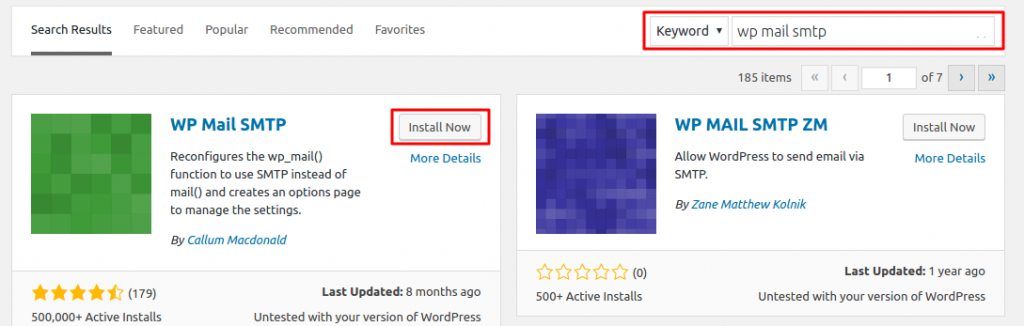
Versions have evolved over the years
Lorem Ipsum is that it has a more-or-less normal distribution of letters, as opposed to using ‘Content here, content here’, making it look like readable English. Many desktop publishing packages and web page editors now use Lorem Ipsum as their default model text, and a search for ‘lorem ipsum’ will uncover many web sites still […]
Letraset sheets containing lorem passages
Lorem Ipsum is that it has a more-or-less normal distribution of letters, as opposed to using ‘Content here, content here’, making it look like readable English. Many desktop publishing packages and web page editors now use Lorem Ipsum as their default model text, and a search for ‘lorem ipsum’ will uncover many web sites still […]
Many web sites still in their infancy
Lorem Ipsum is that it has a more-or-less normal distribution of letters, as opposed to using ‘Content here, content here’, making it look like readable English. Many desktop publishing packages and web page editors now use Lorem Ipsum as their default model text, and a search for ‘lorem ipsum’ will uncover many web sites still […]