Why Choose Self-Hosted n8n for Workflow Automation?
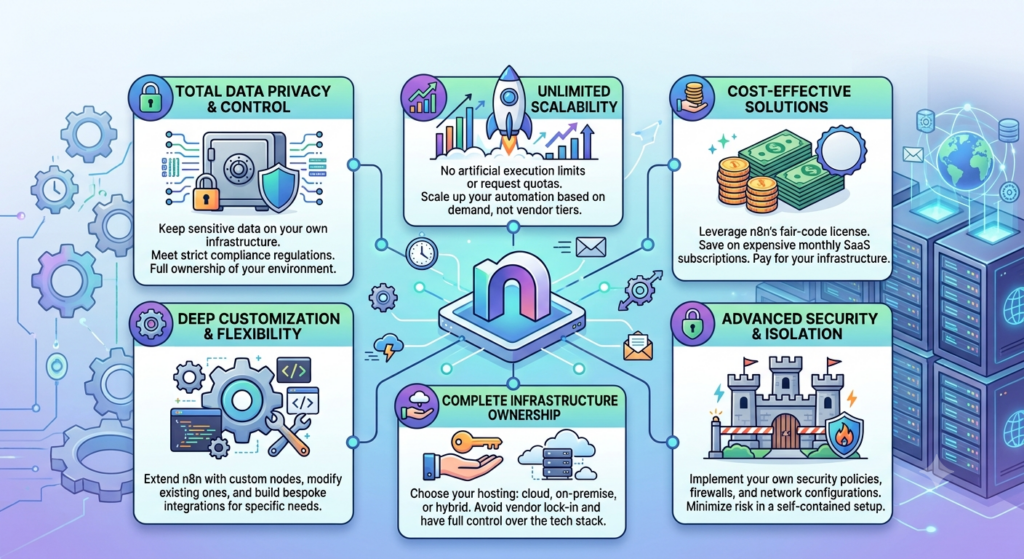
As businesses grow, managing repetitive tasks across multiple applications can become time-consuming. Teams often move information between tools, send follow-up emails, update customer records, generate reports, and manage internal processes manually. Although these tasks may appear simple, completing them repeatedly can reduce productivity and increase the chance of errors.
Workflow automation helps businesses connect applications and complete routine tasks with less manual effort. However, many organizations also want greater control over their data, software configuration, hosting environment, and operating costs. This is where self-hosted n8n becomes a practical solution.
n8n is a workflow automation platform that allows users to connect applications, create automated processes, and manage business operations through visual workflows. When n8n is hosted on your own VPS, you can control the environment where your workflows, credentials, and execution data are processed.
OwnWebServers n8n Hosting provides a reliable VPS environment for running self-hosted n8n. With dedicated virtual resources, NVMe storage, full root access, persistent webhooks, DDoS protection, and scalable infrastructure, it is designed for developers, businesses, and automation teams.
TL;DR
Self-hosted n8n allows businesses to automate repetitive tasks while maintaining greater control over their data, software, and hosting environment.
The main benefits of self-hosted n8n include:
- Full control over your n8n installation.
- Greater control over workflow data and credentials.
- Flexible server and software configuration.
- Support for application, API, database, and webhook integrations.
- More control over resource usage and performance.
- Custom workflows for specific business requirements.
- No per-execution pricing on the hosting plan.
- No fixed workflow limits imposed by the hosting provider.
- Scalable VPS resources for growing automation needs.
- Full root access, DDoS protection, and free setup.
OwnWebServers n8n Hosting plans start at $12/month, with options available for different workflow requirements.
What Is Self-Hosted n8n?
Self-hosted n8n is an installation of the n8n workflow automation platform that runs on a server managed by you or your hosting provider. Instead of relying only on a third-party automation service, you control the server where n8n is installed and operated.
n8n allows users to connect different applications and services through workflows. These workflows can perform actions when a specific event occurs. For example, a new website form submission can automatically create a customer record, send an email notification, and save the information in a spreadsheet or database.
When n8n is self-hosted, businesses can manage installation settings, access permissions, updates, backups, security configuration, and server resources according to their needs.
This setup is useful for organizations that want workflow automation with more flexibility and control over their technical environment.
Why Do Businesses Choose Self-Hosted n8n?
Businesses choose self-hosted n8n for different reasons. Some want to keep workflow data within their own hosting environment, while others need more flexibility when connecting internal systems, private APIs, and custom applications.
Hosted automation platforms can be convenient, but they may include restrictions related to usage, workflow executions, integrations, customization, or pricing. Self-hosting gives businesses more control over how the platform is configured and used.
Self-hosted n8n can be a suitable choice for businesses that need:
- Custom workflow automation.
- Control over application data.
- Integration with internal systems.
- Flexible server resources.
- Custom software and API connections.
- More predictable hosting expenses.
- A dedicated environment for business workflows.
The right hosting approach depends on the team’s technical knowledge, workflow complexity, security requirements, and maintenance responsibilities.
Greater Control Over Your Workflow Data
Workflow automation often involves business information such as customer details, order records, employee data, support tickets, API credentials, and internal documents. Keeping control over this information is important for many organizations.
With self-hosted n8n, businesses can choose where the platform is installed and how access is managed. They can configure server permissions, security rules, database access, and backup procedures based on their internal requirements.
OwnWebServers highlights complete data ownership as one of the benefits of its n8n hosting environment. Users can keep workflow data, credentials, and execution logs under their own server control instead of depending entirely on a third-party automation provider.
Self-hosting does not automatically make every workflow secure. Businesses should still use strong passwords, secure credentials, access controls, software updates, firewall rules, and regular backups.
Flexible Application and API Integrations
One of n8n’s key benefits is its ability to connect different applications and services. Businesses can use workflows to move information between tools and reduce repetitive manual tasks.
For example, a company can create a workflow that:
- Receives a new website form submission.
- Checks the submitted information.
- Adds the lead to a CRM.
- Sends a notification to the sales team.
- Stores the details in a database.
- Sends a follow-up email to the customer.
n8n can also work with APIs and webhooks, making it useful for connecting custom applications and internal business systems.OwnWebServers supports n8n hosting for workflows involving applications, APIs, databases, webhooks, and other connected services. Self-hosting is especially helpful when a business needs to connect private services or systems that require special configuration.
Customize Workflows for Your Business Needs
Every business follows different processes. A standard automation template may not fully match the way a company manages leads, orders, support requests, content, or internal approvals.
n8n allows users to create workflows based on their own requirements. Workflows can include triggers, conditions, filters, data transformations, API requests, notifications, and multiple actions.
Businesses can use this flexibility to build automation for:
- Lead management.
- Customer onboarding.
- Email notifications.
- Order processing.
- Support ticket updates.
- Content publishing.
- Data synchronization.
- Report generation.
- Internal approval processes.
- Marketing campaign tasks.
With a self-hosted setup, technical teams can also manage environment variables, server-level settings, and supporting services according to their workflow architecture.
Better Control Over Hosting Resources
Workflow performance depends on the number of workflows, execution frequency, connected applications, data volume, and complexity of each process.
A small workflow may require limited resources, while workflows involving file processing, database operations, multiple API calls, or frequent executions may need more CPU and RAM.
When n8n runs on your own VPS, you can select a hosting configuration based on your expected workload. You can also monitor resource usage and upgrade the server when your automation requirements increase.
OwnWebServers offers three n8n VPS hosting configurations with different CPU, RAM, storage, and bandwidth resources. This allows users to select a plan based on their current workflow requirements and expected growth.
Full Root Access and Server Configuration
Self-hosted n8n is useful for technical users who need control over the server environment. Full root access allows administrators to manage software installations, system settings, security rules, services, and application dependencies.
Depending on the deployment method, administrators may configure:
- n8n installation and updates.
- Node.js and related dependencies.
- Database settings.
- Reverse proxy configuration.
- SSL certificates.
- Firewall rules.
- Server monitoring.
- Backup processes.
- Environment variables.
OwnWebServers n8n Hosting includes full root access, allowing users to manage their VPS environment and configure the server according to their application needs.
This level of control is valuable for developers and system administrators who need to connect n8n with other applications or deploy customized automation solutions.
Persistent Webhooks for Event-Based Automation
Webhooks allow applications to send information to n8n when a specific event occurs. For example, a payment notification, form submission, new order, or support request can trigger an automated workflow.
Persistent webhook support is important because businesses often need reliable URLs that remain available for connected services. This makes it easier to build event-based workflows that respond when new data arrives.
With webhook-based automation, businesses can reduce the need for manual checking or repeated polling. Instead, workflows can begin when an event is received from a connected application.
This is useful for:
- Payment notifications.
- New customer registrations.
- Order updates.
- Form submissions.
- CRM events.
- Application alerts.
- Support ticket creation.
Cost-Effective Automation Solution
Automation platforms may charge based on workflow executions, tasks, users, or other usage measurements. As automation activity increases, monthly expenses may also change.
Self-hosted n8n provides a different cost structure. Businesses pay for the hosting environment and manage the platform themselves. OwnWebServers promotes its n8n hosting as a cost-effective option without per-execution pricing or fixed workflow caps from the hosting provider.
The overall cost depends on:
- VPS pricing.
- Required CPU and RAM.
- Storage usage.
- Backup requirements.
- Maintenance needs.
- Monitoring and security tools.
- Technical support requirements.
Self-hosting may be cost-effective for businesses with frequent workflow executions, but it also requires responsibility for server management and maintenance.
Suitable for Agencies, Developers, and Businesses
Self-hosted n8n is not limited to large enterprises. Different types of users can benefit from running n8n on their own hosting environment.
Small Businesses
Small businesses can automate lead collection, customer notifications, invoice updates, and routine administrative tasks without assigning employees to every repetitive process.
Developers
Developers can connect APIs, databases, custom applications, and internal tools through flexible workflows. Self-hosting also provides more control over the development and testing environment.
Digital Agencies
Agencies can use n8n to create automation systems for different clients. These may include marketing workflows, reporting systems, CRM updates, and content management processes.
E-commerce Businesses
Online stores can automate order notifications, inventory updates, customer emails, shipping updates, and data synchronization between different platforms.
Technical Teams
IT and operations teams can use n8n to automate alerts, system checks, ticket creation, and internal service management tasks.
Reliability, Security, and Technical Support
Automation workflows often support important business operations. If the n8n server becomes unavailable, connected processes may stop running until the issue is resolved.
For this reason, businesses should select a hosting environment with reliable infrastructure, security features, backups, and technical assistance.
OwnWebServers n8n Hosting includes DDoS protection, free setup, resource isolation, and 24/7 technical support. The company also promotes a 99.99% uptime guarantee across its hosting services.
Security also depends on how the server is managed. Businesses should use secure login methods, firewall protection, regular updates, monitoring, and independent backups to protect their workflows and data.
OwnWebServers n8n Hosting Plans
OwnWebServers provides three self-hosted n8n VPS plans for developers, businesses, and automation teams. Each plan includes different resources to support different workflow requirements.
| Plan | vCPU | RAM | NVMe Storage | Bandwidth | Price |
|---|---|---|---|---|---|
| VPS-1 | 1 Core | 2 GB | 30 GB | 1 TB | $12/mo |
| VPS-2 | 2 Cores | 4 GB | 60 GB | 2 TB | $24/mo |
| VPS-3 | 4 Cores | 8 GB | 120 GB | 4 TB | $48/mo |
All plans are designed for self-hosted n8n deployment and include features such as persistent webhooks, full root access, DDoS protection, and free setup.
The right plan depends on the number of workflows, execution frequency, connected applications, database usage, and amount of data processed.
How to Get Started With Self-Hosted n8n
Getting started with self-hosted n8n generally involves the following steps:
- Select a VPS plan based on your workflow requirements.
- Choose a supported operating system.
- Configure the server and security settings.
- Install n8n and its required dependencies.
- Set up a database if required by your deployment.
- Configure a domain name and SSL certificate.
- Create your first workflow.
- Connect the required applications and services.
- Test workflow executions.
- Set up backups and monitoring.
A properly configured environment helps keep workflows stable and makes future maintenance easier.
How to Know When Your Business Needs Self-Hosted n8n
Self-hosted n8n may be the right option if your business experiences one or more of the following situations:
- Your team performs repetitive tasks across multiple applications.
- Employees spend too much time moving data manually.
- You need to connect internal tools or private APIs.
- You want more control over workflow data.
- Your automation requirements are increasing.
- You need customized workflow logic.
- You want to manage your own hosting environment.
- Your workflows process files, records, or large amounts of data.
- You need more flexibility than a standard hosted automation platform provides.
- You have a technical team that can manage server maintenance.
Before choosing self-hosted n8n, consider your technical knowledge, security responsibilities, expected workload, backup requirements, and available maintenance resources.
Conclusion
Self-hosted n8n provides businesses with a flexible way to automate repetitive tasks while maintaining greater control over their data, software, and hosting environment.
With n8n, businesses can connect applications, automate internal processes, manage API integrations, and create workflows tailored to their specific needs. Hosting n8n on your own VPS also provides control over server resources, configuration, access permissions, and application management.
OwnWebServers n8n Hosting offers VPS plans starting at $12/month, along with full root access, persistent webhooks, NVMe storage, DDoS protection, free setup, and scalable resources.
For developers, agencies, small businesses, and enterprise teams, self-hosted n8n can support a wide range of automation requirements. If your business wants to reduce manual work, connect different applications, and build customized workflows, self-hosted n8n can provide a practical foundation for long-term workflow automation.
Related blog: How to Scale Your Linux VPS Hosting for Growing Websites