Windows 11 VPS Hosting for High-Speed Application Deployment
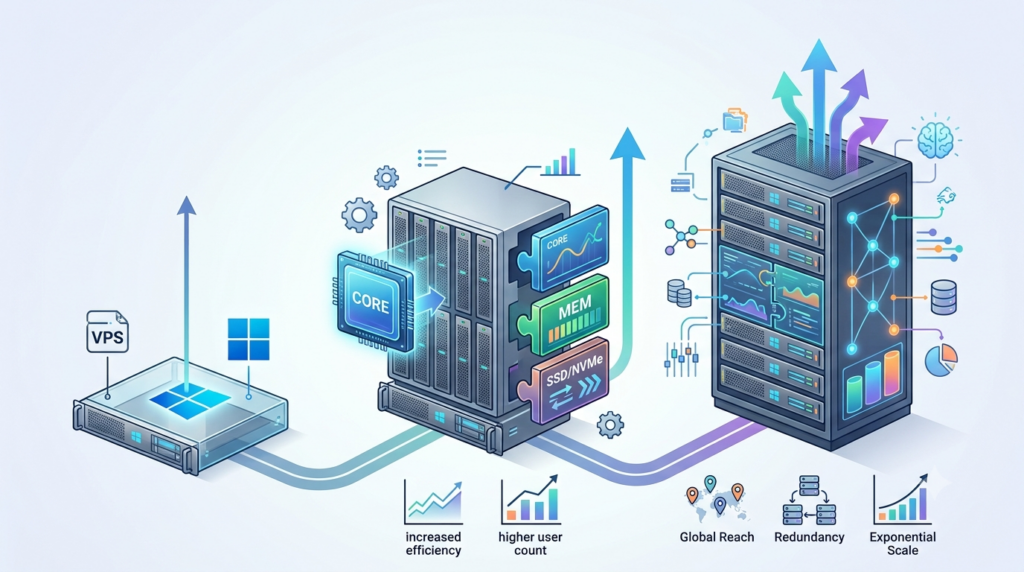
Deploying Windows-based applications can become difficult when your local computer does not have enough resources or when an application needs to remain available around the clock. Developers, businesses, and remote teams often need a Windows environment that they can access from different locations without depending on a physical computer.
A Windows 11 VPS provides a practical way to run applications inside a remote Windows environment with dedicated virtual resources. You can connect through Remote Desktop, install the software you need, configure the server, and manage your applications from almost any device.
OwnWebServers Windows 11 VPS Hosting is designed for modern workloads with scalable CPU and RAM resources, SSD storage, RDP access, fast provisioning, security features, and 24/7 expert support. Plans start at $19/month, with configurations available up to 14 CPU cores, 48 GB RAM, 500 GB SSD storage, and unlimited bandwidth.
TL;DR
Windows 11 VPS hosting gives developers and businesses a remote Windows environment for deploying applications, running productivity software, managing projects, and accessing a virtual desktop from almost anywhere.
The main benefits of OwnWebServers Windows 11 VPS include:
- Windows 11 virtual desktop environment.
- RDP access for remote management.
- VPS deployment within minutes.
- Up to 14 vCPU cores.
- Up to 48 GB RAM.
- Up to 500 GB SSD storage.
- Up to unlimited bandwidth on higher plans.
- Flexible CPU, RAM, and storage scaling.
- Enhanced security features.
- 99.99% uptime guarantee.
- 24/7 expert support.
- Free setup with no hidden setup fees.
This makes Windows 11 VPS hosting suitable for developers, businesses, remote workers, testing environments, and users who need a Windows application environment without maintaining physical hardware.
What Is Windows 11 VPS Hosting?
Windows 11 VPS hosting provides a virtual private server running the Windows 11 operating system. Instead of installing applications and storing everything on your local computer, you can access a remote Windows environment through Remote Desktop.
The VPS provides its own allocated CPU, RAM, storage, and network resources. This gives you a dedicated environment where you can install compatible software, configure applications, manage files, and perform development or business tasks.
A Windows 11 VPS can be used for:
- Application deployment.
- Software development and testing.
- Remote desktop access.
- Business applications.
- Productivity software.
- Project management.
- Website and application administration.
- Automated applications.
- Remote work environments.
Because the VPS is hosted in a data center, you can connect to it remotely instead of keeping a physical Windows computer running continuously.
Why Use a Windows 11 VPS for Application Deployment?
Application deployment often requires a stable environment where developers can install dependencies, configure software, test updates, and keep applications available.
A local computer may not be suitable for every deployment. It can be turned off, have limited resources, or be unavailable when team members need access.
A Windows 11 VPS provides a remote environment that can remain available while giving you control over the Windows desktop and installed applications.
For developers, this can be useful when testing Windows-specific applications or maintaining a consistent environment for development and deployment tasks.
Businesses can also use Windows VPS hosting when employees need access to Windows-based software without requiring every user to have a high-performance local machine.
Fast VPS Deployment Within Minutes
Getting a server ready should not become a project by itself. OwnWebServers states that Windows 11 VPS instances are prepared within minutes, allowing users to connect through Remote Desktop and begin configuring their environment without a lengthy manual setup process.
Once your VPS is available, you can install compatible software, configure your applications, create users, manage files, and adjust settings according to your requirements.
Fast provisioning is particularly useful when you need a Windows environment for:
- Development testing.
- Temporary projects.
- Application deployment.
- Remote work.
- Software testing.
- Business applications.
- Client projects.
Powerful CPU and RAM Options
Application performance depends heavily on the resources available to the server. A lightweight application may work comfortably with a smaller VPS, while development environments, productivity applications, databases, and multiple applications running at the same time may require additional CPU and RAM. OwnWebServers Windows 11 VPS plans range from 2 CPU cores and 2 GB RAM to 14 CPU cores and 48 GB RAM.
Higher-resource plans can be useful when you need to run several applications simultaneously or support more demanding development and business workloads.
For example, a developer running an IDE, database, browser, testing tools, and other background applications may benefit from a plan with additional memory and CPU resources.
SSD Storage for Applications and Files
Storage is another important part of application deployment. Applications require space for installation files, databases, project files, logs, updates, temporary data, and user documents. As projects become larger, storage requirements can increase.
OwnWebServers Windows 11 VPS plans provide SSD storage ranging from 50 GB to 500 GB. The right amount of storage depends on what you plan to install and how much application or business data you expect to keep on the VPS.
Before selecting a plan, consider:
- Application installation size.
- Database requirements.
- Project files.
- User documents.
- Backup requirements.
- Future storage growth.
Choosing sufficient storage from the beginning can help avoid unnecessary upgrades later.
Remote Desktop Access From Almost Anywhere
One of the main advantages of a Windows VPS is Remote Desktop access. Instead of being tied to one physical computer, you can connect to your Windows 11 VPS from a compatible device and work inside the same remote Windows environment.
This can be useful for developers and businesses that work across multiple locations.
For example, you could use a Windows 11 VPS from:
- A desktop computer.
- A laptop.
- A remote office.
- A home workstation.
- Another supported device.
Your applications and files remain on the VPS, while you access the Windows desktop remotely. OwnWebServers provides optimized RDP access as part of its Windows 11 VPS environment.
Flexible Resource Scaling as Your Workload Grows
Your resource requirements may change as your application grows.
A small development project may initially need only a few CPU cores and several gigabytes of RAM. As the project expands, you may need additional processing power, memory, or storage.
OwnWebServers allows users to modify CPU, memory, and storage resources as requirements change.
This makes it easier to start with a configuration that matches your current workload rather than immediately paying for the largest available server.
When scaling, monitor actual resource usage. Increasing RAM will not solve a storage problem, and adding CPU will not necessarily fix an application that is limited by memory.
Enhanced Security for Windows Applications
A remote Windows environment needs appropriate security controls, particularly when it is used for business applications or sensitive data.
OwnWebServers describes its Windows 11 VPS environment as having enhanced security technologies and modern encryption, along with proactive measures designed to help protect applications and business operations.
Server security should also be managed by the user. Good practices include:
- Using strong passwords.
- Securing RDP access.
- Keeping Windows and applications updated.
- Limiting unnecessary access.
- Configuring firewall rules.
- Monitoring login activity.
- Maintaining regular backups.
Security is especially important when a VPS is used for business applications or remote access.
Suitable for Developers and Application Testing
Windows 11 VPS hosting can provide developers with a separate environment for testing applications before moving them into production.
Instead of changing your main computer every time you need to test a new application, you can use a VPS as a dedicated development or testing environment.
Developers can use the server to:
- Install development software.
- Test Windows applications.
- Run application builds.
- Configure databases.
- Test different application settings.
- Maintain remote development environments.
- Test updates before deployment.
Having a separate environment can also help keep development work isolated from your primary computer.
Windows 11 VPS for Remote Business Work
A Windows VPS is not only useful for developers.
Businesses can use a Windows 11 VPS as a remote desktop environment for applications that require Windows. Employees can connect to the same environment from different locations while the applications remain installed on the server.
This can be useful for:
- Business productivity applications.
- Project management.
- Accounting software.
- Administrative work.
- Remote office environments.
- Team collaboration.
- Application management.
The exact applications you can run depend on their Windows 11 compatibility, licensing requirements, and resource requirements.
OwnWebServers Windows 11 VPS Plans
OwnWebServers provides eight Windows 11 VPS configurations designed for different workloads. The plans start at $19/month and increase in CPU, RAM, storage, and bandwidth as resource requirements grow.
| Plan | CPU | RAM | SSD Storage | Bandwidth | Price |
|---|---|---|---|---|---|
| Basic | 2 Cores | 2 GB | 50 GB | 6 TB | $19/mo |
| Starter | 3 Cores | 4 GB | 80 GB | 7 TB | $26/mo |
| Premium | 4 Cores | 6 GB | 120 GB | 8 TB | $40/mo |
| Advanced | 6 Cores | 12 GB | 200 GB | 15 TB | $51/mo |
| Developer | 8 Cores | 16 GB | 250 GB | 20 TB | $65/mo |
| Business | 10 Cores | 24 GB | 300 GB | 25 TB | $89/mo |
| Expert | 12 Cores | 32 GB | 400 GB | Unlimited | $109/mo |
| Enterprise | 14 Cores | 48 GB | 500 GB | Unlimited | $129/mo |
These plans allow users to choose resources based on their applications, number of users, storage requirements, and expected workload. The Developer plan is marked as the Most Popular option on the OwnWebServers page.
How to Choose the Right Windows 11 VPS Plan
The right Windows 11 VPS plan depends on what you intend to run For basic applications and light remote desktop use, an entry-level plan may be sufficient. Developers running multiple applications or development tools may require additional CPU and RAM. For larger business workloads, higher plans provide more processing power, memory, storage, and bandwidth.
Before selecting a plan, consider:
- How many applications will run simultaneously?
- How much RAM does your software require?
- How much storage will your project need?
- Will multiple users connect through RDP?
- How much bandwidth will your applications consume?
- Will your workload increase in the future?
Starting with a suitable plan and scaling when necessary can provide a better balance between performance and cost.
Reliability and Global Infrastructure
A remote application environment needs reliable network connectivity and server availability.
OwnWebServers states that its infrastructure is continuously monitored across global regions and highlights network stability and scalable infrastructure. The Windows 11 VPS page lists a 99.99% network uptime figure and currently identifies live data centers in Secaucus and West Palm Beach, as well as Los Angeles. It also lists additional locations as expanding soon.
The location of your server can also affect network latency. When selecting infrastructure for a specific user base, consider where your users are located and where the application data is being accessed.
24/7 Expert Support
Managing a Windows VPS can involve more than installing an operating system. You may need help with RDP access, application configuration, server resources, or troubleshooting.
OwnWebServers provides 24/7 expert support for its Windows 11 VPS services.
This can be useful for businesses and developers who want access to technical assistance while managing their remote Windows environment.
How to Know When You Need a Windows 11 VPS
A Windows 11 VPS may be a suitable option if:
- You need a remote Windows desktop.
- Your application requires Windows.
- Your local computer does not have enough resources.
- You need a server that remains available continuously.
- You want a separate environment for application testing.
- Your team needs remote access to Windows applications.
- You need additional CPU, RAM, or storage.
- You want to deploy applications in a remote Windows environment.
Before selecting a VPS, check your application’s Windows compatibility, licensing requirements, hardware requirements, and expected resource usage.
Conclusion
Windows 11 VPS hosting provides a practical way to run Windows applications and development environments without depending entirely on a physical computer. With remote desktop access, scalable resources, SSD storage, and a Windows 11 environment, you can deploy and manage applications from almost anywhere.
OwnWebServers Windows 11 VPS plans start at $19/month and scale up to 14 CPU cores, 48 GB RAM, 500 GB SSD storage, and unlimited bandwidth. The service also includes fast provisioning, flexible resource scaling, security features, 99.99% uptime, free setup, and 24/7 expert support.
Whether you are a developer testing Windows applications, a business running remote software, or a team that needs a reliable Windows environment, choosing the right VPS configuration can give you the resources and flexibility needed for your application deployment.
With OwnWebServers Windows 11 VPS Hosting, you can start with the resources you need today and scale your environment as your applications and workload grow. Explore OwnWebServers Windows 11 VPS Hosting
Learn more How Windows 10 VPS Hosting Scales With Your Growth